
How to Improve Note Taking Skills: A Practical Guide

Improving your note taking skills boils down to four key habits: preparing beforehand, capturing ideas actively, organizing your notes systematically, and reviewing them afterward. This isn't just about writing faster; it’s a strategic approach that transforms note taking from a tedious task into a powerful tool for learning and retention.
Why Better Note Taking Is a Learnable Superpower
Let's be honest—most of us were never formally taught how to take good notes. We just started scribbling, trying to get down everything we heard. But that's a common trap. When you try to capture every single word, you shift into autopilot, mindlessly transcribing without actually thinking about what's being said. This habit can actually make it harder to recall the information later.
The secret is to shift from being a passive stenographer to an active participant. It’s a mental switch. Instead of just recording, you start identifying key ideas, making connections, and synthesizing concepts in real-time. Once you see notes as a tool for thinking, not just a storage bin, your ability to learn and remember skyrockets.
The Real Impact of Effective Note Taking
This isn't just a nice theory; it's backed by results. A study involving undergraduate physics students found that when a structured note-taking system was introduced, exam scores jumped significantly. The class average climbed from 70.0 to 76.6 on a 100-point scale. That’s clear evidence that a deliberate, organized approach pays off. You can dive into the specifics of this study on note taking's impact in higher education at arxiv.org.
This skill is just as critical in the professional world. Think about it: better notes lead to more productive meetings, clearer action items, and a much better handle on complex projects. It's a direct path to being more effective in your role.
The goal isn’t to capture every spoken word. The goal is to capture every important idea. Effective note taking is the bridge between hearing something and truly understanding it.
By breaking down the process into core pillars, we can build a system that works for you, whether you're in a lecture hall or a boardroom.
Core Pillars of Effective Note Taking
Focusing on these four areas will turn what feels like a chore into one of your most valuable skills for both academic and professional growth.
Set Yourself Up for Success Before You Start
Great notes don’t just happen by accident. From my experience, the best note-takers treat preparation as half the battle. Walking into a meeting or lecture cold is like trying to build furniture without looking at the instructions—you might end up with something, but it's likely to be wobbly and inefficient.
If there’s one habit I swear by, it's the five-minute pre-read. Before any session, I take just a few minutes to scan the agenda, flip through the presentation slides, or review the previous meeting's notes. This simple act primes your brain. It builds a mental scaffold, helping you instantly recognize and connect with the most important ideas as they come up. You shift from reacting to what you hear to actively engaging with it.
Choose Your Tools Wisely
The old "pen vs. laptop" debate completely misses the point. There's no single best tool—only the right tool for you and the situation. The goal is a frictionless system that lets your brain do the heavy lifting, not one that adds another layer of distraction.
I’m a big believer in a hybrid approach. For a meeting that’s likely to involve diagrams or flowcharts, my digital tablet is indispensable. But for a creative brainstorming session, nothing beats the feel of a good pen on paper. Something about it just helps my thoughts flow more freely.
Your note-taking tool should feel like an extension of your thoughts, not a barrier to them. The moment you find yourself fighting with software or searching for the right pen is the moment you've lost focus on what truly matters.
This mindset extends to your digital space, too. If you’re on a laptop, close every distracting tab and silence notifications. When joining a virtual meeting, consider using a tool with an auto transcribe software feature. It’s a game-changer, freeing you from the pressure of capturing every single word so you can concentrate on the bigger picture.
Create Your Pre-Session Checklist
To make preparation a consistent habit, a simple checklist works wonders. This isn’t about adding another chore; it’s about ensuring you’re ready to capture what counts from the moment the session begins.
Here are a few things that might go on your own list:
- Review Relevant Materials: Spend 5-10 minutes looking over the meeting agenda, presentation deck, or assigned reading.
- Check Your Supplies: Is your pen full? Notebook have clean pages? Device charged?
- Define Your Goal: I always ask myself, "What is the one key thing I need to walk away with?" This gives my listening a clear purpose.
Investing just a few minutes upfront pays off tremendously. You arrive focused, you have the right tools, and you're prepared to engage with the material on a much deeper level.
From Passive Hearing to Active Capturing

This is where the real work of improving your note taking skills begins. It’s the mental switch from being a human tape recorder—passively hearing words as they fly by—to becoming an active processor of ideas. Your goal isn't to get down every single word. It’s to build a useful, condensed record of what actually matters.
This means training your brain to filter information in real-time. Listen for the speaker's signposts, the verbal equivalent of a highlighter. When you hear phrases like, "The most important point is...," "To sum up...," or "The key takeaway here is...," that's your cue. These are direct signals telling you this is important, write it down.
Listen for Structure, Not Just Words
Instead of scrambling to capture every sentence, try to tune into the underlying structure of the talk. Is the speaker comparing two different concepts? Are they outlining a process step-by-step? Figuring out this bigger framework helps you anticipate what’s coming and organize your notes on the fly.
For instance, if someone says, "There are three main causes for this issue," you can immediately set up three bullet points in your notebook. This simple, proactive step turns note-taking from a frantic race into a more analytical exercise.
It's a common frustration. A 2022 international survey found that while 96% of university students take notes, 63% said the lecturer's speaking speed made it difficult. Active listening helps you stay ahead, even when the pace is fast. You can dive deeper into the student note-taking findings on tandfonline.com.
Develop Your Personal Shorthand
One of the most powerful things you can do to keep up is to create your own system of abbreviations and symbols. This isn't about learning a complex, formal shorthand. It’s about building a personal code that’s fast, intuitive, and gets you back to listening.
Here are a few simple ideas to get you started:
- Symbols: An arrow (
→) can show cause-and-effect. An asterisk (*) can mark an important point. A question mark (?) can flag something to follow up on later. - Abbreviations: Shorten common words that pop up all the time. Think "b/c" for "because," "w/" for "with," and "eg" for "for example."
- Initialisms: Use the first letter of recurring phrases, like "KPI" for Key Performance Indicator in a business meeting.
The real power of a personal shorthand is speed and efficiency. A simple symbol can capture a complex relationship in a fraction of a second, freeing up your mental energy to focus on the next big idea.
This technique has been a game-changer for me. I’ve found that for dense topics or fast-moving discussions, my own shorthand can easily cut my writing time in half. It takes a little practice to make it second nature, but the payoff is a set of notes that are clean and focused, not a chaotic mess.
This is also a great place to let technology do the heavy lifting. For instance, you can use a tool to automatically generate meeting minutes with AI, which takes care of the word-for-word transcription. That frees you up to focus entirely on capturing the big-picture insights and action items with your own shorthand system. It’s all about using every tool at your disposal to capture what truly matters.
Finding the Right Note Taking System for Your Brain
Let's be clear: there’s no single "best" method for taking notes. The right system is simply the one that clicks with how you think and what you need to accomplish. The real goal is to find a structure that feels natural, so you can stop worrying about the how and focus on the what.
It’s all about matching the method to the mission. Are you trying to capture details from a dense lecture? Brainstorming a new marketing campaign? Each scenario demands a different approach.
Matching Your Method to the Moment
Over the years, I've found three methods stand out for their effectiveness in different situations: the Cornell Method, Mind Mapping, and the classic Outline Method. Each one is a fantastic tool, but you have to know when to use it. I certainly wouldn't use the same system for a creative free-for-all as I would for a technical deep-dive.
- The Cornell Method: This is my workhorse for information-heavy sessions like university lectures or complex readings. Its unique structure forces you to actively process the material right from the start, which is huge for retention.
- Mind Mapping: When I need to see the big picture and the details, I grab a blank page and start a mind map. It’s perfect for letting ideas flow without a rigid structure, making connections between concepts, and planning out projects visually.
- The Outline Method: For anything with a clear, logical flow—like a well-organized presentation or a training module—you can't beat the simplicity of an outline. It’s clean, hierarchical, and easy to scan.
This infographic gives a great visual breakdown of how these systems work and where they shine.
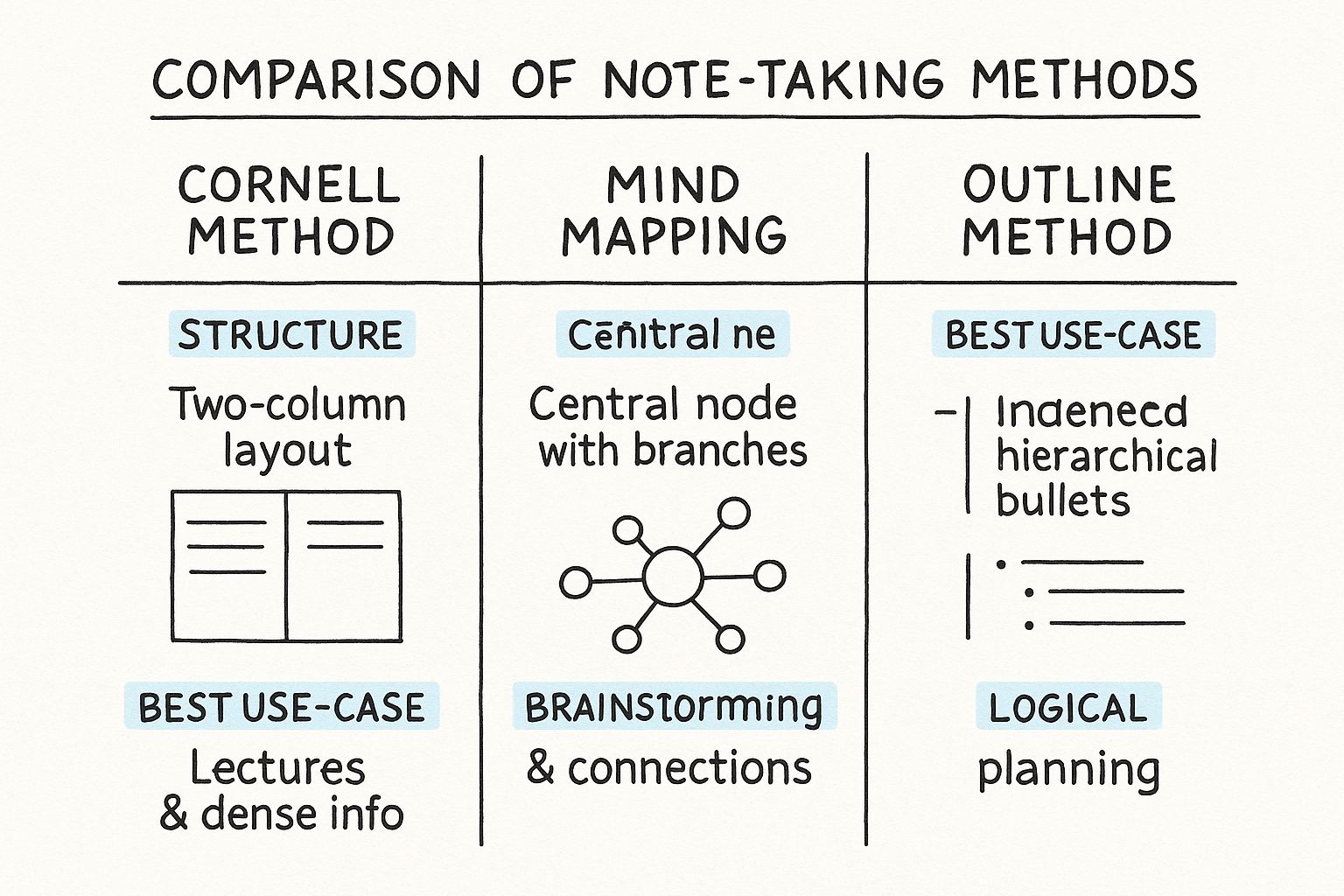
As you can see, the rigid boxes of the Cornell Method are built for absorbing structured information, while the organic, sprawling nature of a mind map is all about encouraging creative, non-linear thinking.
To help you decide, let's put these popular methods side-by-side.
Comparison of Popular Note Taking Methods
Ultimately, the table above is just a starting point. The best way to find your fit is to try them out in different situations.
Creating Your Own Hybrid System
Here's the secret: the most effective note-takers I know don't rigidly stick to one system. They treat them like a box of tools, picking and choosing elements to build something that works for them.
You might start a meeting with a simple outline but suddenly sketch a mini-mind map in the margin to explore a complex point someone made. Or maybe you use a two-column layout—inspired by Cornell—on a digital doc to separate key facts from your own questions and ideas.
Don’t be afraid to break the rules. The most effective note-taking system is the one you’ll actually use consistently because it fits the way your brain works. Your notes should serve you, not the other way around.
For example, I often blend outlining with my personal shorthand. I’ll use the main bullet points to capture the flow of a conversation, but I’ll use symbols like asterisks for action items, question marks for follow-ups, and arrows to connect related ideas. This simple mix gives me both the structure I need and the flexibility to add my own layer of meaning.
The key is to experiment. Give one method a try for a week. Then switch. See what feels right and, more importantly, what gives you the most useful notes when you look back at them later.
Turning Your Raw Notes Into Lasting Knowledge
Taking notes is only half the battle. The real learning—the kind that actually sticks—happens when you intentionally revisit and engage with what you've written. Notes you never look at again are just wasted effort. The real magic is turning that messy first draft into a personal knowledge bank you can actually use.
This is the single biggest habit that separates passive listening from true understanding. It’s not about cramming; it's about connecting the dots over time. When you make review a consistent part of your process, getting ready for an exam or a big project briefing becomes less about last-minute panic and more about confident recall.
Build a Simple Review Cycle
To lock information into your long-term memory, you need a rhythm. The science behind this is called spaced repetition—revisiting material at specific intervals to strengthen recall. It sounds complicated, but it doesn't have to be.
Here’s a simple but incredibly effective cycle I've used for years:
- The 24-Hour Scan: Within a day, spend just 5-10 minutes quickly reading through your notes. The goal here isn't a deep study session. You're just re-activating the memory pathways your brain created during the lecture or meeting. It’s also the perfect time to clean up messy handwriting or fill in any gaps while the context is still fresh.
- The 7-Day Deep Dive: About a week later, block off 20-30 minutes for a more focused review. This is where you really start to engage with the material on a deeper level.
Instead of just passively re-reading, try to summarize the main ideas in your own words at the bottom of the page. This one small action forces your brain to process the information, not just recognize it.
Reviewing your own notes is a proven strategy. Research shows that students who consistently take and review notes can score about 13% higher on tests. While students often only manage to capture 40% of the key points during the initial lecture, the review process is what fills in those blanks and truly solidifies the knowledge. You can read more about the impact of note-taking on academic performance.
Refine and Enhance Your Notes
During your deeper review, you can start adding layers of meaning that make your notes even more powerful. This is how you transform them from a simple transcript into a personalized study guide built for how you think.
Try a few of these active refinement techniques:
- Color-Code Your Themes: Grab some highlighters and connect related concepts. Maybe you use yellow for key definitions, pink for examples, and blue for action items or follow-up questions.
- Write Questions in the Margin: Look at a section of notes and ask yourself, "What question does this paragraph answer?" Jotting these questions down turns your notes into a ready-made self-quiz.
- Create Your Own Links: Physically draw arrows to connect a new idea back to something you learned in a previous session. This helps you build a mental map of the entire subject, not just isolated facts.
This refinement process is also a game-changer for collaborative work. For instance, color-coding key takeaways is a fantastic way to quickly pull together a summary of meeting notes with action items for your team, ensuring everyone leaves on the same page.
Frequently Asked Questions About Note Taking
Even with a solid game plan, it's normal to run into a few challenges. Let's walk through some of the most common questions people ask when trying to level up their note-taking skills. Sometimes, a straightforward answer is all you need to get back on track.
How Can I Keep Up When the Speaker Is Just Too Fast?
This is the most common struggle, and the solution is to shift your goal. Stop trying to capture every word and focus on capturing every idea.
Start by developing a personal shorthand. Use symbols (→ for 'leads to', * for 'important') and abbreviations that make sense to you. This alone will dramatically increase your speed. Also, train yourself to listen for signposts—phrases like "The most important point is..." or "In summary..."—and prioritize writing those things down.
If you miss something, don't get flustered. Just leave a blank space, maybe jot a quick question mark, and move on. You can almost always fill in the gap later from context or by asking a quick question. Getting stuck on one missed detail will only make you miss the next three.
What’s the Best Way to Organize My Digital Notes?
It's easy for digital notes to become a disorganized mess. The best system isn't the most complex one; it's the one you'll actually stick with. I’ve found that a simple folder structure is the most reliable starting point. Create broad categories that fit your life, like "Client Projects," "Team Meetings," or "Q3 Marketing."
Inside those folders, be consistent with your naming conventions. A format like YYYY-MM-DD - Topic - [Project Name] works wonders because it keeps everything chronological and makes searching a breeze. And don't forget tags. Think of them as keywords for your brain. Using tags like #actionitem, #decision, or #idea lets you pull up related notes across all your folders instantly.
Any good organization system, digital or not, has one job: to make finding things effortless. You should be able to pull up any note in less than 30 seconds. If it's taking longer, your system has too much friction.
How Do I Know If I'm Taking Too Many Notes?
There isn't a magic word count, but you can check yourself by asking one simple question: "Is this a core idea, a supporting detail, or just filler?" Your focus should always be on the core ideas and only the most crucial supporting details. The moment you find yourself writing down every word, you've stopped taking notes and started transcribing.
Here’s a practical test: look at a page of your notes from a recent meeting. Can you summarize the entire page in one or two sentences? If so, you're on the right track. If you can't because it's a jumble of disconnected facts, you've likely captured too much noise and lost the signal. Your notes are meant to be a concise guide, not a full script.
Is It Better to Type Notes or Write Them by Hand?
This is the classic debate, and honestly, both methods have their strengths.
- Typing: It's undeniably faster. Plus, typed notes are searchable, easy to edit, and simple to share, making them great for collaboration.
- Handwriting: The physical act of writing forces your brain to process information more deeply. Studies suggest it can boost memory and conceptual understanding because you can't just mindlessly type what you hear.
So, what's the answer? Many people find a hybrid approach works best. You might type your notes during a rapid-fire lecture to get all the key data down. Later that day, you could handwrite a summary page to really cement the concepts in your mind. The best method is the one that fits the situation and your own learning style. Don't be afraid to experiment.
Ready to stop worrying about capturing every word and start focusing on the big ideas? HypeScribe uses AI to provide real-time transcriptions and intelligent summaries for your meetings and lectures, so you can focus on what truly matters. Explore how HypeScribe can transform your note taking.


































































































