
Choosing the Best Audio to Text Transcription Software

Think of audio to text transcription software as your digital scribe, listening to recordings and typing out every word almost instantly. From my experience, the real magic of this technology is how it uses Automatic Speech Recognition (ASR) to transform spoken language into written text, making everything from rambling meeting recordings to polished podcasts searchable and easy to work with.
How Does Audio to Text Transcription Software Actually Work?
At first glance, turning speech into text might seem like magic. But behind the scenes, it's a sophisticated, two-step process driven by artificial intelligence. I like to picture it as a two-person team: one is an expert listener who catches every word, and the other is a sharp editor who cleans up the raw notes, adding structure and clarity.
The process kicks off the moment you upload a recording. The software doesn't hear words the way we do. Instead, it "sees" them as complex sound waves and patterns, breaking the audio down into tiny, analyzable chunks. This is where the real work begins.
The Listener: Automatic Speech Recognition (ASR)
The first part of the job, the heavy lifting, is handled by a technology called Automatic Speech Recognition, or ASR. Think of ASR as a student who has spent years listening to millions of hours of audio, learning to recognize countless words, accents, and dialects. Its main task is to match the sound patterns in your recording to the words it knows from its massive training library.
As it analyzes the audio, it makes thousands of predictions every second. For example, it might hear a sound and calculate a 95% probability that the word is "transcribe" and only a 5% chance it's "train scribe." It does this for every sound, stringing together the most likely sentences. The initial transcript is born from this lightning-fast probability game.
The AI transcription market is booming for a reason. It's projected to grow from $4.5 billion to an incredible $19.2 billion by 2034, with a 15.6% compound annual growth rate. Professionals are quickly ditching tedious manual transcription for AI tools that can hit up to 99% accuracy in over 100 languages. You can read more about the market trends on Sonix.ai.
However, this first pass is often a rough draft. It might be missing punctuation, confuse speakers, or stumble over industry-specific jargon. That's where the editor comes in.
The Editor: Natural Language Processing (NLP)
Once ASR has produced its raw text, a second technology called Natural Language Processing (NLP) takes the baton. If ASR is the listener, NLP is the editor. It's the brains of the operation, adding context, structure, and polish to make the transcript genuinely useful.
NLP algorithms get to work on several critical tasks:
- Adding Punctuation: It analyzes the speaker's intonation and pauses to add periods, commas, and question marks where they belong.
- Identifying Speakers: This process, called diarization, figures out who is speaking and labels each part of the conversation accordingly.
- Understanding Context: It cleans up ASR's mistakes. For example, NLP knows that "write now" in a conversation should almost certainly be "right now" based on the surrounding words.
From my perspective, the real breakthrough in modern transcription software isn't just turning speech into text; it's about converting messy, unstructured conversations into organized, actionable data. NLP is the key to that transformation.
The whole process relies on a powerful partnership between these core AI technologies. Each one has a distinct role, but they work together to deliver the final product.
Core Technologies Driving Transcription Software
TechnologyPrimary FunctionUser BenefitAutomatic Speech Recognition (ASR)Converts audio soundwaves into a raw, unedited text draft.Delivers incredible speed, turning hours of audio into text in minutes.Natural Language Processing (NLP)Analyzes, structures, and refines the raw text for context and readability.Adds punctuation, identifies speakers, and corrects errors, making the text usable.Machine Learning (ML)Continuously improves ASR and NLP models by learning from new data.The software gets smarter and more accurate over time, especially with custom vocabulary.
This combination is what separates a basic speech-to-text tool from a truly intelligent transcription platform.
This simple flowchart shows how it all comes together.
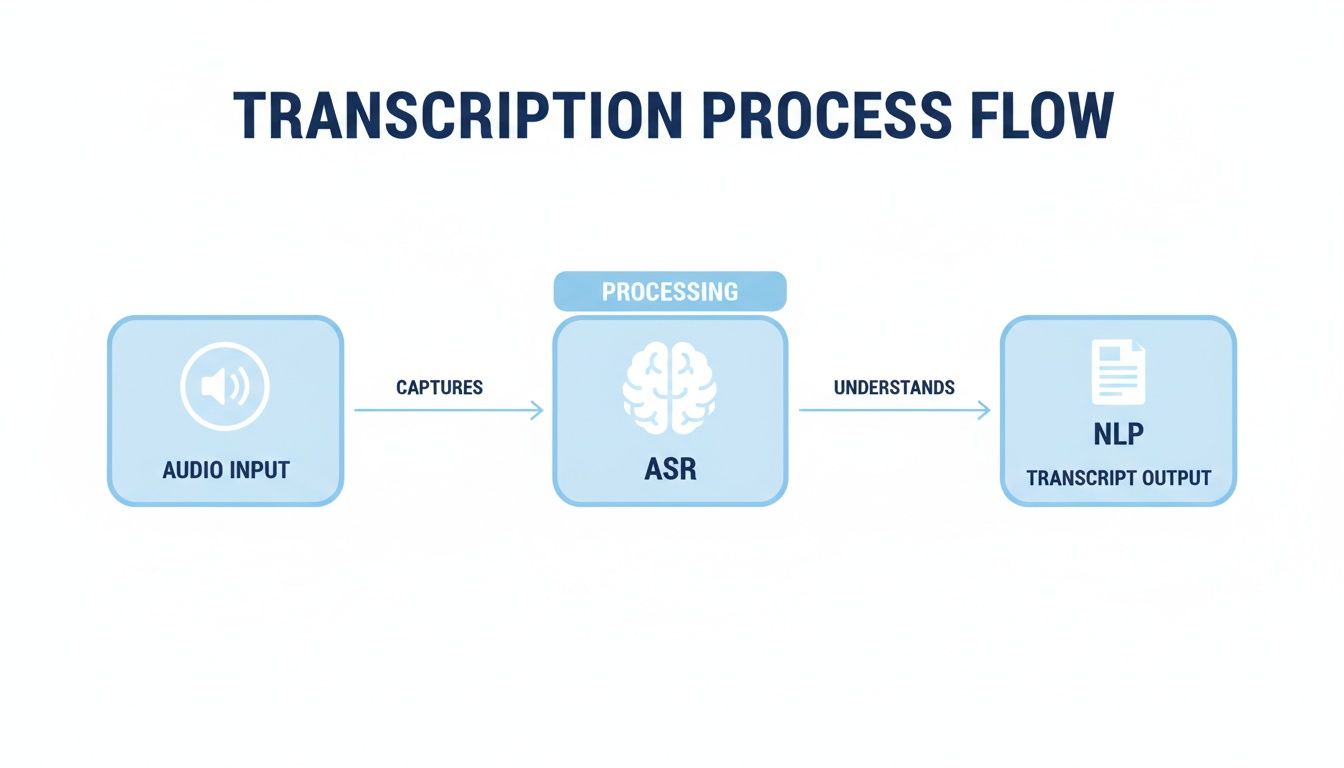
As you can see, the raw audio is first interpreted by ASR and then polished by NLP to produce the final, ready-to-use document.
Together, ASR and NLP create an amazing synergy. You can dive deeper into how this technology is evolving in our guide to AI-powered transcription software. By perfectly blending high-speed listening with intelligent editing, these tools save countless hours of manual work.
What '99% Accuracy' Really Means and How to Improve It
You see it plastered on every transcription software website: up to 99% accuracy. It sounds practically perfect, right? But what I've learned from experience is that the last 1% is where all the headaches hide.
Think about it. In a 1,000-word transcript, a 1% error rate means 10 wrong words. That could be a mangled quote, a critical number transcribed incorrectly, or the CEO's name misspelled. Suddenly, that "nearly perfect" transcript requires a lot of manual cleanup.
That 99% figure is usually achieved in a lab—pristine audio, one person speaking with a clear accent, and absolute silence. Real-world recordings are never that clean. That’s why understanding what actually affects accuracy is the key to getting a transcript you can actually use.
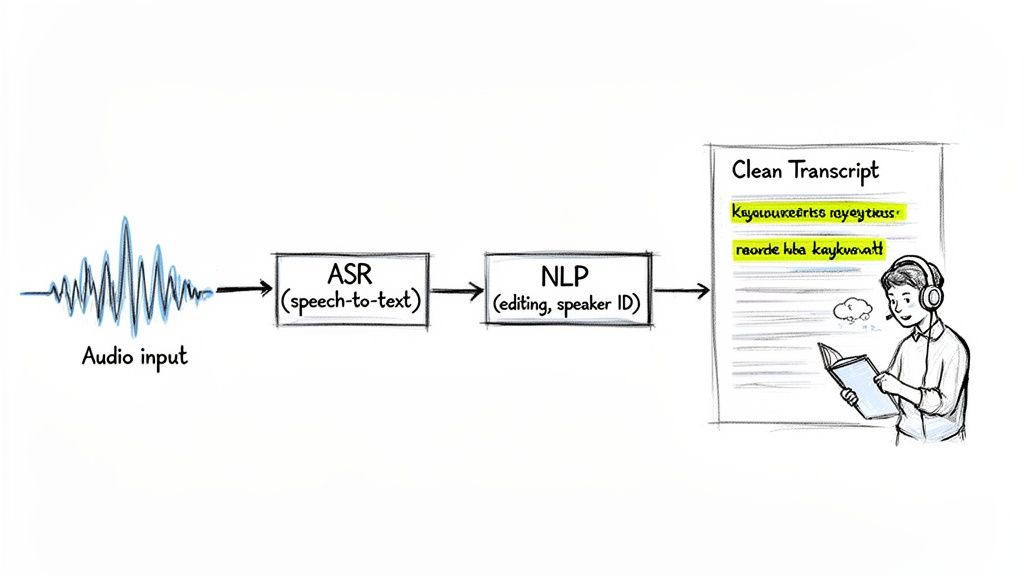
Common Obstacles to Perfect Transcription
Imagine the AI is trying to listen to one person in a noisy, crowded room. The more chaos there is, the more it's going to struggle to pick out the right words. I've found several common problems can tank the accuracy of your transcription.
These issues introduce "static" into the recording, making it tough for the software to lock onto the voice. Even the most advanced AI can't make sense of a messy audio file.
- Poor Audio Quality: This is, without a doubt, the number one killer of transcription accuracy. Muffled audio, a quiet speaker far from the mic, or a highly compressed file will leave you with a transcript full of gaps and gibberish.
- Background Noise: A humming air conditioner, nearby conversations, street traffic, or even the clatter of a coffee shop forces the AI to guess what’s speech and what’s noise.
- Multiple Overlapping Speakers: When people talk over each other, the AI often gets confused. It struggles to untangle the different voices, leading to jumbled or incomplete sentences.
- Strong Accents or Dialects: Most AI models are trained on standard accents. While they're getting much better, a particularly strong or less common accent can still trip them up and increase the error rate.
- Technical Jargon and Unique Names: An AI doesn't automatically know your company's internal acronyms, niche industry terms, or how to spell an unusual name like "Siobhan."
The good news is, you're not helpless. With a few smart moves, you can take control of these variables and give the AI a much better chance of succeeding.
Actionable Tips for Boosting Accuracy
Getting a great transcript starts long before you click the "transcribe" button. If you optimize your recording process and use the software's built-in tools, you can get much closer to that advertised 99% accuracy.
Based on my own tests, the single most effective way to improve transcription accuracy is to improve the source audio quality. A high-quality recording gives the AI the best possible chance to succeed.
Here are a few practical steps I take to get cleaner, more reliable transcripts every single time:
- Use an External Microphone: Your laptop's built-in mic is designed to pick up everything around it, which means it also picks up echo and background chatter. A simple external USB or lavalier mic makes a world of difference by focusing directly on the speaker's voice.
- Choose a Quiet Recording Space: This one seems obvious, but it's crucial. Find a room away from noisy colleagues, close the windows to block traffic sounds, and turn off fans or air conditioners. Even soft furnishings like carpets and curtains can absorb echo and clean up the sound.
- Encourage Clear Speaking Habits: For interviews or meetings, I try to set a simple ground rule: speak one at a time and try to enunciate. It’s not always possible in a fast-paced brainstorm, but for more structured recordings, this simple change can have a huge impact.
- Leverage Custom Vocabulary: This is a game-changer. Most professional tools let you "teach" the AI specific words. Before transcribing, you can upload a list of product names, industry acronyms, or people's names. The AI will then recognize and spell them correctly, saving you a ton of editing time. If you're looking for more ways to get started, you can learn more about how to convert audio to text effectively in our detailed guide.
What Really Matters: The Features That Make Transcription Software Work for You
Good transcription software does more than just turn speech into words. The best tools are designed to be genuine productivity hubs, loaded with smart features that take you from a raw audio file to a polished, useful document in a fraction of the time it would take manually. It's this move beyond basic word-for-word output that separates a decent tool from one you can't live without.
These aren't just flashy add-ons; they completely change how you work with spoken content. Forget sifting through a huge wall of text. With the right features, you can jump straight to key moments, see exactly who said what, and pull out the most important bits of information without ever having to listen to the whole recording again.
Core Features for Maximum Efficiency
At the heart of any great transcription tool are the features that give your conversations structure and context. They’re what turn a flat, lifeless document into an interactive, easy-to-navigate resource. I consider these the absolute must-haves for a smart, fast workflow.
Without these, you’re stuck with a transcript that still needs a lot of manual cleanup to be truly useful.
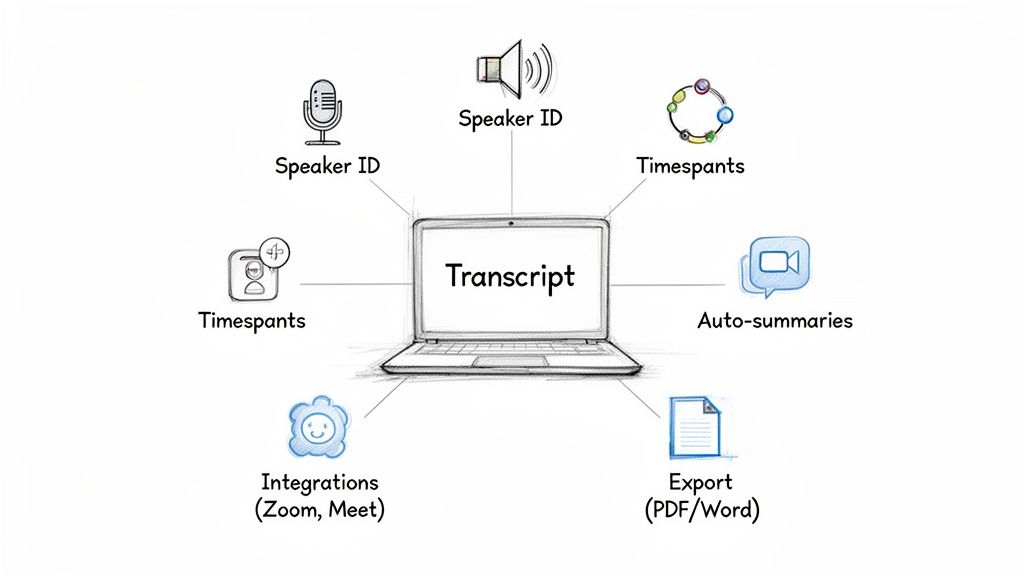
- Speaker Identification (Diarization): This is a lifesaver for any recording with two or more people. The software automatically figures out who is speaking and labels each part of the conversation (e.g., "Sarah:", "David:"). It saves you the headache of trying to remember voices and manually assign names to dialogue.
- Interactive Timestamps: Every single word in the transcript is linked to the exact moment it was spoken in the audio. If I'm not sure about a particular phrase or want to hear the speaker's tone, I just click the text, and it plays that specific audio clip. It's incredibly intuitive.
- Versatile Export Options: A great tool should slot right into how you already work. Look for the ability to export your transcript in all the essential formats, like Microsoft Word (.docx), PDF, plain text (.txt), or even Markdown for pasting into notes apps or websites.
AI-Powered Insights That Get to the Point
The biggest leap forward in transcription has come directly from artificial intelligence. Modern AI features don't just transcribe; they analyze the conversation to pull out the most valuable information. They basically do the post-meeting summary for you.
This is where you see a massive return on your investment. In fact, this analytical power is a key reason the AI meeting transcription market is projected to explode from $3.86 billion to $29.45 billion by 2034. That’s a staggering growth rate of 25.62% per year, driven by the shift to hybrid work. As teams become more distributed, tools that provide real-time transcripts and smart summaries are no longer optional.
These AI capabilities turn long, rambling discussions into clear, concise assets.
The real power of modern transcription software isn't just capturing what was said, but telling you what it means. AI summaries and key takeaway extraction are the features that deliver true business value.
Here are the AI features that make all the difference:
- Automated Summaries: The software reads the entire transcript and boils it down into a short, easy-to-digest summary that hits all the main points.
- Key Takeaway Extraction: AI goes a step further by identifying the most important ideas, decisions, and conclusions, then presenting them as a simple bulleted list.
- Action Item Generation: The system is smart enough to spot tasks and next steps mentioned in the conversation (like, "John will follow up with the client") and pull them into a clean to-do list.
Seamless Integrations for a Connected Workflow
Finally, the best transcription software doesn't live on an island. It connects smoothly with the other tools you rely on every day, capturing conversations where they happen and sending the results where they need to go. This kind of connectivity is crucial for any professional, especially if you work in a team.
For example, direct integrations with platforms like Zoom, Google Meet, and Microsoft Teams allow a bot to automatically join your calls, transcribe in real-time, and generate a summary the moment the meeting ends. This means nothing gets missed, even if someone joins late or has to drop off early.
For a deeper dive into how these tools can boost team collaboration, check out our guide on meeting transcription software. By putting these features to work, you can turn transcription from a tedious chore into a powerful, automated part of your daily routine.
How to Choose the Right Tool for Your Specific Needs
Picking the right audio to text software isn't about finding the "best" tool—it's about finding the best tool for you. What a podcaster needs to edit an interview is worlds apart from what a corporate legal team needs to document a deposition. The secret is to line up the software’s features with what you actually do every day.
Choosing the wrong tool is like trying to edit a video with a basic text editor. You’ll just end up frustrated and wasting time. But if you focus on your specific job, you’ll find a platform that feels like it was built just for you.
For Project Managers and Remote Teams
If your calendar is a wall of back-to-back virtual meetings, your needs are crystal clear. You need a tool that basically acts as an automated meeting assistant. The whole point is to capture what’s said and—more importantly—turn those conversations into things you can actually do, right away.
I'd recommend you zero in on software that integrates seamlessly with your daily workflow. That means automatically joining, recording, and transcribing your calls on platforms like Zoom, Google Meet, and Microsoft Teams. The most valuable features are real-time transcription, which lets everyone follow along, and AI-powered action item generation, which spits out a to-do list the second the meeting ends.
The true test of a meeting transcription tool isn't just the accuracy of the words. It's how fast it helps your team get from talking to doing. Automated summaries and action items are non-negotiable.
For Journalists and Researchers
When you're a journalist conducting interviews or an academic gathering field data, accuracy and portability are everything. Your work often happens out in the real world, not some soundproof office, so your software has to handle background noise and less-than-ideal conditions. Nailing every quote is non-negotiable.
Look for these essential features:
- High-Fidelity Mobile Recording: A solid app that captures clean audio right from your phone is a must for interviews on the go.
- Precise, Clickable Timestamps: You have to be able to jump to the exact moment in the audio to check a quote or hear the speaker's inflection.
- Speaker Identification (Diarization): When you’re talking to multiple people, knowing who said what automatically saves hours of painful manual labeling.
This demand for detail-oriented, AI-driven tools is fueling massive growth. In the U.S. alone, the transcription market is valued at $30.42 billion and is expected to hit $41.93 billion by 2030. This boom is powered by tools that can turn an hour-long interview into searchable text in under a minute—a lifesaver for any journalist on a deadline.
For Students and Educators
In the world of academics, it all comes down to capturing knowledge and making it accessible. Students need an affordable way to turn lectures into study notes, and educators need to create materials that work for everyone. The focus here is on value, simplicity, and easy collaboration.
A generous free plan or a budget-friendly starter tier is usually the first thing to look for. You’ll want straightforward features like multiple export options (PDF, Word, TXT) to easily share notes or upload transcripts into a learning management system. The ability to upload audio from anywhere—a recorded lecture, a YouTube link—adds the kind of flexibility that makes learning and teaching so much easier. As you compare options, finding the best transcription tool often comes down to the one that fits your study or teaching habits perfectly.
Matching Features to Your Professional Role
To make it even clearer, here's a quick guide to which features matter most depending on your role. While everyone benefits from high accuracy, certain tools become critical for specific jobs.
Use this table as a starting point. Your perfect tool is the one that ticks the "Must-Have" boxes for your work, making your entire process faster and more efficient.
Protecting Your Data with Secure Transcription
When you send an audio file off to be transcribed, you’re handing over more than just sound waves. You’re trusting a service with your conversations—and that could be anything from a confidential client strategy session to a deeply personal interview. This is why security isn’t just a nice-to-have feature; it’s the absolute bedrock of any good audio to text transcription software.
Think of your audio file like a sealed envelope. You wouldn’t just hand it to a stranger on the street. The best services act as a bonded courier, using serious security measures to protect your data from the moment it leaves your device until the second you decide it’s time to delete it.
Understanding Encryption: Your First Line of Defense
The single most important security tool in the box is encryption. It essentially scrambles your data into a secret code, making it completely unreadable to anyone who doesn't have the key. Top-tier transcription services use two distinct types of encryption to keep your files safe at every step.
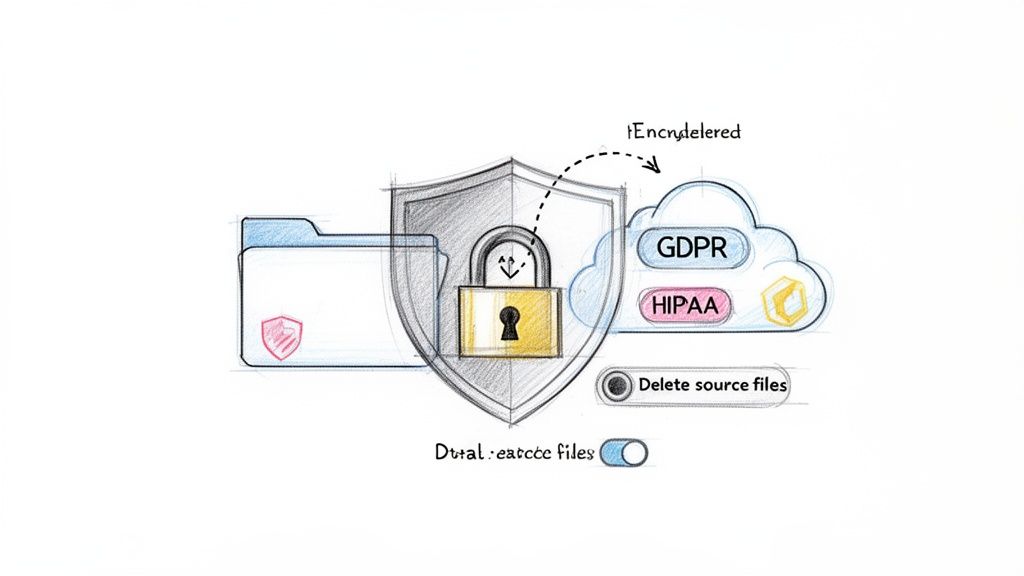
- Encryption in Transit: This keeps your data safe while it's traveling from your computer to the transcription service's servers. It uses protocols like TLS (Transport Layer Security) to prevent anyone from intercepting or eavesdropping on the file during upload.
- Encryption at Rest: Once your audio file safely arrives, it needs to be stored. Encryption at rest means the file stays scrambled and unreadable while it’s sitting on the server, protecting it from any unauthorized access.
Security isn't just a bullet point on a features list—it's a fundamental promise. If a provider is vague about their encryption standards, that’s a huge red flag.
Navigating Compliance and Privacy Policies
Beyond the technical side of encryption, there are official rules. If you’re working in fields like healthcare or law, or if you handle data from anyone in Europe, you absolutely have to pay attention to compliance.
Two of the big ones you'll run into are:
- GDPR (General Data Protection Regulation): This is a must if you're dealing with data from anyone in the European Union. It puts strict controls on how personal data is handled.
- HIPAA (Health Insurance Portability and Accountability Act): A critical US law that sets the standard for protecting sensitive patient health information.
It’s also crucial to know what a service does with your data. Take a few minutes to read through documents like Parakeet-AI's privacy policy. A good policy will tell you exactly how your information is stored, who can see it, and for how long. The best platforms go a step further by giving you direct control, allowing you to permanently delete both your source files and the final transcripts whenever you want. You should always have the final say over your information.
Finding the Best Value in Transcription Pricing
Trying to figure out the cost of audio to text transcription software can feel like comparing apples and oranges. You'll see everything from simple per-minute rates to complex subscription tiers, and it's easy to get lost in the details.
The secret is to match your real-world usage to the right pricing model. Do you just need to transcribe a single interview once a blue moon, or are you part of a team cranking out transcripts from daily meetings? Knowing this will guide you straight to the most budget-friendly option.
Decoding the Most Common Pricing Plans
Most services use a few standard pricing models, each with its own pros and cons. Getting a handle on these is the first step to making a smart choice. The main ones you'll run into are pay-as-you-go, monthly subscriptions, and sometimes, flat-rate enterprise plans.
- Pay-As-You-Go (PAYG): This is as straightforward as it gets. You pay a set rate for every minute or hour of audio you process, with no monthly commitment. It's the perfect fit if your transcription needs are sporadic or unpredictable. For instance, Rev offers a PAYG rate of $0.25 per minute for its AI transcription.
- Monthly Subscriptions: Here, you get a bucket of transcription minutes for a fixed monthly fee. For anyone with regular transcription needs, this almost always offers the best bang for your buck, since the per-minute cost drops significantly. A $20/month plan might give you 600 minutes, which works out to just over 3 cents per minute—a huge saving over PAYG.
The biggest mistake you can make is choosing a plan based on the lowest price alone. True value comes from a balance of cost, accuracy, time saved, and features that fit your workflow.
Looking Beyond the Price Tag
A cheaper service isn't always a better deal. If that low-cost tool spits out a messy transcript that takes you an hour to fix, you’ve actually lost money when you factor in your time. To find a true return on investment, you have to weigh the sticker price against the software’s performance.
When you're comparing options, think about these factors:
- Accuracy and Editing Time: How much cleanup does the first draft require? A high-accuracy tool, like HypeScribe with its up to 99% accuracy, means you spend far less time making manual corrections.
- Turnaround Speed: How long are you left waiting? Fast processing is a game-changer. Turning an hour of audio into text in under a minute lets you move on to your actual work instead of just waiting around.
- AI-Powered Features: Does the plan include smart features like automated summaries, chapter markers, or action item detection? These extras can distill a long meeting into useful, actionable notes in seconds.
- Integrations: Does it play nice with the other tools in your world, like Zoom, Google Meet, or your team's project management app? Smooth integrations create a seamless workflow, saving clicks and headaches.
The Power of the Free Trial
At the end of the day, the only way to really know if a service works for you is to take it for a spin. Nearly every reputable platform offers a free trial, and you should absolutely use it.
Don’t just upload a perfect, studio-quality recording. Throw it a curveball. Use a real-world file with background noise, multiple speakers talking over each other, or industry-specific jargon. This is your chance to see how it really performs under pressure. This hands-on test is the most reliable way to make sure you're getting genuine value before you pull out your credit card.
Common Questions About Transcription Software
Even with all the impressive technology, you probably still have some practical questions about how audio to text transcription software actually works day-to-day. Getting straight answers is the best way to set the right expectations and pick a tool that won't let you down.
Let's dive into some of the most common questions people ask.
How Fast Can Software Transcribe an Audio File?
One of the first things everyone wants to know is: how long does it actually take? Are we talking minutes, or hours?
The speed of modern AI transcription is genuinely impressive. Most services can process audio much faster than real-time. For instance, a one-hour audio file can often be fully transcribed in just a few minutes. Sometimes, it’s even done in under 60 seconds, depending on the service and how busy their servers are.
Of course, a few things can affect that speed, like the clarity of the original audio. For live events, real-time transcription is a game-changer, capturing speech almost instantly with just a slight delay. This makes it perfect for getting an immediate text record of meetings or webinars.
Can Transcription Tools Handle Different Languages and Accents?
This is a big one. What about speakers with different accents or who are speaking another language?
Yes, this is where the best transcription software really shines. Top-tier platforms are trained on massive global datasets, allowing them to support over 50 or even 100 languages and a wide array of dialects. This training helps them understand and accurately transcribe speakers with all sorts of accents.
While a very thick or unusual accent might still pose a slight challenge and dip the accuracy rate a little, the technology is getting better all the time. Most tools let you specify the language beforehand, which cues the AI to use the right model and deliver the most accurate transcript possible.
The ability to accurately process multiple languages and accents is what transforms transcription software from a niche tool into a global communication and documentation asset.
Is My Data Kept Private and Secure?
With any cloud-based tool, security is a major concern. You need to know your sensitive conversations are safe.
Any transcription service worth its salt makes security a top priority. Look for providers that offer end-to-end encryption, which is the gold standard for protecting your files when you upload them and while they're stored.
Many services also comply with major data privacy laws like GDPR and HIPAA, which is non-negotiable for anyone in the legal, medical, or corporate fields. For ultimate peace of mind, pick a platform that gives you the power to permanently delete your files and transcripts after you're done. Always give the privacy policy a quick read before you upload anything sensitive.
Ready to see this speed and accuracy for yourself? HypeScribe turns your audio and video into usable text in seconds, supporting over 100 languages and offering features like automated summaries and action items. See how easy it is to pull valuable insights from your conversations. Start your free trial at HypeScribe.



































































































