
What is Workflow Automation and Why Does It Matter?

Picture this: your team is drowning in a sea of small, repetitive tasks. Think forwarding emails, manually updating spreadsheets, or endlessly chasing down approvals. It's the kind of work that drains energy and stalls progress on what really matters.
Workflow automation is the technology that acts like a lifeline, pulling your team out of that drudgery. It sets up a digital assembly line for your business processes, where tasks flow smoothly from one step to the next—all on their own.
Unpacking Workflow Automation for the First Time
If you've ever set up a smart home device, you already understand the core idea. It's simple logic: when you unlock your front door (the trigger), the lights automatically turn on and the thermostat adjusts (the actions).
Workflow automation applies that same "if this, then that" principle to your daily work. Instead of you manually copying a new customer's info from a form into a spreadsheet and then drafting a welcome email, automation handles it all the second that form is submitted. This small shift frees up a surprising amount of your team's day, letting them focus on more important challenges.
From Manual Effort to Automated Efficiency
The difference between a manual task and an automated one is night and day. Manual work is slow, inconsistent, and wide open to human error. An automated workflow, however, is fast, reliable, and performs the job perfectly every single time.
Here's a number that really puts it in perspective: an estimated 45% of current paid activities could be automated right now. In the U.S. alone, that's about $2 trillion in annual wages tied up in tasks a machine could be doing.
Let's look at a few real-world examples where automation makes an immediate difference:
- Onboarding a new employee: Forget the paper checklist. An automated workflow can instantly send out HR forms, schedule orientation meetings, and grant access to necessary software the moment a contract is signed.
- Processing an invoice: Automation can lift data directly from an invoice PDF, plug it into your accounting software, and send it to the right manager for a one-click approval.
- Managing customer support tickets: A new ticket can be automatically assigned to the right agent based on keywords, while simultaneously pinging a team channel in Slack or Microsoft Teams so nothing gets missed.
To really see the contrast, let's break it down.
Manual vs Automated Workflows at a Glance
This table gives a quick snapshot of how a simple shift in approach can completely change the way work gets done.
The benefits are clear. You're not just saving a few minutes here and there; you're building a more resilient and efficient system for your entire operation.
This lets your team shift their focus from mind-numbing repetition to strategic thinking, creative problem-solving, and genuine customer engagement—the work that actually grows the business. Organizing this newly streamlined information is crucial. To take the next step, you can learn more about how to structure all this valuable company information by exploring what is a knowledge management system. It’s the perfect follow-up to getting your tasks in order.
How Automation Actually Connects Your Business Tools
You don't need to be a developer to understand how workflow automation works. At its core, it’s built on three simple concepts that work together like a row of dominoes. Once you see how they connect, you'll start seeing opportunities to automate everywhere.
It all starts with a Trigger. This is the specific event that kicks off the whole process—the first domino to fall. It could be anything from a new lead filling out a form on your website to a specific time of day, like 9:00 AM on a Monday.
Next, you have the Actions. These are the tasks you want the system to execute once that trigger fires. If the trigger is the first domino, the actions are all the others that fall in a perfect sequence. A single trigger, like that new lead, could launch several actions: adding them to your CRM, sending a welcome email, and pinging your sales team in Slack.
The Core Building Blocks of Automation
These components are the foundation of every automated process, whether it’s a simple two-step task or a complex, multi-app sequence.
- Triggers: The starting gun for any workflow. A common one is receiving an email with a specific subject line, like "Invoice Due."
- Actions: The specific jobs performed by the software. This could mean creating a task in your project management tool, updating a spreadsheet, or sending a text message.
- Logic: This is the "brain" of the operation. Logic introduces conditional rules—think "if-this-then-that"—allowing your workflow to make decisions. For example, if a support ticket is marked "Urgent," then the workflow can automatically assign it to a senior support agent.
This simple map shows how these three elements flow together to create a complete automated workflow.
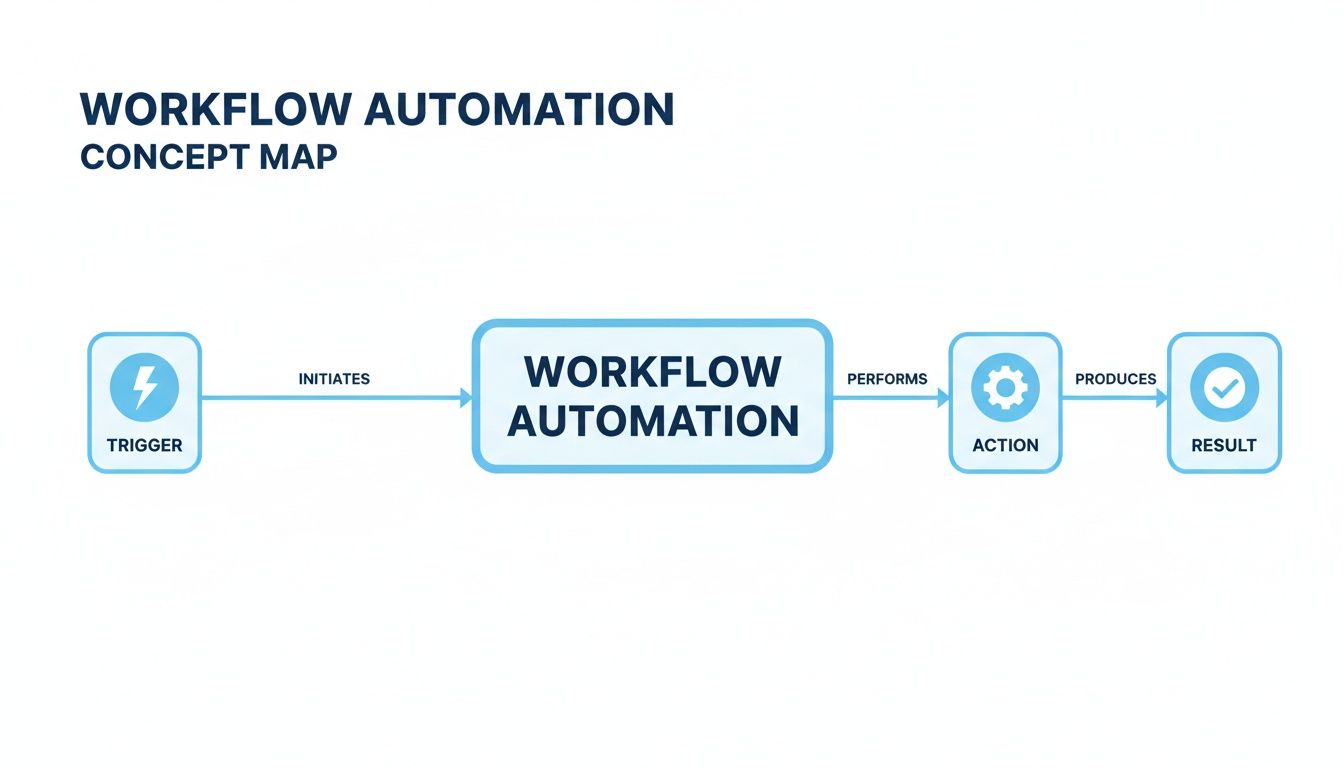
The visualization shows a clear path from a starting point (the trigger) to a series of tasks (the action), leading to a successful outcome (the result).
The Technology That Makes It All Work
So, how do all these different apps—your email, CRM, and project manager—actually talk to each other? The magic behind this communication is a technology called an API, which stands for Application Programming Interface.
Think of an API as a digital messenger or a universal translator. When you set up a workflow, the automation platform uses APIs to send instructions and data between your software tools. The best part? You don't need to know how to code; the platform handles all the technical back-and-forth for you.
For example, when a new customer makes a purchase on your website (the trigger), the automation tool uses the e-commerce platform's API to grab the order details. It then uses your email marketing tool's API to add that customer to a "New Buyers" list and your shipping software's API to create a new order label.
An API is like a restaurant menu. It provides a list of predefined requests a program can make to another program. You don’t need to know how the kitchen works; you just need to know what you can order.
Adding Intelligence with AI
Lately, workflow automation has gotten even smarter with the addition of Artificial Intelligence (AI). AI can analyze unstructured data—like the text of an email or the transcript of a meeting—and add a layer of intelligence to your automated actions.
For instance, an advanced workflow could use AI to analyze the tone of a customer support email. If the AI detects a high level of frustration (the logic), it could automatically escalate the ticket to a manager and flag it for an immediate personal follow-up.
This blend of triggers, actions, APIs, and AI is what allows businesses to build incredibly powerful, seamless workflows. It’s how you connect your entire collection of software, saving countless hours and making sure no task ever falls through the cracks.
The Real Business Impact of Automating Your Workflows
It’s one thing to understand the nuts and bolts of workflow automation, but seeing it change your business firsthand? That’s where the magic happens. Let's move past the technical "how" and dig into the real-world results that convince companies to make the switch. This isn't just about making things a little easier; it's about fundamentally changing how work gets done for the better.
Drive Radical Efficiency and Productivity
The first thing you’ll notice after automating is a massive jump in efficiency. Think about those clunky, multi-step processes that eat up your team's day, like manually pulling together the weekly sales report. With an automated workflow, the system can grab the data from your CRM, pop it into a pre-made template, and shoot it off to the leadership team every Monday morning—all before anyone has had their first cup of coffee.
What once took hours now takes seconds. When you give that time back to your team, they can finally shift their focus from mind-numbing admin work to the strategic projects that actually move the needle. All of a sudden, there’s more headspace for building customer relationships, solving tough problems, and planning for the future.
Minimize Costly Human Errors
Look, no matter how sharp your team is, mistakes happen. Manual data entry and repetitive tasks are a breeding ground for human error. A misplaced decimal point, a copy-paste slip-up, or a forgotten step can snowball into bad reports, compliance headaches, and hours of wasted time fixing the mess. Some studies even suggest poor data quality can cost companies between 15% and 25% of their revenue.
Workflow automation practically erases that risk. By setting up a standardized, digital process, you guarantee that tasks are done the exact same way, every single time. The result is cleaner data, more dependable reports, and a whole lot more confidence in your operations.
Boost Team Morale and Empowerment
Nothing crushes a person’s spirit faster than boring, repetitive work. When you have smart, capable people spending their days on tasks a computer could do in its sleep, you get burnout and disengagement. Taking that administrative weight off their shoulders is one of the quickest ways to improve job satisfaction.
By automating the mundane, you free your team to focus on the work that truly requires their human ingenuity: creativity, critical thinking, and empathy. This doesn't just make them happier; it builds a culture where people are valued for their ideas, not just their ability to check boxes.
The market is screaming this from the rooftops. Valued at USD 21.17 billion in 2025, the global workflow automation market is expected to rocket past USD 80.57 billion by 2035. You can dig into the findings behind the workflow automation market to see just how big this shift is. This kind of explosive growth is a clear signal that companies everywhere are waking up to the power of operational efficiency and employee empowerment.
Calculating Your Return on Investment
Seeing the value of automation isn't just about warm feelings; it's about cold, hard numbers. You can use a straightforward framework to calculate the return on investment (ROI) for any process you're thinking of automating.
A Simple ROI Framework:
- Identify the Manual Task: Pick a specific, recurring job. Let's say it's processing 100 customer invoices each month.
- Measure Time Spent: Clock how long it takes to do it by hand. If each invoice takes 15 minutes, you're looking at 1,500 minutes (or 25 hours) every month.
- Calculate Labor Cost: Multiply that time by the employee's hourly wage. At $30/hour, that single task costs the company $750 a month.
- Determine Automation Cost: Now, factor in what your automation tool costs. Let's imagine it's a $50 monthly subscription.
- Calculate Savings: Just subtract the tool's cost from the labor cost: $750 - $50 = $700. That's a $700 savings every month from automating just one process.
This back-of-the-napkin math shows the immediate financial upside. But the bigger win is that it lets you scale your business without having to scale your payroll at the same rate. You can onboard more clients, fulfill more orders, and take on bigger projects with the team you already have, paving a clear road to sustainable growth.
Real-World Examples of Automation in Action
Theory is great, but to truly understand workflow automation, you need to see it in action. Let's look at how teams are using it every day to swap tedious, manual tasks for efficient, hands-off systems. These aren't just pie-in-the-sky ideas; they're practical applications changing how work gets done right now.
The basic idea is simple: find a sequence of tasks that you do over and over, and then build a digital assembly line for it. This gets rid of manual hand-offs, slashes the risk of human error, and frees up your team to focus on work that actually requires their brainpower.
Automating Human Resources Onboarding
One of the most common—and impactful—examples is in HR, especially when onboarding a new hire. Onboarding someone manually involves a dizzying amount of admin, from sending out paperwork to scheduling intro meetings and setting up accounts. It’s a process that’s practically begging for mistakes and delays.
An automated workflow changes the game completely. The moment a candidate signs their offer letter (that's the trigger), a whole sequence of events kicks off on its own:
- Paperwork on Autopilot: The system immediately emails the new hire with links to all the necessary tax forms, contracts, and company policy docs.
- Smart Scheduling: It scans key team members' calendars and automatically books orientation sessions, introductory meetings, and training calls.
- IT Gets the Memo: A ticket is instantly created in the IT helpdesk system to create new accounts (email, Slack, project management tools) and get their laptop ready.
Not only does this create a smooth, consistent experience for every new employee, but it also hands the HR team back dozens of hours per hire.
Streamlining Marketing and Sales Operations
In the world of marketing and sales, speed and personalization are everything. Automation is the engine that drives modern customer relationship management, turning a flicker of interest into a solid lead.
Think about it: a visitor downloads an ebook from your website. Instead of that lead just sitting in a spreadsheet hoping a salesperson sees it, an automated workflow jumps into action. It can add them to your CRM, tag them based on the content they downloaded, and drop them into a targeted email sequence. If they start showing strong interest—say, by visiting the pricing page a few times—the workflow can automatically create a task for a sales rep to give them a personal call.
By automating these first few touchpoints, you make sure no lead ever falls through the cracks. Every single person gets a timely and relevant response, which can dramatically boost conversion rates.
This is the real power of a well-designed workflow: it stitches together the different tools in your tech stack to create a seamless journey for both your customers and your team.
This diagram gives you a great visual of how a modern automation process, especially for meetings, can connect different business tools.
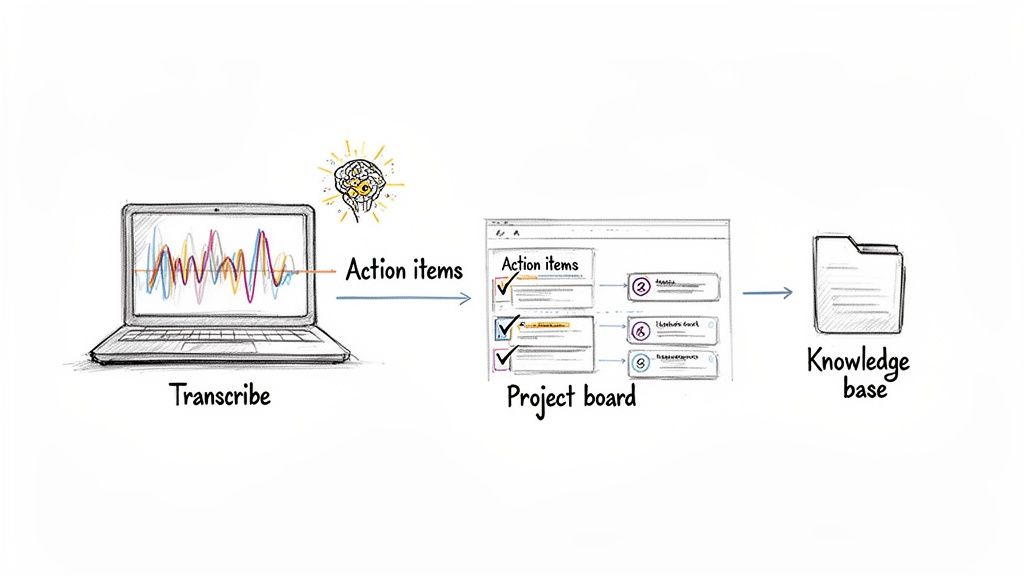
As you can see, automation isn't about just one action. It's about starting a value chain from a single event, like a meeting, that ripples across all your operational tools.
Transforming Meetings into Actionable Knowledge
We've all been there. You have a great meeting, make some big decisions, and then... nothing happens. The gap between conversation and action is a universal pain point. Translating talk into trackable tasks and shared knowledge often gets lost in the daily grind. This is where AI-powered automation is a massive help.
Let's walk through a specific workflow using a tool like HypeScribe. Your project team jumps on its weekly Google Meet check-in. Here’s what the automation does:
- Automatic Transcription: The conversation is transcribed in real-time as the meeting unfolds.
- AI-Powered Analysis: The second the call ends, AI gets to work. It analyzes the transcript to identify key decisions, summarize the discussion, and—most importantly—pull out specific action items and who is responsible for them.
- Task Creation and Assignment: The workflow then connects to your project management tool (like Asana or Jira). It automatically creates tasks for each action item and assigns them to the right people, complete with due dates.
- Knowledge Base Integration: Finally, the meeting summary and key takeaways are pushed to a shared knowledge base like Confluence or Notion. This makes the information instantly searchable for anyone, anytime.
That single workflow turns a one-hour conversation into a series of documented, assigned, and trackable actions. If you're looking to make your meetings more productive, you might be interested in how an AI meeting minutes generator can become the hub for this kind of automation. For a deeper dive, looking into how Large Language Models enhance automation shows how this technology is getting even more powerful.
Looking at these examples, it’s clear that workflow automation is way more than a simple convenience. It’s a strategic way to build smarter, more efficient, and more resilient operations across your entire business.
Your Step-by-Step Implementation Guide
So, you're ready to jump into workflow automation. It can feel like a massive project, but from my experience, the key is to start small and follow a clear, structured plan. This playbook will walk you through the essential steps, from finding the right tasks to automate to making sure everything runs smoothly long-term.
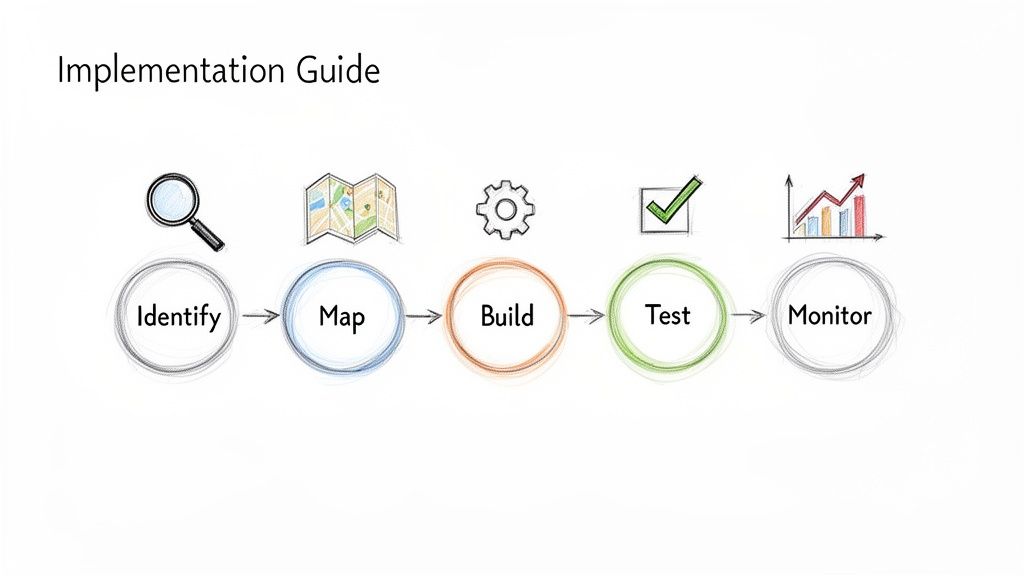
Think of this less as a technical setup and more as a strategic upgrade to how your business actually works.
Step 1: Identify the Best Processes to Automate
First things first: you need to pinpoint where automation will give you the biggest win with the least amount of headache. Don't try to automate a sprawling, multi-department process on your first go. Instead, look for the low-hanging fruit.
These are usually tasks that are:
- High-Volume: Things that your team does over and over again, every single day or week.
- Rule-Based: Processes that follow a predictable, "if this, then that" logic without needing a lot of human judgment.
- Time-Consuming: The kind of work that eats up hours but doesn't require deep, strategic thought.
- Prone to Error: Manual data entry and copy-pasting are classic culprits here.
Think about processing expense reports, onboarding a new client, or pulling together weekly performance numbers. These are the perfect candidates to get you started.
Step 2: Map Your Current Workflow
Before you can automate anything, you have to understand it inside and out. Seriously, don't skip this part. One of the biggest mistakes people make is automating a broken process—all that does is help you do the wrong thing faster.
Take the time to map out every single step from A to Z. Document things like:
- What triggers the whole thing to start?
- What are all the individual tasks involved?
- Who is responsible for each piece of the puzzle?
- What tools are they using right now?
- Where do things get stuck? What are the bottlenecks?
Drawing it all out on a whiteboard or using a simple digital tool can be a game-changer. This is where you’ll spot all the little inefficiencies and redundancies you can fix before you even think about building the automation. If you need a hand with this, our guide on how to document business processes is a great place to start.
Step 3: Choose the Right Tools
The market for automation tools has exploded, which is both a blessing and a curse. There are a ton of options, and it can be tough to know where to begin. For context, the global workflow management system market was valued at USD 17.7 billion in 2025 and is on track to hit USD 56.1 billion by 2031. A big reason for this boom is the rise of no-code platforms that let almost anyone build powerful automations.
Your choice of tool really boils down to what you need:
- No-Code Platforms (e.g., Zapier, Make): These are fantastic for connecting different cloud apps. If you know how to drag and drop, you can use these.
- Specialized Solutions (e.g., HypeScribe): These are built to solve very specific problems, like automating everything around your meetings and knowledge sharing.
- All-in-One Platforms (e.g., Airtable, Notion): These act as a central hub, combining database functions with automation to manage entire projects.
My advice? Start with a tool that solves your most immediate pain point and offers a free trial. That way, you can play around without any financial commitment.
Step 4: Build and Test in a Pilot Project
Alright, it's time to get your hands dirty. Start small with a controlled pilot project. Take the workflow you mapped out earlier and build it in the tool you chose. You'll set up the trigger, define the sequence of actions, and add any logic needed.
Testing is absolutely critical. Run your new automated workflow with sample data or in a separate testing environment. Check every single step to make sure it's firing exactly as you planned before you roll it out to the whole team.
This pilot phase lets you iron out all the kinks in a low-stakes environment, which makes for a much smoother launch. For more practical advice on getting this right, this is a great resource on how to automate business processes.
Step 5: Monitor and Refine Continuously
Finally, great automation is never a "set it and forget it" deal. Once your workflow is live, you need to keep an eye on it. Watch your key metrics—how long does it take, are there any errors, is it completing successfully?
Your business will evolve, and the tools you use will get updated. That’s why it’s so important to regularly revisit your automations and look for ways to make them even better. You might find a new step you can add or a smarter way to connect your apps. This cycle of monitoring and refining is what ensures your automations stay valuable for years to come.
Common Questions About Workflow Automation
As you start digging into workflow automation, a few questions always seem to come up. Getting straight answers to these is key to feeling confident and ready to dive in. Let's tackle some of the most common ones I hear.
What Is the Difference Between Workflow Automation and BPM?
It's really easy to get these two confused, but they serve very different purposes.
Think of it this way: Business Process Management (BPM) is the grand architectural plan for your entire business. It’s the high-level strategy for analyzing and redesigning how everything works together to hit major company goals.
Workflow automation, on the other hand, is one of the essential tools you use to bring that plan to life. If BPM is the blueprint, automation is the smart wiring that automatically opens the doors and adjusts the lights. It zeroes in on specific, rule-based tasks within the larger system, while BPM always keeps its eye on the big, complex picture.
Do I Need Coding Skills to Set Up Automation?
Absolutely not. This is probably the single biggest myth that holds people back. It used to be true—you needed a developer on speed dial—but the wave of no-code and low-code platforms has completely changed the game.
Modern tools like Zapier, Make, and Airtable have put serious automation power into everyone's hands. They use simple drag-and-drop interfaces that let you connect your favorite apps and build sophisticated workflows, all without writing a single line of code.
Sure, a massive, company-wide system might still need some IT involvement. But for the vast majority of day-to-day business automations, the people who actually do the work can now build their own solutions. It’s a powerful shift that lets teams fix their own problems on the fly.
How Can I Convince My Team to Invest in Automation?
To get real buy-in, you have to talk about results, not just ideas. The best way I've seen this work is to start small, find a genuine pain point, and show exactly how automation can make it go away.
Here’s a simple strategy that works wonders:
- Find the Pain: Pinpoint a task that makes everyone on your team groan. Maybe it's the 15 hours a week spent manually pulling numbers for a report.
- Calculate the Cost: Put a dollar amount to that wasted time. Nothing gets attention faster than showing the hard cost of doing things the old way.
- Propose a Pilot: Suggest a small, low-risk test run. Just automate that one reporting task and track what happens.
- Show the Full Picture: When your pilot is a success, present the full story. It’s not just about the money saved; it’s about fewer errors, faster turnaround, and a team that’s a whole lot happier. That's an argument no one can ignore.
Is Automation Only for Repetitive Administrative Tasks?
That’s where most people start, but it's just the tip of the iceberg. Automation is fantastic at crushing administrative work, but its real magic is freeing up your team for more strategic, creative thinking. It takes care of the "work about work" so humans can focus on the work that matters.
Even a creative team can get bogged down in administrative friction. They can automate things like:
- Pulling in client feedback from emails, Slack, and forms into one central spot.
- Creating new project folders and standard assets the moment a new project is approved.
- Transcribing brainstorming sessions using a tool like HypeScribe so every idea is captured without a designated note-taker.
This doesn't stifle creativity—it fuels it. By clearing away the monotonous tasks, automation gives your team back the time and mental energy to do what you hired them for in the first place.
Ready to eliminate the busywork from your meetings and turn conversations into action? HypeScribe uses AI to automatically transcribe, summarize, and create action items from your calls, integrating seamlessly into your workflows. Discover how you can make every meeting more productive.


































































































