
The Ultimate Guide to Using a Voice to Text Note Taking App

We've all been there: sitting in a fast-paced meeting or an information-packed lecture, trying to capture every critical detail. Your fingers are flying across the keyboard, but you can feel yourself falling behind. You're so focused on typing that you miss the subtle nuances of the conversation, and key action items get lost in the scramble.
This struggle highlights the fundamental flaw in traditional note-taking—it's simply too slow for the natural speed of a conversation. I've found that it forces you to choose between participating in the discussion and documenting it.
Stop Typing and Start Talking: How a Voice to Text App Actually Helps
This is exactly where a modern voice to text note taking app comes in. Think of it as a personal stenographer with superpowers. It doesn't just create an audio file you have to listen to later; it actively listens, understands, and converts spoken words into organized, searchable, and genuinely useful text.
Imagine finishing a one-hour client call and, within seconds, receiving a perfect transcript, a concise summary of the discussion, and a neat list of all the tasks that were agreed upon. That’s the power I’ve experienced with this technology.
It’s about turning a conversation you just had into an active resource you can immediately use. You can finally put your keyboard down, give the speaker your full attention, and trust that nothing important will be missed. The difference is night and day.
- Complete Focus: Engage fully in the discussion without the distraction of typing.
- Perfect Recall: Get a flawless, word-for-word record of every conversation.
- Time Savings: Eliminate the hours spent manually transcribing notes after meetings or interviews.
- Instant Organization: Find key information in seconds with searchable text, AI-generated summaries, and clear action items.
For anyone who relies on information from conversations—from busy professionals to diligent students—a good voice-to-text app closes the gap between talking and doing. It’s not just about what was said; it’s about making that information matter.
How Voice to Text Transcription Actually Works
Have you ever spoken into an app and watched your words appear as text, wondering how it all happens? It's not quite magic, but it’s the next best thing. From my experience, it’s like having a personal stenographer who’s not only a world-class typist but also an expert editor who understands nuance, context, and even who’s speaking.
This all happens thanks to two powerful technologies working in tandem.
First up is Automatic Speech Recognition (ASR). This is the part of the system that does the "hearing." It takes the audio from your voice, breaks it down into the smallest units of sound (known as phonemes), and then intelligently matches those sounds to words. Early ASR was clumsy and good for a few laughs, but today's systems are incredibly precise, analyzing soundwaves to achieve near-human levels of understanding.
Once ASR has the raw words down, Natural Language Processing (NLP) steps in to do the "thinking." NLP is the editor that cleans everything up—it adds punctuation, corrects grammatical mistakes, and figures out the meaning behind the words. It’s how a voice to text note taking app knows you mean "write a note" instead of "right a note," just by listening to the surrounding conversation.
From Sound Waves to Structured Notes
Modern transcription has moved far beyond simple dictation. It’s no longer just about getting the words on the page; it's about making those words meaningful and actionable. The best apps now use advanced AI to identify different speakers, pull out action items, and even generate a neat summary of the whole discussion.
At its core, the journey from spoken word to organized note follows a simple 3-step path.
This diagram breaks down that basic workflow.
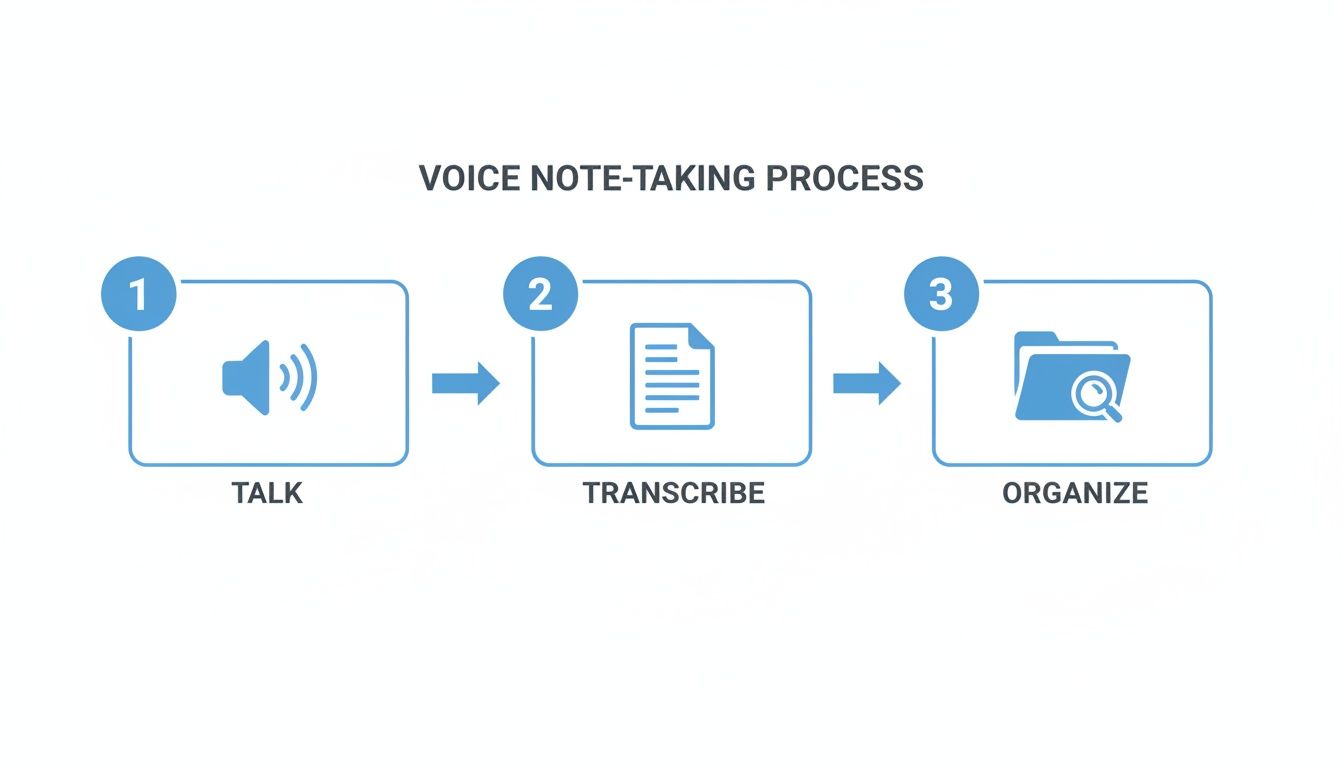
This "talk, transcribe, organize" model is how a messy audio file becomes a valuable, structured asset in just a few moments.
Of course, the quality of the final transcript depends heavily on the quality of the initial audio. Garbage in, garbage out, as they say. I've found that using a decent microphone or even a good pair of noise reduction headphones can make a huge difference in how clearly the ASR engine can hear you.
The powerful one-two punch of ASR and NLP is what allows a tool like HypeScribe to produce transcripts with up to 99% accuracy. This deep understanding of human language is what turns a simple audio recording into a real productivity powerhouse.
As this technology gets even smarter, its ability to understand and structure information will only get better. To get a deeper look at where things are headed, you can read our guide on AI-powered transcription software.
What Key Features Should You Look For in a Note Taking App?
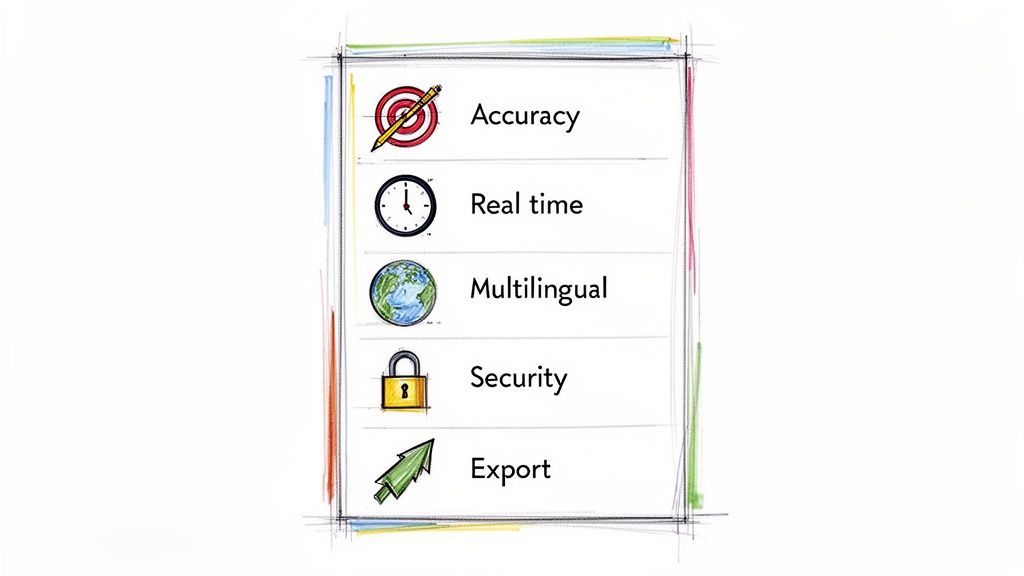
Let's be honest—not all voice note apps are built the same. Plenty of them can record audio, but a truly great voice to text note taking app is packed with smart features that actually save you time and make your notes useful. Knowing what to look for is the difference between finding a game-changer and just another app that clutters your phone.
Think of it like buying a car. Any basic model can get you from point A to B. But it’s the premium features—the smooth handling, the smart navigation, the top-notch safety system—that make the drive enjoyable and efficient. The same goes for these apps.
The Make-or-Break Basics for Usable Notes
Before you get wowed by fancy extras, make sure the app nails the fundamentals. If the core transcription is messy, you’ll spend more time cleaning up the text than you saved in the first place.
- High Transcription Accuracy: This is your number one priority. The best tools on the market consistently hit 98-99% accuracy. That's the difference between a rough, garbled mess and a clean transcript you can use right away. An app with high accuracy, like HypeScribe, gives you text you can actually trust.
- Real-Time Transcription: You also want an app that keeps up with the conversation, turning speech into text as it happens. This lets you follow along live, add your own comments, or even catch and correct a name or term on the fly. It’s a must for meetings, lectures, or any live event.
Without these two pillars, any other features are just window dressing. They’re the engine of a powerful note-taking machine.
Advanced Features That Really Make a Difference
Once you’ve confirmed the basics are solid, it's time to look at the features that separate a good tool from a great one. These are the capabilities that handle the real-world messiness of work and collaboration.
Multilingual Support is a big one, especially if you work with international teams or clients. A top-tier app won't just recognize dozens of languages; it can also handle conversations where people switch between languages or have different accents.
You also need Flexible Export Options. A fantastic transcript is useless if it's trapped inside the app. Look for tools that let you easily export your notes into formats you already use, like PDF, Word, or TXT. This makes sure your new tool fits right into your existing workflow, which might include some of the best writing tools for authors.
Your private conversations should remain private. Security and Privacy are not just buzzwords; they are critical. Look for tools that offer end-to-end encryption, ensuring your data is protected both while it's being transferred and while it's stored.
These advanced features make the app adaptable and trustworthy, turning it into a reliable part of your professional life. If you spend a lot of time in meetings, you might also find our guide on choosing a meeting note taking app helpful.
Feature Comparison: Basic vs Advanced Voice to Text Apps
To put it all in perspective, here’s a quick breakdown of what you typically get with a free, basic app versus a professional platform. The difference is night and day.
| Feature | Basic App | Advanced App (e.g., HypeScribe) |
|---|---|---|
| Transcription Accuracy | 80-90%, often with errors | Up to 99% accuracy, delivering a reliable text. |
| Real-Time Transcription | Rarely available | Standard feature for live meetings and instant review. |
| Multilingual Support | Limited to one or two languages | Supports 100+ languages and dialects. |
| Export Formats | Basic text file only | Multiple formats like Word, PDF, and Google Docs. |
| Security | Minimal or undefined | End-to-end encryption and robust privacy controls. |
| AI Summaries & Actions | Not available | Automatically generates summaries and identifies action items. |
Ultimately, choosing the right voice to text note taking app is about matching its features to what you actually need. A basic app might be perfectly fine for quick personal reminders, but if you’re relying on it for your job, an advanced tool is a professional necessity.
How Professionals Are Unlocking Productivity With These Apps
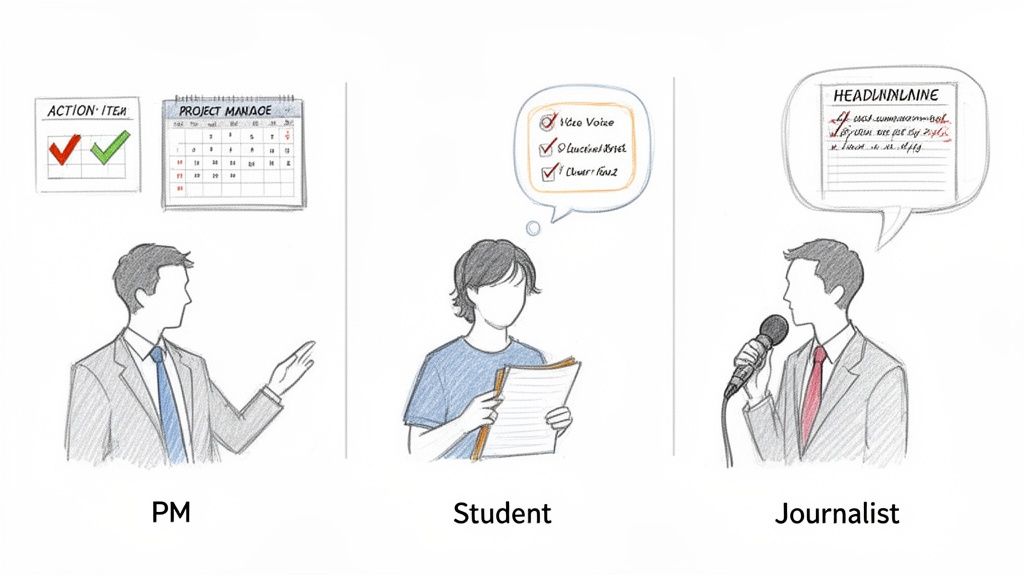
The true impact of a voice to text note taking app isn’t found on a feature list—it’s in how it fundamentally changes your daily work. Forget the theory for a moment. Let's look at how people in different roles are using these tools to get hours back in their week and simply work smarter.
These apps have become more than just transcription tools; they're active partners in getting things done. I know one writer who speaks their initial ideas for an article and gets back a structured first draft in minutes. They told me this alone cut their initial drafting time by over 70%.
For the Project Manager Juggling Multiple Teams
Think about a project manager, Sarah, who is navigating a complex product launch. Her calendar is a wall of back-to-back virtual meetings where crucial decisions are made and tasks get assigned. Her old method involved frantically typing notes, knowing she was missing important context while trying to keep up.
Now, she uses an AI meeting note taker that transcribes every word as it's spoken. The pressure to capture everything is gone. She can finally focus entirely on steering the conversation and making sure her team is on the same page.
After each call, the app automatically delivers a tight summary and a clean list of action items, complete with who owns them. Sarah just copies this list into her project management tool, and the follow-up is done. A task that used to eat up an hour of her afternoon now takes less than five minutes.
For the Student Acing Their Final Exams
It's a similar story for students. Take Ben, a university student drowning in information while studying for his finals. His lectures are incredibly dense. Trying to write notes by hand meant he'd often miss the professor's more detailed explanations.
Ben now records every lecture with his voice to text app. He ends up with a perfect, searchable transcript of the entire semester. If he needs to review a topic, he can instantly search for keywords like "quantum theory" or "market equilibrium" and find every single instance where the professor covered it.
For revision, he uses a game-changing feature: an AI chatbot that knows the content of his lecture transcripts. He can ask it direct questions like, "Explain the main causes of the 2008 financial crisis based on the lecture from October 15th" or "Quiz me on the key concepts from last week's class." It’s like having a personal tutor who has memorized every word his professor said.
For the Journalist on a Tight Deadline
And it's not just for meetings or lectures. Maria, a journalist, just wrapped up a critical hour-long interview. She has a two-hour deadline breathing down her neck and needs to find the most powerful quotes and summarize the conversation for her editor.
Instead of the old-school method of manually scrubbing through the audio, she uploads the recording. In under a minute, she has a full, accurate transcript. She then hits the "key takeaways" button, and the AI gives her a bulleted list of the most important points. Just like that, she has the skeleton of her article ready to go.
This mix of raw speed and intelligent summaries helps her hit deadlines without cutting corners, turning a raw conversation into a polished story faster than ever. You can learn more about how this works in our guide on the best AI meeting note taker for professionals.
Why I Use HypeScribe: Turning Talk into Action
We’ve covered what makes a good voice-to-text app, but let's get down to it. There's a big difference between a simple recorder and a tool that genuinely boosts your productivity. While plenty of apps can turn your voice into words, HypeScribe was built from the ground up to turn conversations into concrete outcomes. It’s less about just getting the words down and more about making them useful.
The need for this kind of high-powered transcription is exploding. The global AI transcription market is expected to jump from $4.5 billion in 2024 to a staggering $19.2 billion by 2034. Why the four-fold leap? Accuracy has finally caught up, with top-tier platforms like HypeScribe now matching human performance. You can read more about this massive shift and what it means for professionals over at Sonix.ai.
It All Starts with Speed and Accuracy
Let’s be honest—the biggest headache with most transcription tools is the waiting, followed by the tedious cleanup of all the mistakes. HypeScribe tackles this problem directly. You can upload an hour-long audio or video file and have a complete, accurate transcript ready in less than 30 seconds.
That speed doesn't come at the cost of quality. With up to 99% accuracy, the text you get is clean and ready to go. This means you can stop wasting time fixing garbled sentences and focus on what the conversation was actually about.
Going Beyond a Wall of Text to Find the Point
A transcript is just raw material. The real magic is in finding the signal in the noise. HypeScribe’s AI is smart enough to not just write down what was said, but to understand it.
- Smart Summaries: It automatically boils down long-winded discussions into a few key paragraphs. You can get the gist in moments, not hours.
- Action Item Detection: It finds and pulls out any tasks, deadlines, or follow-ups mentioned in the conversation, giving you a ready-made to-do list.
- Key Takeaways: The AI identifies the most important conclusions and big ideas, so you get a high-level overview without rereading everything.
This is what turns a passive record of a meeting into a tool that actually helps you get things done. You can move straight from conversation to action.
Made for How We Really Work: Global and Connected
Work today isn't stuck in one language or one app. HypeScribe is built for that reality, with impressive support for over 100 languages and dialects. No matter who is in the room or on the call, you get clear and accurate notes.
It also plugs right into the tools you’re already using. HypeScribe integrates seamlessly with:
- Zoom
- Google Meet
- Microsoft Teams
It can even join your calls as a participant, transcribing in real-time so your notes are ready the second the meeting ends. Plus, you can pull in files directly from YouTube, Google Drive, and various social media platforms, making it a central hub for all your spoken content.
When it comes to your conversations, security is everything. HypeScribe uses strong end-to-end encryption to protect your data, both when it's being transferred and when it's stored. You always have full control, including the ability to permanently delete your source files and transcripts.
To top it off, the transparent, token-based pricing keeps things simple and affordable. Whether you're a freelancer, a student, or part of a growing team, the cost scales with your usage, so you're not locked into a rigid, expensive plan. It’s a powerful, secure, and genuinely intelligent voice to text note taking app designed for the real world.
Common Questions About Voice to Text Note Taking
So, the idea of an app that takes notes for you sounds great, but you probably have a few "what if" questions running through your head. That’s smart. A tool that handles your important conversations is a big deal, and it's wise to get the full picture before diving in. Let's clear up a few of the most common concerns we hear.
The engines powering these apps are getting seriously good, and fast. The global speech-to-text API market—the tech that makes this all possible—is expected to jump from $3.8 billion in 2024 to over $8.5 billion by 2030. This isn't just hype; it's driven by industries like healthcare and business that can't afford mistakes. You can dig into the data behind this growth over at Persistence Market Research.
This incredible investment means the apps available today are more capable than you might think.
How Do Apps Handle Multiple Speakers in a Meeting?
This is probably the biggest question people have. What happens when you have a room full of people talking? Will the transcript just be a confusing wall of text?
Not with the good ones. The best apps use a feature called speaker diarization. Think of it as a smart moderator who instantly recognizes who is speaking based on the unique qualities of their voice. The AI then automatically assigns a label (like "Speaker 1" or "Speaker 2") every time that person talks. The result is a clean, organized script that’s easy to follow, not a jumbled mess.
How Secure Is My Recorded Data?
Handing over audio of a sensitive meeting or a private interview can feel a little unnerving. It should. Your private conversations need to stay private, period.
That’s why you should only consider tools with rock-solid security. A trustworthy voice to text note taking app like HypeScribe uses end-to-end encryption. This means your data is scrambled and unreadable while it’s being uploaded (in transit) and while it’s stored on the servers (at rest). You should also have the power to permanently delete your files and transcripts whenever you want.
This isn't just a "nice-to-have" feature; it's the only way to ensure you have complete control over your confidential information.
What if My Audio Has Background Noise?
Let's be realistic—perfect audio is rare. We've all been on calls with barking dogs, coffee shop chatter, or that one person who types like they're trying to break their keyboard. So, how does an app cope with messy, real-world sound?
It's a two-part answer:
- Your Part: You can always help the AI by using a decent microphone, getting closer to the source of the audio, and cutting down on background noise when you can.
- The AI's Part: Modern AI models are trained on countless hours of real-world audio, noise and all. They’ve learned how to isolate the primary speaker's voice and essentially tune out the distracting sounds. You’d be surprised how clean a transcript can be, even from a less-than-ideal recording.
How Does Pricing Work for Longer Recordings?
Finally, let's talk about cost. Nobody wants to hit a frustrating time limit when they're trying to transcribe a 90-minute lecture or a three-hour workshop. Some services are rigid about this, but more advanced platforms like HypeScribe use a flexible, token-based system.
Instead of buying minutes, you get a bundle of "tokens" you can use for any audio length. This model scales perfectly—it works just as easily for a quick two-minute voice memo as it does for a multi-hour event. It’s a fairer approach that ensures you only pay for what you actually need.
Ready to turn your conversations into clear, actionable notes? HypeScribe offers the speed, accuracy, and smart features you need to stop typing and start achieving. Get started for free today and experience the future of note-taking.



































































































