
How to Transcribe Instagram Videos: The Ultimate 2026 Guide
Turning the spoken words in your Instagram video into text isn't just a technical task—it's a strategic move for anyone serious about growing their audience. I've learned from experience that the quickest way to do this is to take your video—whether you have a link, a downloaded file, or a screen recording—and use an AI-powered transcription service like HypeScribe. In just seconds, you get an editable, searchable text version of your entire video.
Why Should I Transcribe My Instagram Videos?
In the incredibly fast-paced world of social media, simply posting a video is no longer enough. To see real growth, you need to make every piece of content work harder for you. Learning how to transcribe your Instagram videos is a genuine game-changer, unlocking the hidden potential in your spoken words.
I used to forget that for many people, social media is a silent experience. A huge number of users scroll through their feeds with the sound off. If you don't have text, your carefully crafted message vanishes into thin air. Transcriptions ensure your content makes an impact, whether someone's watching in a quiet office or on a noisy commute.
How Does Transcription Boost My Reach and Engagement?
When you add a transcript to your video, you’re doing more than just catering to sound-off viewers. You're also making your content much easier to find. Search engine crawlers and Instagram's own algorithm can't "listen" to your video, but they can definitely read text. Every word from your transcript becomes another keyword that helps new audiences discover your profile.
This directly fuels the metrics that matter:
- Increased View Duration: Captions have been proven to keep people watching longer. This signals to the algorithm that your content is high-quality, so it gets shown to more people.
- Wider Accessibility: You immediately open your content up to the deaf and hard-of-hearing community—a large and often overlooked audience.
- Improved Comprehension: It's not just about accessibility. Non-native speakers or anyone in a distracting environment can follow along much more easily, which means they'll actually absorb your message.
The numbers are staggering. In the explosion of short-form video, Instagram Reels have become an absolute powerhouse. With over 2 billion monthly active users engaging daily as of early 2026, transcription is the key to tapping into their full value. Reels alone accounted for more than 50% of time spent on the platform in 2025, yet all that valuable spoken content is invisible without text. You can learn more about how to automatically transcribe your video files on Rev.com.
How Can I Repurpose Content with a Transcript?
Think of it this way: a single video is a goldmine of material. A transcript is the map that shows you where to dig. It transforms your video from a one-off post into a fountain of new content.
From personal experience, this is one of the biggest benefits. I can pull out a few powerful quotes and turn them into eye-catching graphics for my feed. I can take a key topic I discussed and expand it into a full blog post. Or, I can copy and paste a summary of the video into my next email newsletter. This is a core tenet of smart social media automation strategies. You save hours of brainstorming and ensure your core message reaches a much broader audience across all your channels.
How to Get Your Instagram Video Ready for Transcription
So, you've got an Instagram video you need to transcribe. Before you can let a tool like HypeScribe work its magic, you first have to get the video itself. It sounds simple, but how you grab that video can make a big difference in speed and quality.
Think of it this way: the better your source video, the more accurate your final transcript will be. It’s a small step that pays off big time. Let's walk through the three main ways I handle this, depending on the situation.
Method 1: The Direct Link (The Quickest Way)
Honestly, this is my go-to method 90% of the time. It’s fast, clean, and requires zero downloads.
For any public Instagram post (including your own), just tap the paper airplane icon and hit "Copy Link." Modern transcription platforms, especially HypeScribe, are built to pull the video directly from that URL. You just paste the link, and the software takes care of the rest. This is perfect when you need a quick transcript for a single Reel and don't want to clutter up your device with video files.
Method 2: Downloading the Video File (For More Control)
Sometimes, you need the actual file. Maybe you're transcribing a whole batch of videos for your content library, or you just want a high-quality master copy to keep.
For your own content, Instagram makes this easy. Just find the video in your grid, tap the three dots, and select "Download." It saves the video, usually as an MP4, right to your phone or computer. From there, you can upload it directly into your transcription service. This is the best approach for content managers or creators who archive everything and need full control over their source files.
If you find yourself juggling a lot of downloaded files, it's worth taking a minute to understand the best video formats for quality and compatibility.
Method 3: Screen Recording (The Last Resort)
What if the video is from a private account (that you have access to), a temporary Story, or a Live? In these tricky cases, screen recording can be your only option.
Every modern smartphone has a built-in screen recorder. Just start the recording, play the video with the sound on, and stop when it's over. It’s a simple workaround, but it comes with a major catch.
A Serious Note on Ethics and Copyright: Only screen record and transcribe content if you have explicit permission from the original creator. Grabbing someone else's work without their consent is a fast track to copyright trouble and damages your reputation. Always respect creator ownership.
To help you decide which path to take, here's a quick breakdown of the options.
Comparing Instagram Video Retrieval Methods
This table offers a quick look at the best ways to get your Instagram video ready for transcription, highlighting the pros, cons, and ideal scenarios for each.
| Method | Pros | Cons | Best For |
|---|---|---|---|
| Direct Link | Extremely fast; no storage used; simple to use. | Requires an active internet connection; only works for public posts. | Transcribing single, public Reels or posts quickly. |
| Download | Highest quality; works offline; you own the file. | Takes up device storage; an extra step is involved. | Batch processing, archiving content, or when you need a master copy. |
| Screen Record | Works for private videos, Stories, and Lives. | Lower audio/video quality; can have on-screen distractions. | When you have permission and no other method is possible. |
Ultimately, choosing the right method is about balancing speed, quality, and access.
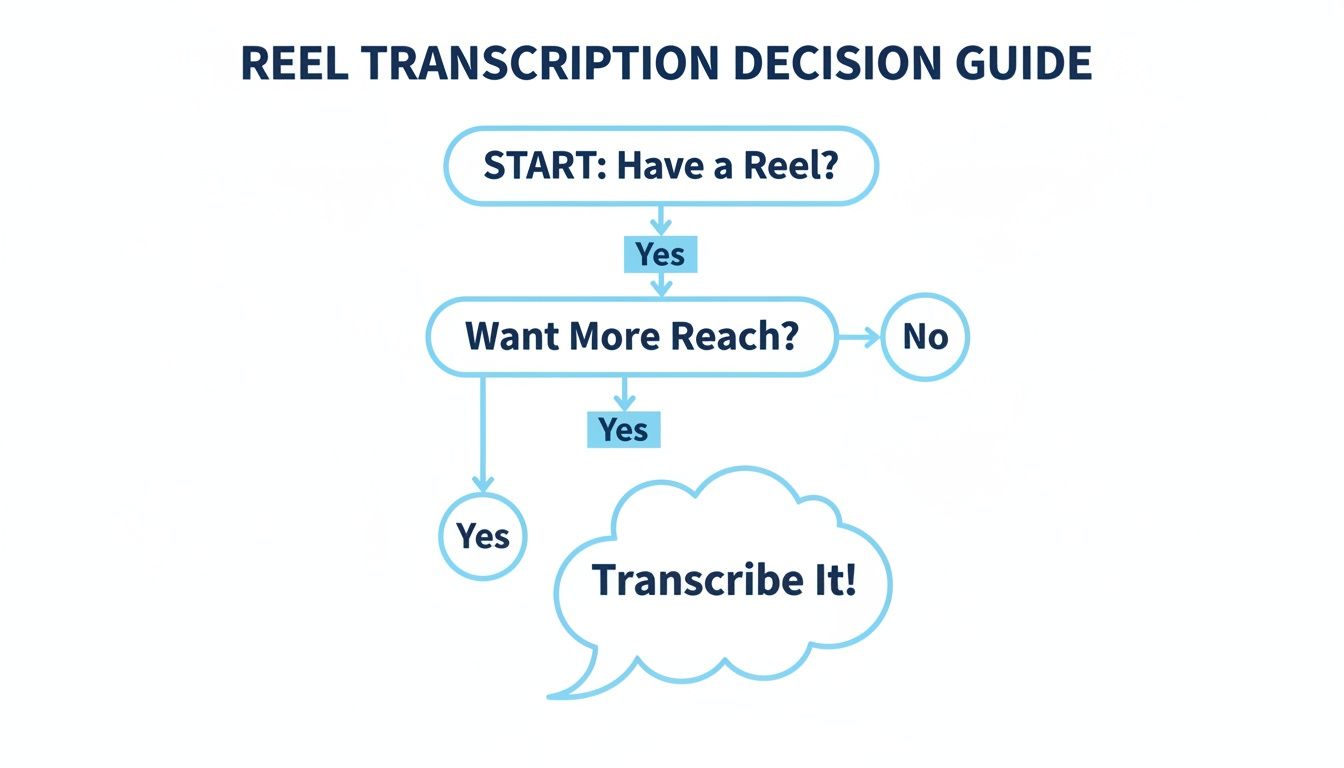
Once you have your video ready, you're just a few clicks away from a full transcript and perfectly synced captions.
How to Use AI to Transcribe an Instagram Video
Alright, you've got your Instagram video ready to go. Now for the fun part—letting an AI do all the heavy lifting. This is where you hand off the tedious work of typing out every word to a tool like HypeScribe and get a full transcript back in moments. Seriously, modern AI has turned this chore into a few simple clicks.
You don't need a beast of a computer or any technical know-how. If you can copy and paste a link, you have everything it takes to get a professional-grade transcript.

Step 1: Provide the Video to the AI Tool
The most straightforward method is to work directly from the video's URL. Just paste that link you copied from Instagram into the transcription tool and hit go. The software handles the rest—it fetches the video, isolates the audio, and runs it through its speech-to-text engine. If you downloaded the file, you'll simply upload it instead.
For a typical one-minute Reel, I've seen this whole process wrap up in less than 30 seconds. You can literally watch the words appear on the screen in real-time. It’s a genuinely hands-off experience that frees you up to work on something more important.
Step 2: Configure Your Transcription Settings
While the default settings are surprisingly good, spending a few seconds on configuration can really boost the final accuracy. There are two settings I always check.
- Source Language: Most tools try to auto-detect the language, but I've learned it's always better to specify it manually. If the video is in English, just select "English" from the dropdown. This ensures the AI uses the right model from the start.
- Speaker Identification: This is a lifesaver for any video with more than one person, like an interview or a conversation. Toggling this on tells the AI to distinguish between speakers and label their lines (e.g., "Speaker 1," "Speaker 2"). It makes the final transcript infinitely easier to read and edit.
The rise of AI transcription for Instagram makes sense when you look at the platform's sheer scale. By mid-2025, daily video plays surpassed 200 billion across Meta's apps, with Instagram accounting for 30% of that enormous volume. While some transcription services might promise 99% accuracy with a long wait, tools like HypeScribe can hit that mark in seconds. That speed is crucial, especially since data shows Instagram's algorithm has favored captioned Reels by 12% since 2021, leading to 80% higher completion rates. You can dig into more of this data on video transcription at Apify.com.
Step 3: Review the First Draft
Once the AI is finished, you’ll get a full, editable transcript right in the app's editor. I'm consistently impressed with how precise the technology has become, especially with clear audio. You can realistically expect up to 99% accuracy. This means you'll likely only need to make minor tweaks for brand names, industry jargon, or any words that were mumbled.
The text also comes formatted with basic punctuation and paragraph breaks, giving you a clean, usable document from the get-go. For any creator who needs to transcribe Instagram video content regularly, the time saved is incredible. If you're curious about the tech behind this, we break it down in our guide to AI-powered transcription software.
Ultimately, using an AI tool makes transcription accessible to everyone. It’s no longer a specialized, time-consuming task but a simple step in your workflow that helps you unlock the full value of your video content.
How to Edit and Export Your Transcript
Alright, so you've run your Instagram video through HypeScribe and have an AI-generated transcript. That’s a fantastic head start, but let's be real—it's not quite finished. I like to think of AI transcripts as being about 99% of the way there. That last 1% is where your human touch turns a good draft into a perfect, professional asset.
Thankfully, this final polish doesn't take long. Most transcription tools, ours included, come with a built-in editor that syncs the text directly to the audio. As the video plays, you'll see each word highlight in real-time, making it incredibly easy to spot and fix any mistakes.
You'll mostly be correcting the little things that AI still struggles with—misspelled brand names, unique industry jargon, or homophones it got mixed up (like "their" vs. "there"). It's also a good time to check the speaker labels and make sure the right person is credited for each line.
Cleaning Up the Text for Readability
Once you’ve corrected the straightforward errors, it's time to make the transcript genuinely easy for a person to read. AI can sometimes generate clunky punctuation or massive, unbroken walls of text. A few quick tweaks here can make a world of difference.
Here’s what I always focus on:
- Punctuation and Flow: Go through and break up any run-on sentences. Make sure every sentence is properly capitalized and punctuated. This alone dramatically improves clarity.
- Paragraph Breaks: If someone speaks for a long time, the AI might just transcribe it as one giant block. Split these monologues into shorter, scannable paragraphs. This is an absolute must if you're planning to turn the transcript into a blog post.
- Speaker Names: For interviews or multi-person videos, double-check that your speaker labels are consistent. Using a clear format like "Host:" and "Guest:" makes the conversation easy to follow.
Adding and Syncing Timestamps
Timestamps are the invisible glue that connects your text to the exact moment it's spoken in the video. They are the absolute foundation of accurate, professional-looking captions. While the AI does a good job of generating them automatically, you might need to nudge them a little for perfect timing.
This step is critical, and for good reason.
A Verizon Media study found that a staggering 80% of viewers are more likely to finish watching a video if it has captions. Perfect timestamps ensure those captions appear exactly when they should, creating a smooth, frustration-free experience for your audience.
If your goal is to create a caption file, getting the timestamps just right is non-negotiable. The most common format, .SRT, is basically a text file that breaks your transcript into timed chunks. If you want to get into the nitty-gritty, our guide explaining what an SRT file is is a great resource.
Exporting Your Transcript for Any Purpose
With your transcript polished and perfected, you now have a seriously versatile piece of content. The final step is simply exporting it in the format that fits your plan.
Here are the most common choices:
- For Video Captions (.SRT or .VTT): These are the gold-standard formats for uploading directly to Instagram, YouTube, Facebook, or any other video platform.
- For Written Content (.TXT, .DOCX, .PDF): Perfect for turning your video's content into a blog post draft, creating detailed show notes, or just sharing a readable document with your team.
- For Your Knowledge Base (.MD): A Markdown file is ideal for quickly dropping your transcript into tools like Notion or Obsidian.
Once you have your file, you can move on to the final step of adding captions to your video editor. By choosing the right export option, you've successfully turned one Instagram video into a powerful, multipurpose content engine.
What to Do With Your Transcript (After You Transcribe)
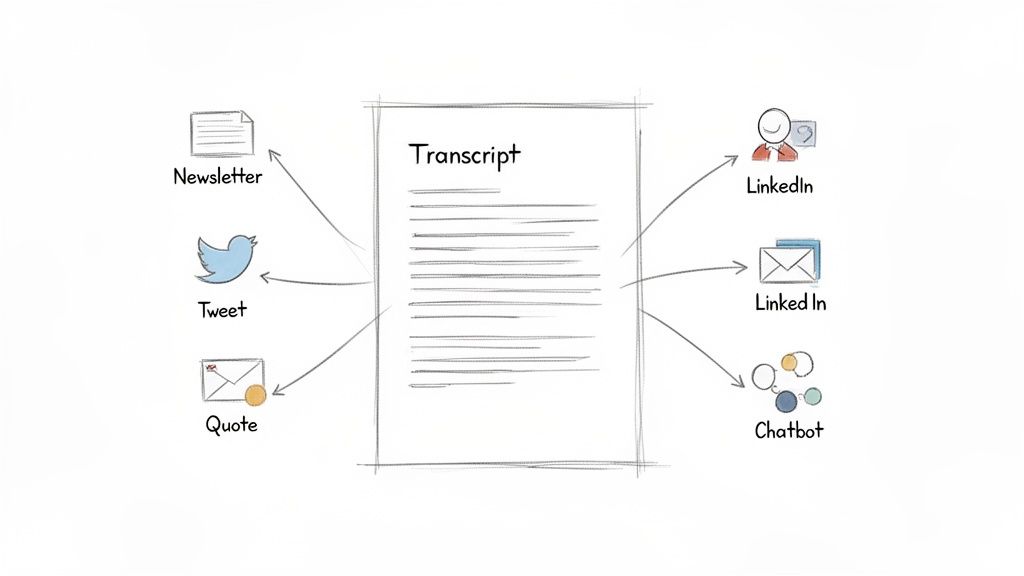
So you've got a perfect transcript from your Instagram video. Great! But don't just file it away. I've found that the biggest mistake people make is treating the transcript as the final step when it's really the first. That text is a goldmine.
Think of it this way: one video can become the foundation for a week's worth of content. This is how you stop the endless cycle of brainstorming and start working smarter. When you transcribe Instagram video files, you're not just creating captions; you're creating a content engine.
Turn Your Transcript into New Content
The first thing I always do is a quick scan for the highlights. Now that your video is a searchable document, you can instantly find the most quotable moments, surprising data points, or a killer piece of advice you shared.
With those nuggets in hand, the possibilities are wide open:
- Spin-Off Quote Graphics: Pull two or three of the most powerful sentences. Drop them into a simple template on Canva to create branded quote graphics for your feed, Stories, or even Pinterest.
- Build a Tweet Thread: Find the core argument or the main steps from your video. Break it down into a sequence of short, sharp tweets for X (what used to be Twitter).
- Write a LinkedIn Post: Look for a professional insight or a personal lesson you shared. Use the transcript as your detailed outline to draft a thoughtful, longer-form post for your LinkedIn audience.
This strategy has become essential as Instagram's video formats have taken over—Reels alone now get over 1.5 billion daily plays. The ability to turn that fleeting audio into searchable text is a game-changer, with the transcription market projected to grow 15% annually. For HypeScribe users, this is even faster; pasting a link can process up to 60 minutes of video in 30 seconds, delivering a transcript and a list of key takeaways. If you're exploring other tools, you can find more helpful breakdowns of Instagram transcript generators on TokScript.com.
Let AI Handle the Heavy Lifting
The real magic happens when you let the AI do more than just transcribe. Modern tools can analyze and repackage your content for you, which is a massive time-saver.
Use the AI summary feature to instantly generate a concise overview of your video. This is perfect for an email newsletter teaser, a YouTube video description, or a quick summary to share with your team on Slack.
Some platforms, including HypeScribe, even have a built-in chatbot that can query your transcript. Instead of rereading the whole thing to find that one statistic you mentioned, you can just ask, "What were the three main tips I shared about SEO?" It finds the answer instantly.
This essentially turns your transcript from a static document into a private, interactive knowledge base you can consult anytime. It's an incredibly efficient way to pull specific facts and ideas without any manual effort.
Common Questions About Instagram Transcription
Once you start to transcribe Instagram video content, a few questions almost always pop up. It's totally normal. Let's walk through some of the common hurdles people run into so you can get great results right from the start.
Can I Transcribe Old Instagram Videos?
Absolutely. The age of a video doesn't matter at all—what really counts is the audio quality.
If you're digging into your own archives, you can just download the original video file and upload it directly. For a public video made by someone else, you just need the link. As long as that post is still live on their feed, you can copy the URL and paste it into a tool like HypeScribe to get the job done.
How Accurate Is AI Transcription for Instagram?
This is the big one, and the honest answer is: it all comes down to how clean your audio is.
- High-Quality Audio: If you’re working with a clear voiceover, minimal background noise, and one person speaking, you can realistically expect 95-99% accuracy. It's impressively good.
- Challenging Audio: For videos shot in a noisy café, with loud background music, or where people are talking over each other, that accuracy might dip to the 70-80% range.
Even when it’s not perfect, the AI-generated draft is a massive head start. I’ve found that spending a few minutes cleaning up a transcript is always a better use of my time than typing everything out from scratch for hours.
Remember, the whole point is to create captions that keep people watching. Since studies show about 80% of viewers are more likely to watch a full video if it has captions, getting your transcript as accurate as possible is the critical first step.
Can I Transcribe Instagram Stories or Lives?
Yes, you can, but the method is a bit different. Stories and Lives are fleeting, so you can't just grab a permanent link. The best workaround here is to screen-record the content as it’s playing.
Just keep a couple of things in mind. First, always get permission before recording and transcribing someone else's content—it's both a legal and an ethical courtesy. Second, screen recording can sometimes compress the audio, so you might need to budget a little extra time for editing the final transcript to get it perfect.
Ready to see what your Instagram videos can really do? HypeScribe handles the heavy lifting, turning your content into accurate transcripts, summaries, and show notes in just a few clicks. Give it a try for free and watch your content start working harder for you. Start transcribing with HypeScribe today!


































































































