
Can I Record a Phone Call? A Legal and Technical Guide

So, can you record a phone call? The short answer is yes, but it's a bit more complicated than just hitting a button. From my experience helping people navigate this, the legality all comes down to a single concept: consent. Where you and the other person on the line are located determines whose consent you actually need.
Getting this right is the first step to recording calls confidently and, more importantly, legally. This guide will walk you through what I've learned about the laws, the technology, and how to handle it all professionally.
The Two Flavors of Call Recording Consent
When people ask me about call recording laws, I explain that they boil down to two different approaches to consent. It helps to think of it this way:
One-party consent is like having a chat in a public square. As long as you're part of the conversation, you can record what's being said without asking for anyone else's permission. You are the "one party" giving the green light. I've found this is the most common rule, but it's not universal.
All-party consent (often called two-party consent) is the total opposite. It's more like a private, confidential meeting. In these cases, every single person involved has to know they're being recorded and explicitly agree to it before you start.
This isn't just a minor legal detail; it's the foundation of every call recording law. Getting it wrong can lead to serious legal trouble. It's exactly why the market for compliant recording tools is booming, with projections showing it will grow from USD 4.64 billion in 2026 to USD 8.16 billion by 2033. This surge is driven by businesses needing to capture calls for quality and training while staying on the right side of the law. You can explore more about call recording market trends to see where the industry is heading.
One-Party vs. All-Party Consent
So, which rule applies to you? It's all about geography. While federal law in the United States only requires one-party consent, about 11 states—like California, Florida, and Pennsylvania—enforce stricter all-party consent rules. When a call crosses state lines, my advice is always to follow the stricter law of the two.
To stay compliant, always act as if you're in an all-party consent state. Announcing the call is being recorded and getting a quick verbal "okay" is the safest and most professional way to handle it.
To help you quickly sort this out, here's a quick reference guide that breaks down the two consent models.
One-Party vs. All-Party Consent at a Glance
This table quickly summarizes the two main legal frameworks for call recording consent, helping you understand which rules might apply to your situation based on real-world scenarios.
| Consent Type | What It Means | Who Needs to Agree | Best Practice |
|---|---|---|---|
| One-Party Consent | Only one person involved in the conversation needs to agree to the recording. | Just you (as the recorder and a participant). | From experience, while legally sufficient in many places, informing the other party is still a great courtesy that builds trust. |
| All-Party Consent | Every person on the call must be aware of and agree to the recording. | Everyone on the call. | Clearly state at the beginning of the call that it is being recorded and get verbal consent. This is non-negotiable. |
Keep this table in mind before you hit record, and you'll be well-positioned to handle consent properly every time.
Navigating the Maze of Call Recording Laws
Alright, you get the difference between one-party and all-party consent. Now let’s talk about how that plays out in the real world. Figuring out if you can legally record a call means knowing exactly which set of rules governs your conversation, and that can change drastically depending on who you're talking to and where they are.
At the federal level, the United States follows a one-party consent rule, thanks to the Electronic Communications Privacy Act (ECPA). This is the baseline for the whole country. It means that as long as you are part of the conversation, you can legally record it without asking for anyone else's permission.
But here's the catch I always warn people about: individual states can, and do, pass their own, stricter laws. This is where things get a lot more complicated.
The All-Party Consent States
While most states stick to the federal one-party rule, a handful demand what's known as all-party consent (or two-party consent). In these jurisdictions, you have to tell everyone on the line that you're recording and get their go-ahead before you hit the button. As of today, 11 states fall into this category:
- California
- Delaware
- Florida
- Illinois
- Maryland
- Massachusetts
- Montana
- Nevada
- New Hampshire
- Pennsylvania
- Washington
Keep in mind that some of these laws have their own quirks. For instance, my research shows the Nevada Supreme Court has interpreted the state's law to require all-party consent for phone calls, even if the original text seems a bit ambiguous. It’s always smart to double-check the latest regulations for any specific state you’re dealing with.
The safest play is what lawyers call the "highest standard" approach. If your call crosses state lines, you must follow the rules of the strictest state involved. So, if you're in Texas (a one-party state) calling someone in California (an all-party state), you must get consent from everyone on the call. No exceptions.
This simple flowchart can help you make the right call every time.
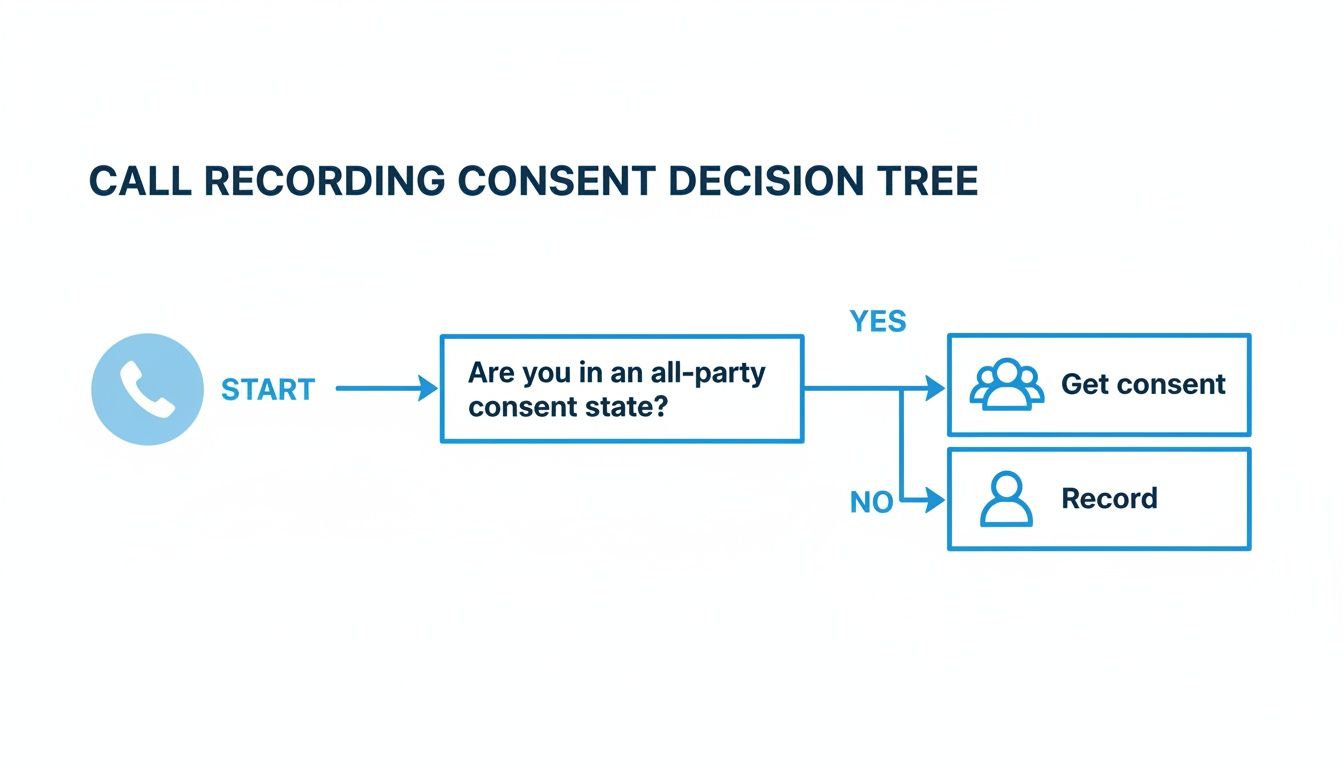
As you can see, the decision is pretty straightforward: find out if anyone on the call is in an all-party state. If the answer is yes, getting consent isn't just a courtesy—it's mandatory.
Crossing International Borders
Things get even trickier when your call goes global. Having worked with international clients, I can tell you that privacy laws in other parts of the world can be incredibly stringent, especially in the European Union with its General Data Protection Regulation (GDPR).
Under GDPR, a person's voice on a recording is considered personal data. To record it, you need a clear, lawful reason, and the most common one is getting explicit consent. That consent has to be:
- Freely given: You can't pressure or trick them into agreeing.
- Specific: They need to know precisely why you're recording.
- Informed: You have to tell them the call is being recorded right from the start.
Other countries, including Canada and the United Kingdom, have very similar rules that require you to notify all parties and get their permission. With these kinds of complexities, it’s best to assume all-party consent is the bare minimum for any international call. For a more detailed breakdown, you might find it helpful to read our guide that asks is it legal to record a conversation without consent.
Ignoring these laws isn't a small mistake; the consequences can be severe. Violations can lead to criminal charges, expensive civil lawsuits, and having your recording thrown out as evidence in court. Whether you're a journalist interviewing a source or a manager leading a remote team, respecting these legal boundaries is simply non-negotiable.
How to Actually Record a Phone Call
Alright, you've navigated the legal landscape. Now for the fun part: actually recording the call. The "how" really comes down to the gear you're using. iPhones, Androids, and computers all play by different rules, so your approach will need to adapt.

It’s easy to see why this is such a common question. We make a mind-boggling 13.5 billion phone calls every single day, adding up to about 4.9 trillion calls a year. As detailed in this phone call statistics report, that's a massive river of information. For anyone using a tool like HypeScribe to analyze conversations, tapping into that flow is a huge opportunity.
How to Record Calls on an iPhone
If you're on an iPhone, you've probably already run into the main roadblock: there's no native "record" button. This is a deliberate choice by Apple. To protect user privacy and prevent sneaky recording, they've completely blocked apps from accessing the phone's microphone during a call. No App Store app can just sit in the background and record for you.
So, how does anyone get it done? The secret lies in a clever workaround I've used myself: three-way conference calls. This is the method nearly all iOS recording apps rely on.
Here's the play-by-play:
- First, you open the recording app and dial its dedicated service number.
- The app connects you to its recording line, which is now on the call with you.
- Next, you use your iPhone's "Add Call" function to dial the person you actually want to talk to.
- Finally, you hit "Merge Calls." This combines everyone into a three-way call: you, your contact, and the silent recording line that captures the audio.
It’s an effective, if slightly clunky, solution. The main downsides are that it almost always requires a paid subscription and takes a little practice to get the hang of.
How to Record Calls on an Android
Android users generally have an easier time, though it’s not always a perfect situation. Unlike Apple’s rigid lockdown, Google's stance on call recording has shifted over the years. The good news is some phone makers, like Samsung and even Google on its Pixel phones, now build a recording feature right into the phone app.
When this feature is available, you'll see a "Record" button on your screen during a call. Tapping it starts the recording and usually plays an automatic notification for the other person, which conveniently helps you stay compliant with consent laws. Whether you have this option depends entirely on your phone model and local regulations.
If your phone doesn't have a built-in recorder, your next stop is the Google Play Store. While Google's changing security policies have made life difficult for some recording apps, plenty of reliable ones still work perfectly. They can capture both incoming and outgoing calls without much fuss. For a complete rundown, you can check out our guide on how to record audio on Android.
How to Record VoIP and Softphone Calls
For many of us, work calls have moved off traditional phone lines and onto Voice over IP (VoIP) platforms like Zoom, Microsoft Teams, and Google Meet. This is fantastic news for recording, as these services often have recording built right in.
When you use a VoIP service for your calls, recording is often just a button-click away. These platforms are designed for business communication, where documentation and review are standard practice.
Take Zoom, for example. It has a big "Record" button that, when pressed, announces to everyone that the call is being recorded with both an audio cue and a visual icon. It’s the most straightforward way to get consent and capture the conversation. Enterprise-grade VoIP systems almost always include call recording as a feature for quality assurance, training, and compliance. In my experience, if you're making business calls from your computer, this is the most reliable path.
Comparing Call Recording Methods
Choosing the right recording method can feel overwhelming. To make it easier, this table breaks down the most common options, highlighting their costs, ease of use, and key features to help you find the perfect fit for your needs.
| Recording Method | Best For | Typical Cost | Ease of Use | Key Consideration |
|---|---|---|---|---|
| iPhone 3-Way Call Apps | iPhone users who need a reliable, albeit manual, solution. | Subscription-based ($5-$15/mo) | Moderate | My experience is this requires merging calls for every recording, which can feel clunky at first. |
| Android Native Recorder | Android users whose phones have the feature built-in. | Free | Very Easy | Availability depends on phone manufacturer, model, and region. |
| Android 3rd-Party Apps | Android users whose phones lack a native recorder. | Free (with ads) to a one-time fee ($10-$20) | Easy to Moderate | App functionality can be impacted by Android OS updates. |
| VoIP/Softphone Platforms | Professionals making calls via computer (Zoom, Teams, etc.). | Often included in subscription plans. | Very Easy | The built-in consent notifications are a huge plus for compliance. |
Ultimately, VoIP and native Android recorders offer the most seamless experience. But even with the workarounds required for iPhones, you have solid options for capturing any important conversation.
Getting Consent Without the Awkwardness
We’ve all been there. You know you need to ask for permission to record a call, but you’re worried about that cringey, awkward pause it might create. It doesn't have to be like that.
The trick is to be confident, upfront, and clear. I've found it helps to think of it less as a stiff legal requirement and more as a simple professional courtesy. It actually helps build trust right from the start.
The best time to bring it up is right at the beginning of the call, before you dive into the real substance of the conversation. A simple, direct statement is all it takes. If you try to bury the request in the middle of a chat or mention it as an afterthought, it can come across as sneaky and make the other person wonder what you're up to.
Scripts You Can Use Today
Having a few go-to phrases in your back pocket makes this whole process feel much smoother. The one you choose will naturally depend on the situation—whether it's a formal client call or a casual brainstorming session with a teammate.
Here are a few proven options I've used myself:
- The Formal Business Approach: "Before we begin, I want to let you know this call is being recorded for quality and training purposes." This is the standard you hear all the time for a reason—it’s clear, professional, and expected in corporate settings.
- The Collaborative Approach: "To make sure I capture all the details and don't miss anything important, would you mind if I record our conversation?" This approach frames the recording as a mutual benefit, which is great for client work or collaborative projects.
- The Casual & Direct Approach: "Hey, just giving you a heads-up that I'm going to record this call so I can focus on our chat instead of scribbling notes. Is that okay with you?" This works perfectly for internal meetings or with colleagues you know well.
Regardless of the script you use, always pause and wait for a clear "yes" or "sure, no problem." That verbal confirmation is your green light to hit record.
What to Do If Someone Says No
It’s not common, but every once in a while, someone will say they’d rather not be recorded. If that happens, the only right way to respond is with immediate respect.
Just say, "Okay, no problem at all," and make sure the recording is off.
Your main goal here is to respect their privacy. Don't push it or try to convince them otherwise; you'll only strain the relationship. Just honor the request and switch to taking good old-fashioned notes.
One last pro tip: make sure your request for consent and their verbal agreement are captured at the very beginning of the audio file. This gives you an ironclad record that you received permission, which can protect you if any questions about whether you can record a phone call come up down the road. While automated systems that announce "This call may be recorded" often rely on implied consent if the person stays on the line, getting a direct, verbal "yes" is always the safest bet.
Turn Recordings into Actionable Intelligence
So, you’ve legally recorded a call. Great. But what’s next? A raw audio file sitting on your drive is packed with potential, but it's essentially locked away. It’s like having a detailed blueprint that you can't unfold. To get any real value from it, you need to turn that conversation into something you can actually use.
This is where things get interesting. Thanks to AI-powered tools like HypeScribe, I no longer have to block out an hour to re-listen to an hour-long call just to find what I need. Instead, I can transform that audio into a perfect transcript, complete with speaker labels and timestamps, in just a few minutes.
From Raw Audio to Searchable Data
Picture this: you upload your recording, and almost instantly, it becomes an accurate text document. This is the first, and most crucial, step. A transcript isn't just a written version of your call; it's a searchable database of the entire conversation.
Suddenly, you can find anything you're looking for. Need to know when a client mentioned their budget? Just hit "Ctrl+F" and search for the term. No more scrubbing back and forth through the audio. For anyone who relies on calls for critical information—from sales reps tracking objections to journalists verifying quotes—this is a massive time-saver.
Here’s a simple visual of how a tool like HypeScribe breaks down your audio into useful parts: a full transcript, a high-level summary, and a list of action items.
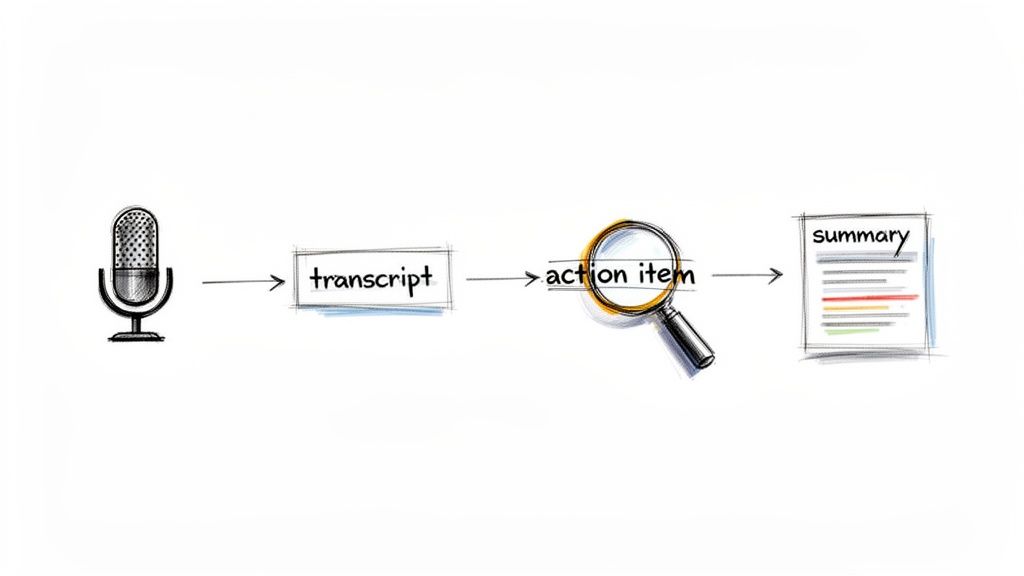
As you can see, the technology takes an unstructured conversation and organizes it into digestible pieces. A one-hour call can become a five-minute read, complete with a clear to-do list.
Unlocking Deeper Insights with AI Analysis
But why stop at just a transcript? The real power comes from making your recordings work for you. Modern AI doesn’t just convert your speech to text; it understands the conversation and pulls out the most important information for you. This includes:
- Automated Summaries: Get the essence of a long call in a few short paragraphs. It's the perfect way to share updates with team members who don’t need every last detail.
- Key Takeaways: The AI identifies the most critical points, decisions, and outcomes, laying them out in a clean, bulleted list.
- Action Items: You'll never miss a follow-up again. The software intelligently spots tasks like "I'll send the proposal over by Friday" or "Let's schedule a follow-up," and adds them to a list.
This level of automation completely changes how you use your call recordings. You can even "ask" your transcript questions. Imagine typing, "What was the client’s biggest concern?" and getting an immediate, precise answer pulled straight from the dialogue.
Think of it this way: a raw recording is like a pile of lumber. A transcript is that lumber neatly stacked. But AI-driven analysis is the set of blueprints and power tools that helps you build something valuable with it.
This is especially effective in sales. While data shows 82% of B2B buyers are open to meetings that start from a cold call, the average dial-to-meeting rate is a dismal 2.3%. Yet, teams using AI to analyze call data have seen that rate jump to between 6.7% and 16.1%. That's more than triple the success, simply by understanding what works and what doesn't.
Creating a Secure and Efficient Workflow
As you start building a library of recorded calls, you’ll need a smart way to manage them. Using a central platform like HypeScribe not only gives you the analysis tools but also keeps your data secure. Look for essential features like encryption and the ability to delete files permanently to protect privacy. You can learn more about the key features of AI-powered transcription software in our detailed article.
For professionals in specialized fields, it can be beneficial to look into specific AI tools for law firms and other industries to see what's available. By creating a simple workflow—record, upload, transcribe, analyze, and store—you build a reliable system for turning every phone call into an opportunity. Answering "can I record a phone call?" is just the beginning; turning that recording into intelligence is what really drives results.
Common Questions About Recording Phone Calls
So, you’ve got the basics of one-party and all-party consent down. But let's be honest, the real world often throws some tricky situations your way. Getting these edge cases right is crucial for recording calls responsibly.
Here are some straight answers to the questions that almost always come up once people start thinking about hitting that record button.
What Happens If I Record Without Consent?
Recording a call without the proper consent is playing with fire. Depending on the state, this isn't just a simple mistake—it can be a criminal offense that leads to hefty fines or even jail time. Federally, breaking the Wiretap Act can land you in prison for several years, along with some pretty steep financial penalties.
On top of the criminal risk, you’re also walking straight into a civil lawsuit. The person you recorded can sue you for damages. And here’s the kicker: any recording you made illegally will almost certainly be thrown out in court, making the whole thing legally useless.
Can I Record a Conversation I Am Not Part of?
The answer to this is a hard no. You absolutely cannot secretly record a conversation between two other people.
This is considered eavesdropping under both federal and state laws, and it's a felony.
The entire legal framework for call recording, even in the most lenient one-party states, hinges on the fact that at least one person in the conversation knows it's being recorded. If you're not a participant, you have no right to record it. Plain and simple.
How Long Should I Keep Call Recordings?
There isn't a universal expiration date for call recordings, but the best practice is simple: keep them only as long as you have a legitimate business reason to. Hoarding old recordings is a liability waiting to happen, especially if you ever have a data breach.
A smart move is to create a clear data retention policy. Many businesses decide to automatically delete recordings after 90 days or a year, unless a specific recording is needed for a legal hold, compliance audit, or an ongoing training issue.
Different industries also have their own rules:
- Financial Services: Regulations like MiFID II can mandate keeping records for five to seven years.
- Healthcare: HIPAA doesn't give a specific timeline for call recordings, but it does demand that you protect patient information. This means secure storage and a clear plan for eventual deletion are non-negotiable.
- Customer Support: It's common for support teams to keep calls for 30-60 days for quality reviews before getting rid of them.
Can I Ever Record a Call Without Any Consent?
Technically, a few extremely narrow exceptions exist, but you should tread very carefully here. Some jurisdictions might allow you to record a call without consent if you're doing it to document a direct threat of violence or a crime like blackmail.
However, trying to use one of these exceptions is incredibly risky, as the legal ground is shaky and varies wildly. For more advanced questions about the technology or specific features needed for compliance, you can look into dedicated call recording solutions.
Ultimately, the safest and smartest path is always to get consent. Before you even think about recording without permission, talk to a lawyer.
Ready to turn your legally recorded calls into accurate transcripts, summaries, and action items? HypeScribe helps you unlock the value in every conversation. Start your free trial today and see how easy it is to transform audio into actionable intelligence. Learn more at https://www.hypescribe.com.



































































































