
Best AI Speech to Text Software in 2026 (Compared)

You finish a meeting, close the call, and realize the hard part hasn't happened yet. The recording exists, but the useful version of that conversation doesn't. Someone still has to find the decisions, clean up the rambling sections, note who promised what, and turn an hour of speech into something the team can use.
That's why the best ai speech to text tools matter now. Not because they can dump words onto a page, but because they can shorten the distance between a conversation and an outcome. In practice, that is the true test. A transcript that sits in a folder is only slightly better than a recording nobody will replay.
After testing transcription tools for meetings, interviews, and rough audio clips, one pattern keeps showing up. Most reviews obsess over headline accuracy and language counts. Those matter. But the bigger difference between a decent tool and a useful one is what happens after the transcript appears.
The End of Manual Note Taking
The old workflow still looks familiar. One person takes scattered notes during the meeting, misses half the details while speaking, then spends another stretch of time replaying the recording to patch the gaps. By the time the final notes are shared, the team has already started forgetting the context.
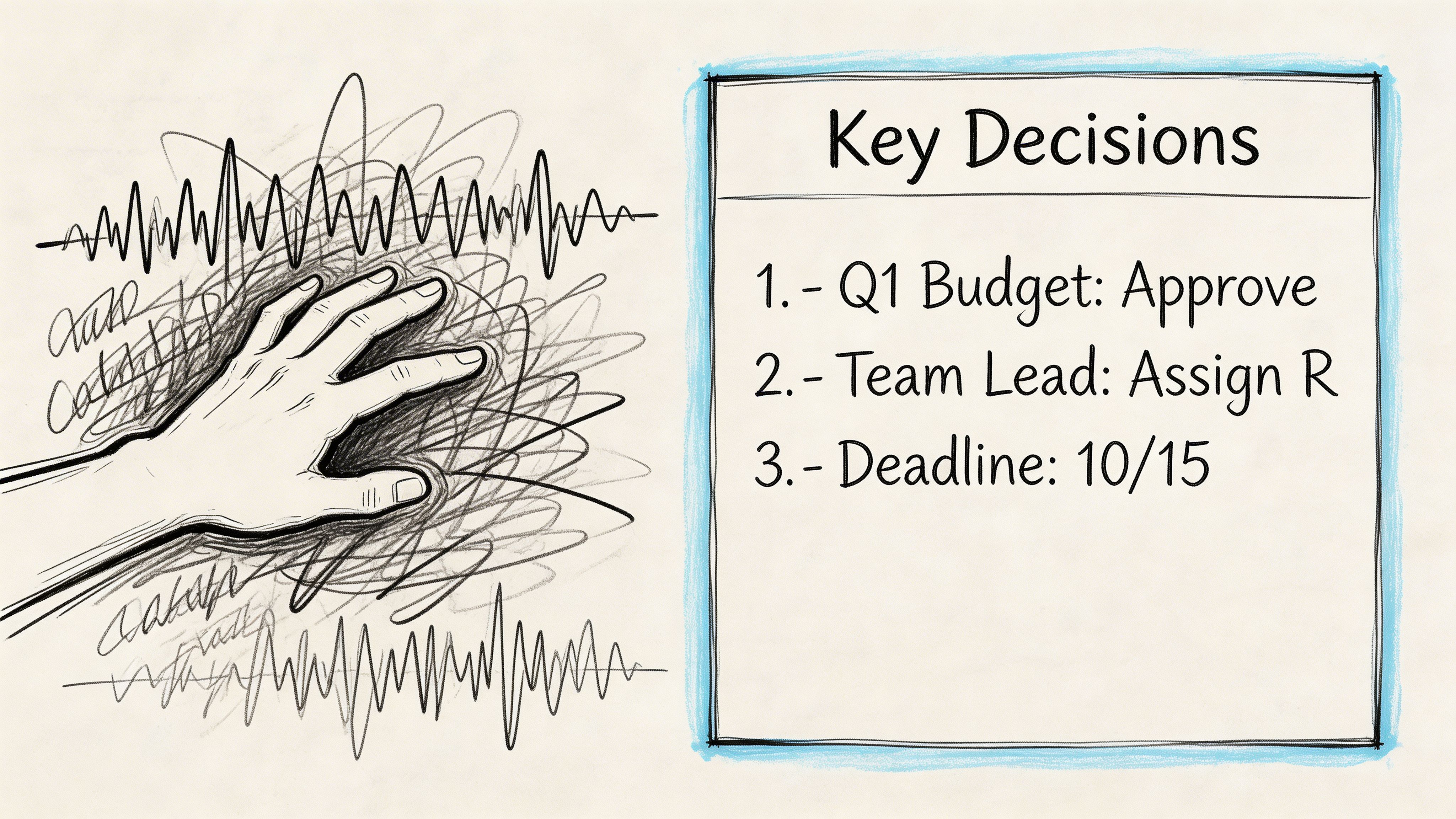
That approach breaks down fastest in hybrid work. Cross-talk, laptop mics, side comments, and weak internet audio all pile up. Content in this category often fixates on clean-lab accuracy, but coverage still underplays what happens in real meetings with accents, overlap, and background noise. One cited summary of the gap notes that word error rate can increase by 25-40% in hybrid meetings with background noise versus clean audio in a 2025 real-time ASR context, which is exactly where many remote teams struggle most (VoiceToNotes).
Transcription isn't the whole job
A raw transcript helps, but it doesn't solve the common post-meeting problems:
- Decision hunting: You still need to find the moment when the team changed scope.
- Task extraction: Someone has to identify action items and assign owners.
- Knowledge reuse: The next person needs search, not a wall of text.
- Shareability: Notes have to move into docs, chats, or project tools without cleanup.
That's the gap between speech recognition and workflow automation.
A transcript becomes valuable when someone can skim it in minutes, trust the summary, and act on the tasks without replaying the audio.
Why manual notes still linger
A lot of teams stick with notebooks, bullet lists, and ad hoc templates because those methods feel controllable. For some workflows, structured traditional note-taking methods still help, especially when people need a repeatable format for summaries. The problem is scale. Manual methods work for one lecture or one client call. They don't hold up when every meeting, interview, and training session needs a searchable record.
The key shift isn't "audio to text."" It's audio to decisions, tasks, and usable memory. That's the standard worth using when comparing tools.
How We Evaluate AI Transcription Tools
A simple feature list doesn't tell you much. Most tools can transcribe audio, export text, and promise strong recognition. The useful differences show up when the audio gets messy or when you need the transcript to feed the rest of your workflow.
I judge these tools like I would for my own stack. Could I trust them for a client call, an interview, or a project sync where I need the summary fast and don't want to spend extra time correcting obvious misses?
The six criteria that matter
Here's the framework that separates products.
| Criteria | What matters in practice | What usually goes wrong |
|---|---|---|
| True accuracy | Handles accents, jargon, multiple speakers, and weak audio without constant correction | Clean demos don't reflect real meetings |
| Workflow speed | Gets from upload or live capture to usable notes quickly | Fast transcript, slow cleanup |
| Language intelligence | Supports multilingual content and doesn't fall apart on names or code-switching | Broad language support with uneven quality |
| Post-transcription features | Summaries, highlights, key points, and task extraction need to be usable | Generic summaries that miss the real decision |
| Integration and export | Easy handoff to docs, team tools, and archives | Export exists, but formatting is clumsy |
| Security and privacy | Clear deletion controls and safe handling for sensitive recordings | Vague retention policies |
Accuracy needs context
A lot of buyers stop at the leaderboard. That's understandable, but it's incomplete. Benchmark accuracy tells you which models are technically strong. It doesn't tell you how well the full product handles overlapping speakers, filler-heavy meetings, or a founder pacing around with AirPods.
That's why I separate model quality from product quality. A great underlying model can still live inside a tool with weak speaker labeling, poor summaries, or awkward exports.
The workflow test
The practical question isn't "How accurate is the transcript?" It's "How long until this recording becomes useful?"
That means checking:
- Input options: upload, live meeting bot, voice note, shared link.
- Processing experience: can you move quickly, or are you waiting around?
- Output quality: transcript, summary, action items, searchable structure.
- Handoff: docs, markdown, team sharing, copy-paste friction.
If you're comparing products in this category, this overview of AI-powered transcription software is close to the right lens because it treats transcription as part of a larger work process, not a standalone novelty.
Practical rule: If the transcript still needs a human to build the summary and task list from scratch, the tool is only solving half the problem.
What I don't overvalue
I don't put much weight on flashy feature counts. "Supports many languages" is less useful than knowing whether a tool can survive a noisy interview. "Has summaries" is less useful than knowing whether those summaries preserve who decided what.
That makes this guide less about checkbox shopping and more about fit. Some tools are better for developers building voice products. Some are better for teams that just want reliable meeting notes. Those are different jobs, and the best ai speech to text choice depends on which one you're trying to solve.
An In-Depth Comparison of Top AI Services
The useful differences show up after the audio leaves the recorder. A tool can produce a decent transcript and still waste time if the summary is vague, the action items need manual cleanup, or the export options break your handoff to the rest of the team.
That is the frame I use here. I care about transcript quality, but I also care about what happens next.
| Tool | Best fit | Strengths | Trade-offs |
|---|---|---|---|
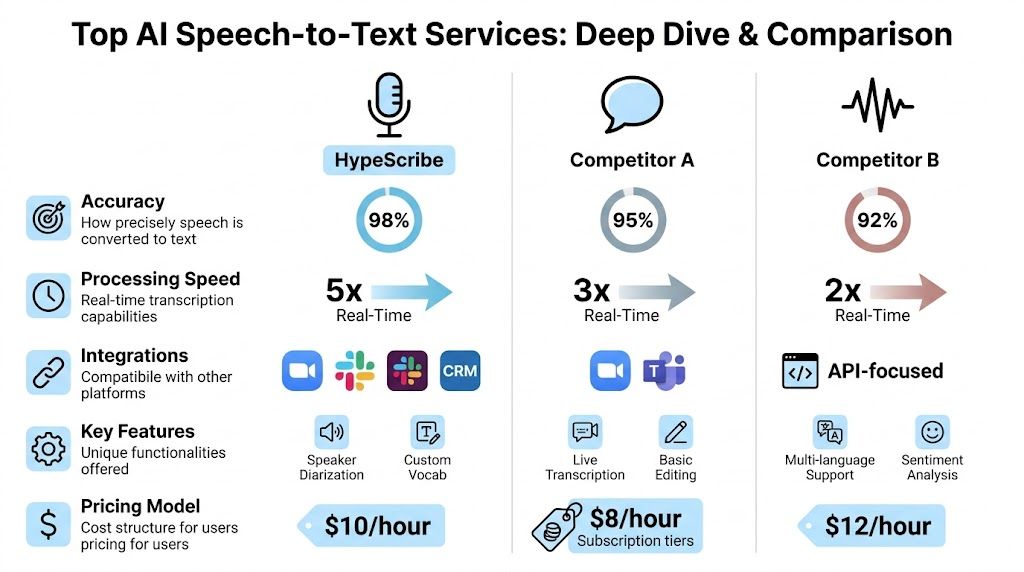
| HypeScribe | Teams that want transcript, summary, and actions in one place | Fast processing, meeting note-taker, exports, chatbot-style retrieval | Better suited to workflow users than deep API builders |
| Deepgram | Developers and product teams building speech features | Strong speed profile, customization, deployment flexibility | More implementation work if you only want turnkey notes |
| Otter.ai | General meeting capture for routine internal calls | Familiar interface, easy collaboration habits | Real-world accuracy can slip on noisy multi-speaker calls |
| AssemblyAI | Teams and builders who want modern speech stack options | Strong enterprise orientation, low-latency focus, broad speech tooling | Often better as infrastructure than as a polished end-user workspace |
The benchmark backdrop
Benchmarks still matter. They show how vendors balance accuracy, speed, and real-time performance. On the 2026 leaderboard from Artificial Analysis, ElevenLabs Scribe v2 leads on word error rate, while Deepgram Nova-2 stands out for processing speed. That split matters in practice. A research interview, a live call assistant, and a voice feature inside a product do not need the same thing.
If you are comparing tools for daily work rather than lab tests, it also helps to look at the full path to convert audio to text for searchable, shareable output, because transcription quality alone does not tell you how much cleanup happens afterward.
HypeScribe for end-to-end meeting output
HypeScribe is aimed at teams that want the transcript and the follow-up work handled in the same place. The value is not just capture. It is capture plus summary, action items, retrieval, and export.
Based on the product details cited in the source material, it accepts uploaded audio and video, links from major platforms, and direct recording. It also offers a meeting note-taker for Zoom, Google Meet, and Microsoft Teams, plus exports to Google Docs, Word, PDF, TXT, and Markdown. That mix fits managers, operators, recruiters, and client-facing teams better than it fits a developer who wants to tune a speech stack at the API level.
The practical strengths are straightforward:
- Meeting capture: automatic joining reduces missed notes on recurring calls.
- Post-call output: summaries and key takeaways shorten review time.
- Question-based retrieval: a chat layer is faster than scrolling through a long transcript.
- Exports: Markdown and document formats make it easier to move notes into a wiki, brief, or CRM record.
The limitation is control. Teams building voice products usually want model-level options, deployment choices, or tighter custom handling. A workflow-first app is less flexible for that kind of work.
Deepgram for speed and developer control
Deepgram is a better fit for product teams than for people who only want meeting notes. Its appeal is the combination of speed, language support, deployment flexibility, and features such as diarization and formatting. In Deepgram's review of leading speech APIs, the company describes Nova-3 in terms that will make sense to engineering teams building live transcription, call analysis, or embedded voice features (Deepgram).
In real use, that means Deepgram works well when transcription is one component inside a larger system. Call centers, media workflows, internal tooling, and voice apps all benefit from that level of control.
What stands out:
- Customization: stronger fit for domain-specific vocabulary and difficult audio.
- Deployment options: useful for teams with privacy, compliance, or infrastructure requirements.
- Latency: well suited to real-time use cases.
The trade-off is obvious once a nontechnical team tries it. Deepgram gives you the engine. Your team still has to build or buy the meeting workspace around it.
Otter.ai for familiar meeting capture
Otter remains popular because it is easy to put into an existing meeting routine. The interface is familiar, the collaboration model is clear, and users do not need much setup before they can start recording internal calls.
Its limits show up faster on messy audio. A comparison from Ditto Transcripts found that accuracy drops sharply under harder conditions, which matches what I have seen with overlapping speakers, weak microphones, and hybrid room audio.
Otter works best in a narrower set of situations:
- Routine internal meetings
- Controlled audio with limited cross-talk
- Reference transcripts that do not need publication-grade cleanup
I would use it for standups, check-ins, and lightweight documentation. I would be more cautious with interviews, customer research, or anything where speaker attribution and exact wording matter.
AssemblyAI for speech infrastructure
AssemblyAI sits closer to infrastructure than workspace software. It makes sense for teams building products around speech, or for organizations that want transcription embedded in a broader internal system.
That affects the buying decision. If the goal is an end-user app for meetings, summaries, and collaborative follow-up, AssemblyAI usually requires more surrounding tooling than a packaged note-taking product. If the goal is to power a speech feature with modern APIs and enterprise-oriented capabilities, that trade-off is often acceptable.
Good fit:
- Developers shipping speech features
- Organizations embedding transcription into larger systems
- Teams that care about low latency and enterprise-grade tooling
Less ideal fit:
- Users who want polished meeting notes out of the box
- Teams that need summaries and task generation without extra setup
What actually separates these tools
After testing enough of these products, the comparison gets simpler. The deciding factor is usually where the work happens after the transcript appears.
| If you need... | Better fit |
|---|---|
| Fast notes, summaries, and action items from meetings | HypeScribe |
| API control, customization, and deployment choice | Deepgram |
| Familiar meeting transcription for everyday calls | Otter.ai |
| Speech infrastructure for product and enterprise use | AssemblyAI |
The best ai speech to text tool depends on the job. For meeting-heavy teams, the winner is often the one that produces usable summaries and tasks with the least cleanup. For product teams, the better choice is usually the service that gives engineers more control over how speech fits into the rest of the stack.
Beyond the Transcript The Modern AI Workflow
The transcript used to be the endpoint. That's outdated now. The transcript is raw material.
The more useful workflow starts with capture, but it doesn't stop until the system has produced something people can skim, search, and act on.
From recording to working document
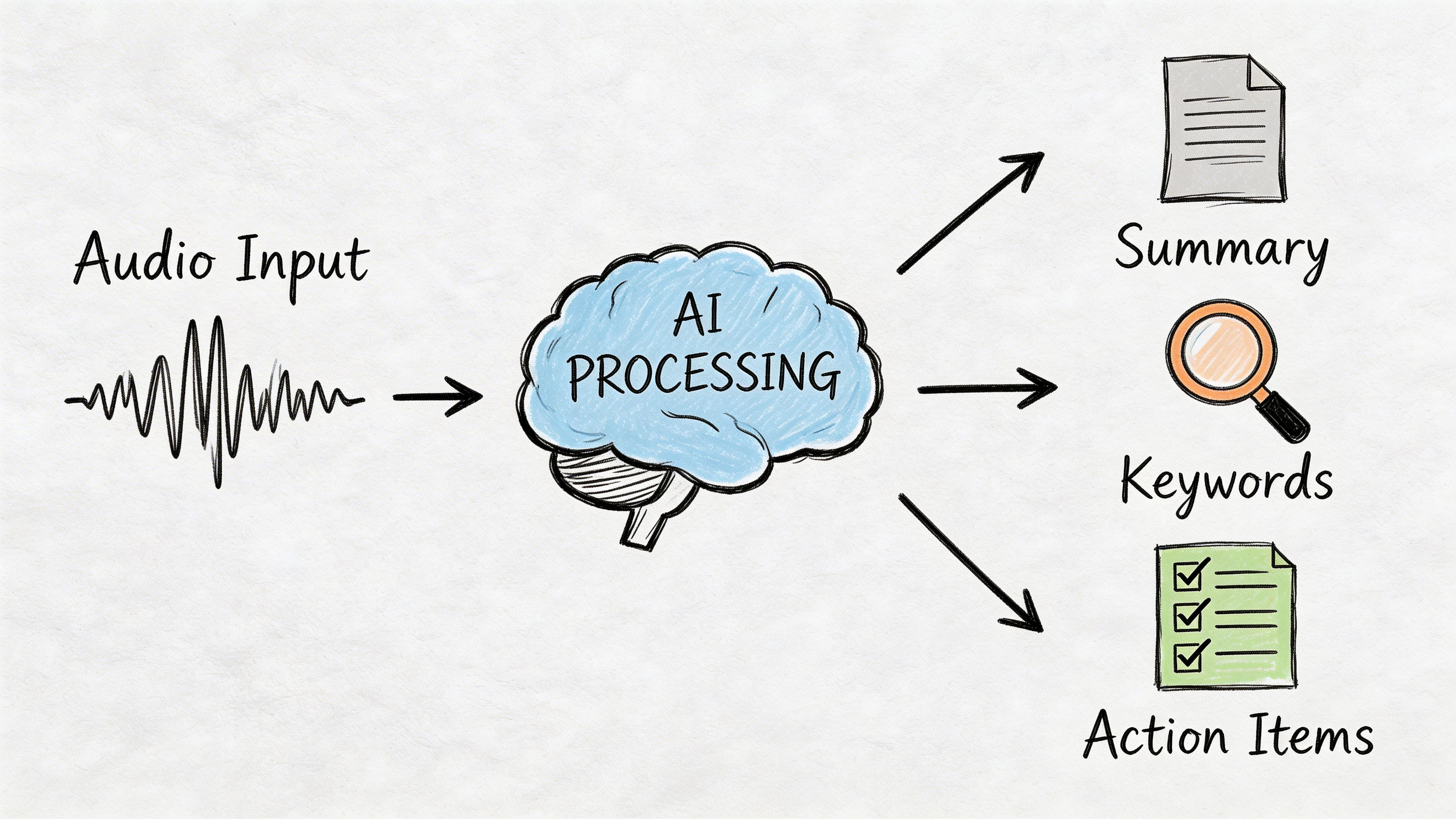
A modern flow usually looks like this:
Capture the conversation
Upload a file, drop in a meeting recording, or let a note-taker join the call.Generate the transcript
This is still the foundation. If the transcript is weak, every later layer gets worse.Create the summary
A strong summary trims the dead space and preserves the decisions.Pull out action items
Meeting software transforms into operational software.Ask follow-up questions
Search and chat interfaces matter when nobody wants to reread the full file.
That chain sounds obvious, but a lot of products still do only step two well.
Why chaining quality matters
This part is under-discussed. If the transcript contains wrong names, missed negations, or speaker confusion, the summary inherits those errors. Then the task list inherits them again. The downstream damage compounds fast.
A cited 2026 Forrester finding notes a 35% productivity loss in enterprise trials due to inaccurate chaining of AI tasks, meaning errors in the sequence from transcription to summary to action items create real workflow drag (Zapier).
That's why integrated workflows matter more than feature checklists.
A weak transcript doesn't stay contained. It leaks into every summary, brief, and task list built on top of it.
One practical example is this guide to convert audio to text, which reflects the fact that users usually want much more than a text dump. They want a usable artifact at the end.
What good workflow tools do differently
The useful products in this category share a few habits:
- They reduce handoffs: Fewer copy-paste steps between transcript, notes, and deliverables.
- They preserve context: Summaries should reflect the actual conversation, not generic bullet points.
- They support retrieval: Search and chat beat scrolling through long files.
- They export cleanly: Notes need to leave the app without breaking structure.
This is the strongest argument for workflow-centric systems. A plain transcript utility can save typing time. A modern AI workflow saves decision-tracking time, follow-up time, and review time. Those are harder costs to see, but they're often bigger.
Matching the Right Tool to Your Profession
The right choice changes with the stakes. A student can tolerate a rough patch in a transcript if search still works. A legal or compliance team can't. That's why blanket recommendations are usually weak.
Top models now reach 2.3% WER in the strongest benchmark conditions, but real-world testing can average 61.92% accuracy when noise, accents, and difficult meeting conditions enter the picture. The same source frames the practical threshold clearly: 5% WER means about 5 errors per 100 words, which may be acceptable for notes, while high-stakes fields still need near-human accuracy of 99%+ (Ditto Transcripts).
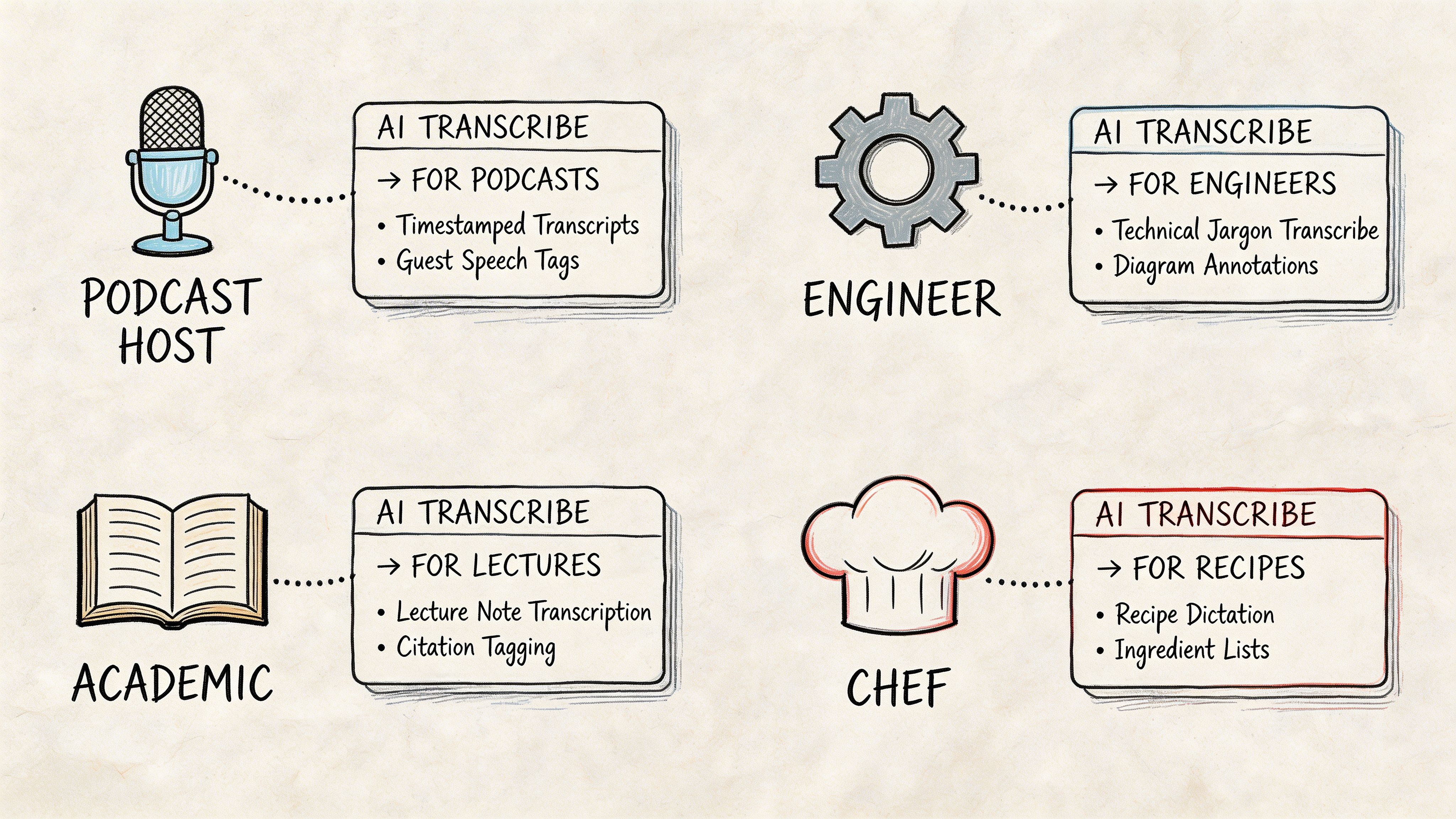
For journalists and researchers
Interview audio is rarely clean. You get street noise, uneven mic distance, interruptions, and names that standard models don't expect.
For this group, prioritize:
- Resilience in messy audio: not just clean benchmark performance
- Speaker separation: because attribution errors are painful to fix
- Searchable transcripts: useful when building a story from many interviews
Deepgram is appealing here if you have technical support or need better control. Workflow tools are useful if you need summaries quickly, but journalists should still spot-check quotes carefully.
For remote team leads
Managers don't need literary transcripts. They need fast clarity. What got approved, what slipped, and who owns the next step.
Meeting-native tools usually excel. If your day is packed with Zoom, Meet, or Teams calls, a system that joins the call, produces notes, and exports the results will save more time than a raw API ever will. If you're comparing lightweight entry points first, this overview of free transcription audio to text is useful for seeing what you can automate before moving to a more committed workflow.
A practical test: after a project update call, can the tool give you a concise summary that the absent stakeholder can trust?
For students and educators
Lecture transcription is different from meeting transcription. The audio is often one speaker for a long stretch, but the file can be long, dense, and packed with terms you'll want to revisit later.
Students should look for:
- Long-file handling
- Fast search
- Clean exports
- Reasonable summarization for review sessions
For this group, "good enough and easy to review" often beats "most customizable."
A quick example of how different use cases shift the decision:
For customer support and operations
Call reviews need consistency more than flair. Teams want searchable transcripts, identifiable themes, and enough structure to support QA, training, and follow-up.
AssemblyAI and Deepgram make sense when the transcript needs to flow into a larger system. A meeting-oriented app may still work for smaller support teams, but operations groups usually outgrow standalone transcript viewers faster than they expect.
The Verdict Which AI Speech to Text Tool Is Best
You finish a client call, open the transcript, and need three things within minutes: a reliable record of what was said, a summary you can send without rewriting, and action items your team can use. That is the standard that matters.
There is no single best ai speech to text tool for every job. The better question is which product creates the least extra work after the audio is captured.
For daily professional use, the winner is usually the platform that gets the full workflow right. Transcription accuracy still matters, but so do speaker separation, summary quality, task extraction, search, export options, and whether the output fits the tools your team already uses. A transcript that needs 20 minutes of cleanup is worse than a slightly less polished one that produces a usable recap and clean follow-ups.
The short version
For meeting-heavy teams, the best choice is the tool that records, transcribes, summarizes, and pushes next steps into shared workflows with minimal editing.
For developers and product teams, Deepgram stands out because it gives you more control over how speech data moves through your own system.
For light internal note capture, Otter still works well enough if the goal is convenience and fast review, not polished downstream output.
For companies building speech features or processing audio at scale, AssemblyAI remains a strong option because it fits better into larger pipelines than meeting-first apps do.
I keep coming back to the same test. After the call ends, how much manual work is left? That question usually settles the ranking faster than any product page does.
The category matters because buying an AI transcription tool is rarely just about turning audio into text anymore. It is also a decision about where conversations live, how knowledge gets organized, and whether summaries and tasks can move into email, docs, CRMs, project trackers, or team chat without someone playing copy-and-paste operator.
That is why the best ai speech to text tool is the one that shortens the path from spoken conversation to a useful outcome. In practice, that often beats the tool with the strongest standalone transcript.
Frequently Asked Questions About AI Transcription
How secure are AI speech-to-text services with sensitive data
Security varies more by product design than by category label. Check for encryption in transit and at rest, clear deletion controls, and a transparent explanation of what happens to uploaded files and transcripts. If you're handling client calls, HR interviews, or internal planning, vague privacy language is a red flag.
Can AI replace a human transcriber
Sometimes. For meeting notes, lectures, interviews for internal use, and general knowledge capture, AI is often good enough and much faster. For legal proceedings, formal compliance records, sensitive medical content, or publication-grade quote verification, human review still matters. The deciding factor isn't whether AI can produce text. It's whether the stakes allow any ambiguity.
What is Word Error Rate and what counts as good
Word Error Rate (WER) measures how many words in a transcript were inserted, deleted, or substituted compared with the correct version. Lower is better. A low WER can be excellent for meetings and note-taking, but "good" depends on the job. Internal brainstorming can tolerate some cleanup. Regulated or high-risk workflows usually can't.
What's the biggest mistake people make when picking a tool
They buy based on transcription alone. In real work, the bigger question is whether the product helps you produce summaries, identify action items, search past conversations, and export useful outputs without extra manual steps.
Should I choose a meeting app or an API platform
Choose a meeting app if you want immediate productivity with little setup. Choose an API platform if you're building a custom workflow, product, or internal system and have the technical resources to shape the experience yourself.
If you want one place to capture meetings, transcribe recordings, generate summaries and action items, and search past conversations without stitching together multiple tools, take a look at HypeScribe.


































































































