Best Voicemail Transcription App for 2026

Monday morning. You open your phone between meetings and see six voicemails. One is from a client who talks fast. One is from a prospect calling from the airport. One is from a teammate forwarding details you need for an afternoon deadline. You tell yourself you’ll listen later.
Later rarely comes.
Audio piles up because voicemail asks for something most busy people don’t have much of, uninterrupted attention. You can skim an email in seconds. You can scan a chat thread even faster. But a voicemail forces you to press play, rewind, replay a name, replay a phone number, then decide what matters. That friction is why so many important messages sit unplayed longer than they should.
The End of Unplayed Voicemails
That backlog isn’t just your personal bad habit. It reflects how communication works now. According to Data Insights Market, the global voicemail transcription market was valued at $1,466.9 million in 2025 and is projected to grow at an 11% CAGR, driven in part by the fact that 80% of the 13.5 billion global daily phone calls go to voicemail.
That number explains the daily experience many professionals already have. Calls don’t happen in neat little windows anymore. They happen while people are in transit, in meetings, in different time zones, or protecting focus time. Voicemail has become the overflow channel for modern work.
A voicemail transcription app addresses the core problem, which isn’t voicemail itself. It’s the fact that audio is slow to process. Once a message becomes text, you can search it, forward it, tag it, summarize it, and turn it into action.
Here’s the practical shift:
- Audio is passive: You have to sit and listen.
- Text is active: You can scan, sort, and respond.
- Structured text is useful: Your team can turn it into tasks, notes, or CRM updates.
Some teams also pair inbound voicemail handling with outbound messaging tools. If you're exploring broader phone-based outreach workflows, this guide to ringless voicemail marketing is useful context because it shows how voicemail can be part of a larger communication system, not just an inbox you ignore.
Unplayed voicemail is usually a workflow problem, not a listening problem.
The best apps in this category don’t just write out what someone said. They help you decide what to do next. That matters far more than transcription alone.
How a Voicemail Transcription App Works
Think of a voicemail transcription app like a sharp assistant who never gets tired. A message comes in, the assistant listens immediately, types what they hear, cleans up the wording, and hands you a readable version while the original recording stays attached for reference.
That’s the simple version. Under the hood, the process is more structured.
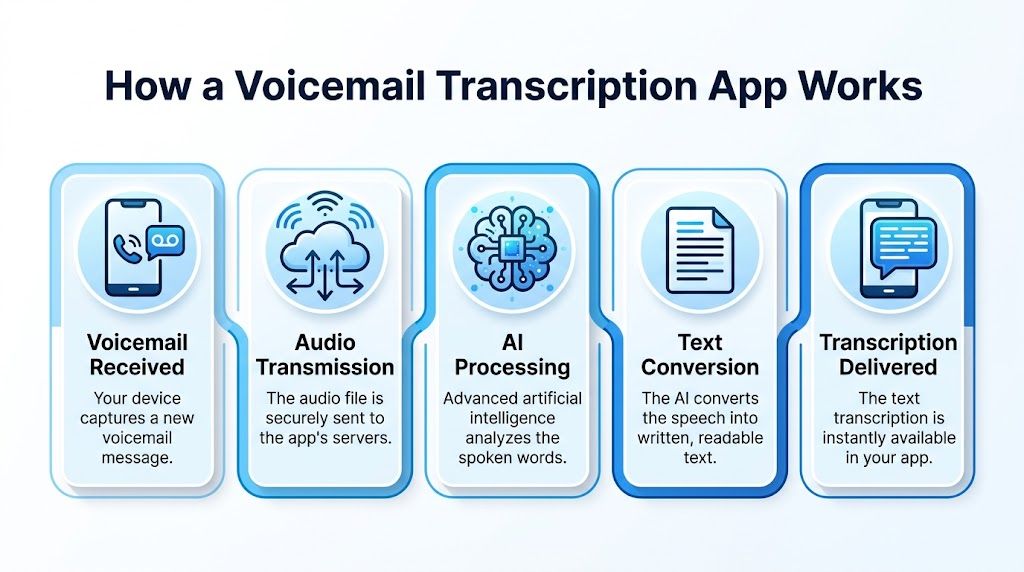
The core pipeline
Most modern systems follow the same basic sequence:
- The app captures the voicemail
The audio arrives from your phone system, VoIP platform, or connected mailbox. - The file is sent for processing
The system uploads the recorded message to a speech engine. In many setups, that happens automatically right after the call ends. - Speech recognition turns sound into words
The engine breaks the audio into tiny sound units and matches them to likely words and phrases. - Language processing cleans up the draft
Raw speech output often looks messy. Natural language processing adds punctuation, improves sentence boundaries, and uses context to make the transcript easier to read. - The transcript gets delivered
You see the text in an app, email, shared workspace, or integrated business tool.
According to My AI Front Desk’s explanation of AI voicemail transcription, a typical pipeline uses a speech-to-text API to upload a recorded voicemail, applies deep neural networks for phoneme recognition, and then uses NLP for contextual post-processing, generating a final transcript in seconds with latency under 5 seconds for a 30-second message.
Why ASR and NLP both matter
People often lump all of this together as “AI transcription,” but two pieces do different jobs.
Automatic Speech Recognition (ASR) is the listening engine. It decides whether the speaker said “meeting,” “meting,” or “meaning.” In voicemail, this step can be tricky because phone audio is compressed and people often speak casually.
Natural Language Processing (NLP) is the cleanup layer. It helps turn a rough string of words into something readable enough to skim in a hallway between calls.
A rough raw output might look like this:
call me back after three maybe three thirty talked to jen from procurement need revised quote before friday
A refined transcript looks more like this:
Call me back after 3:00, maybe 3:30. I talked to Jen from procurement. We need the revised quote before Friday.
That difference matters because readability affects response speed.
Why some transcripts feel smarter than others
Not every app stops at verbatim text. Some systems add labels, highlight names, or identify likely action items. Others provide a plain transcript and leave the rest to you.
If you want a broader explanation of what AI transcription software does beyond voicemail, this overview of AI-powered transcription software covers the bigger picture well.
The part that confuses most buyers
Many people assume transcription happens live while someone is leaving the voicemail. In most cases, it doesn’t. The more common workflow is post-call processing. The message is recorded first, then converted.
That detail matters for expectations. You’re usually not buying a live captioning tool. You’re buying a system that quickly turns missed-call audio into usable text, often fast enough that it still feels instant to the user.
Must-Have Features in a Modern Transcription App
A basic voicemail transcription app turns speech into text. A good one handles messy real-world audio. A great one fits how your team already works.
That distinction matters because buyers often compare feature lists instead of outcomes. “Transcribes voicemail” is table stakes. The better question is whether the app produces text your team can trust and use without adding cleanup work.

Accuracy in the real world
Accuracy is the first filter. If the transcript misses names, dates, or callback numbers, it creates more work than it saves.
The challenge is that performance changes sharply once conditions get messy. According to the 2024 study published by Taylor & Francis, top AI transcription models can achieve over 70% perfect transcripts in ideal conditions, but that still sits far below the 99% human standard, and the gap gets worse with heavy accents or background noise.
For voicemail, that’s a big deal. Voicemail audio is often narrow, rushed, muffled, or recorded from a moving car, lobby, or speakerphone.
A smart evaluation question is this: does the app sound good in a demo, or does it handle your actual callers?
Language support beyond English
Many app pages say “multilingual,” but that can mean anything from broad language availability to uneven quality across languages and accents.
If your callers include international customers, distributed teammates, or vendors from different regions, don’t settle for a language count alone. Ask how the product handles accent variation, mixed-language phrases, names, and phone-quality audio. Those details are where many tools fall apart.
Practical rule: If your business operates across borders, test the app with your hardest voicemail, not your easiest one.
Workflow integration
Transcription becomes valuable when it flows somewhere useful. That could mean Slack for team visibility, Salesforce for sales follow-up, or a support queue for service teams.
Without integration, the transcript just becomes another inbox. With integration, voicemail can trigger action. A sales rep can route a lead. A project manager can assign a follow-up. An operations team can tag an issue and move on.
Look for export options, webhook support, CRM sync, or collaboration hooks. The best app is often the one that disappears into your existing process.
Capture method and delivery style
Some teams want voicemail transcribed after the message lands. Others also want to upload recordings from different channels, such as support calls, field notes, or interview clips. That flexibility matters more than people expect.
A few useful patterns to compare:
- Mailbox-connected apps work best when you need hands-off automation.
- Upload-based tools help when voicemail files come from multiple systems.
- Cross-channel tools are better if your team wants one place for voicemail, meetings, and recorded calls.
Security and privacy controls
Voicemail often contains personal data, account details, scheduling info, or sensitive customer context. That means security isn’t a side issue.
You want encryption, clear retention options, and a straightforward answer to “Who can access the audio and transcript?” If your team works with regulated or sensitive information, it’s also worth reading about AI anonymization and PII protection) so you can ask sharper questions about what “safe” really means when AI systems process spoken data.
Here’s the short checklist many buyers skip:
- Retention controls: Can your team delete source audio and transcripts?
- Access permissions: Can admins control who sees what?
- Processing clarity: Is the transcription automated, or is there any human review?
- Export discipline: Can you move data into approved systems without copy-paste chaos?
A voicemail transcription app shouldn’t just transcribe. It should reduce friction, preserve context, and fit your compliance standards.
Voicemail Use Cases for Every Team and Role
The easiest way to understand the value of a voicemail transcription app is to look at what happens after the transcript arrives.
A remote project manager misses a client call while presenting in another meeting. The voicemail lands as text in the team workspace. She scans it in seconds, sees that the client wants a change in delivery order, and forwards the transcript to design and operations with one sentence: “Please confirm impact before noon.” Nobody waits for her to listen, take notes, and rewrite the message manually.
That’s where the tool starts to feel less like convenience and more like coordination.
Sales and account teams
A sales rep often gets voicemails in the least convenient moments, between calls, during travel, or while working through a queue. If the transcript can move directly into a CRM or team channel, follow-up gets cleaner.
According to VoiceDrop’s discussion of voicemail app workflows, seamless integration with CRM and collaboration tools can address the 20% to 30% productivity loss remote teams face from manual note-taking and task transfer, especially when transcribed voicemails become actionable items in tools like Salesforce or Slack.
That matters because sales work breaks down fast when details stay trapped in audio.
- Lead qualification: A rep can scan whether the caller asked for pricing, timing, or a demo.
- Account history: The message can be attached to the customer record instead of sitting in one person’s phone.
- Team handoff: An account manager can pick up context without asking, “Can you send me the recording?”
If your team also handles inbound call reviews, this overview of call center quality assurance is a useful companion because it shows how recorded conversations become coachable operational data.
Journalists, researchers, and educators
A journalist in the field may receive interview follow-ups while moving between locations. A researcher may get a participant update that needs to be logged accurately. An educator may use voicemail-like voice notes to capture ideas between classes.
In each case, text makes the message reusable. You can quote from it later, search by topic, or drop it into a notebook without replaying audio five times.
Support and operations teams
Support teams value speed, but they also need traceability. A voicemail transcript gives both. A service manager can skim the issue, route it to the right queue, and preserve the original audio in case tone or nuance matters.
A transcript turns “someone should listen to this” into “the right person can act on this now.”
Students and solo professionals
Students, consultants, and solo operators benefit too. If you’re running your own practice, every missed message competes with client work. Reading first lets you triage quickly: urgent, can wait, or delegate.
The transcript isn’t the finish line. It’s the handoff point between communication and action.
How to Choose the Right Voicemail Transcription App
Most buyers compare apps the wrong way. They look for the longest feature list, then pick the cheapest option that says “AI.” That usually leads to disappointment because voicemail quality, team workflow, and security standards vary so much from one organization to another.
A better approach is to choose based on fit. The right voicemail transcription app for a solo consultant won’t be the same one a support team or healthcare-adjacent operation needs.
Start with your actual workflow
Before you compare vendors, answer three plain questions:
- Where do voicemails come from now?
Phone carrier inbox, VoIP platform, shared business line, or mixed sources. - Who needs the transcript next?
Just you, a manager, a sales team, support, or multiple departments. - What needs to happen after transcription?
Read and reply, assign work, store in a CRM, or archive securely.
Those answers narrow the field faster than any feature matrix.
Security deserves a front-row seat
For business use, convenience can’t outrank control. According to Cisco’s Unity Connection solution overview, systems like Cisco Unity Connection use proprietary automated transcription engines that process only the first 120 seconds of a message without human intervention, delivering transcripts securely to email inboxes while adhering to enterprise security standards.
That example is useful because it highlights the questions serious buyers should ask:
- Is transcription fully automated?
- How is the audio delivered and stored?
- What part of the message gets processed?
- How are transcripts shared with users?
- Can the organization control retention and deletion?
Security language on vendor pages often sounds reassuring but vague. You want specifics.
Compare apps with a simple checklist
CriterionWhat to Look ForWhy It MattersAccuracy fitStrong performance on phone-quality audio, accents, and noisy recordingsDemo-quality audio isn’t the same as real voicemailLanguage supportReliable handling of the languages your callers actually useBroad claims mean little if your use case is multilingualWorkflow integrationEmail, Slack, CRM, help desk, or export options that match your processA transcript stuck in one inbox creates another bottleneckSecurity controlsEncryption, retention settings, access permissions, automated processingVoicemail often contains sensitive business or personal dataReview experienceEasy way to compare transcript with original audioUsers need a fast way to confirm names, dates, and numbersPricing modelSubscription or usage-based pricing that matches your volumeTeams overpay when the model doesn’t match how they workAdmin controlsShared inbox support, team visibility, and user managementImportant for multi-person lines and cross-functional teams
Match the pricing model to usage
Pricing matters, but not in isolation. Some teams want predictable monthly software spend. Others prefer usage-based pricing because voicemail volume swings throughout the month.
A low sticker price can become expensive if your team needs upgrades for integrations, exports, or admin controls. On the other hand, a premium tool can be wasteful if you only need basic read-and-reply functionality.
One practical check is to test how the vendor talks about limits. Clear pricing language often signals product maturity. Hidden caps usually become a headache later.
Don’t ignore legal and policy questions
If your organization records or stores business calls, legal review may come into play. That doesn’t mean the project has to stall. It means procurement and compliance should be involved early.
This guide on can I record a phone call is worth reviewing if call recording and transcript storage intersect in your environment.
Buy for the hardest message your team receives, not the cleanest sample in the product tour.
A good choice saves time. A great choice also reduces risk, shortens handoffs, and gives your team confidence that voicemail won’t vanish into one person’s phone.
Getting Started A Step-by-Step HypeScribe Onboarding Guide
If you’ve never used a modern transcription tool before, the fastest way to understand one is to run a single message through it and watch what happens. The setup is usually simpler than people expect.
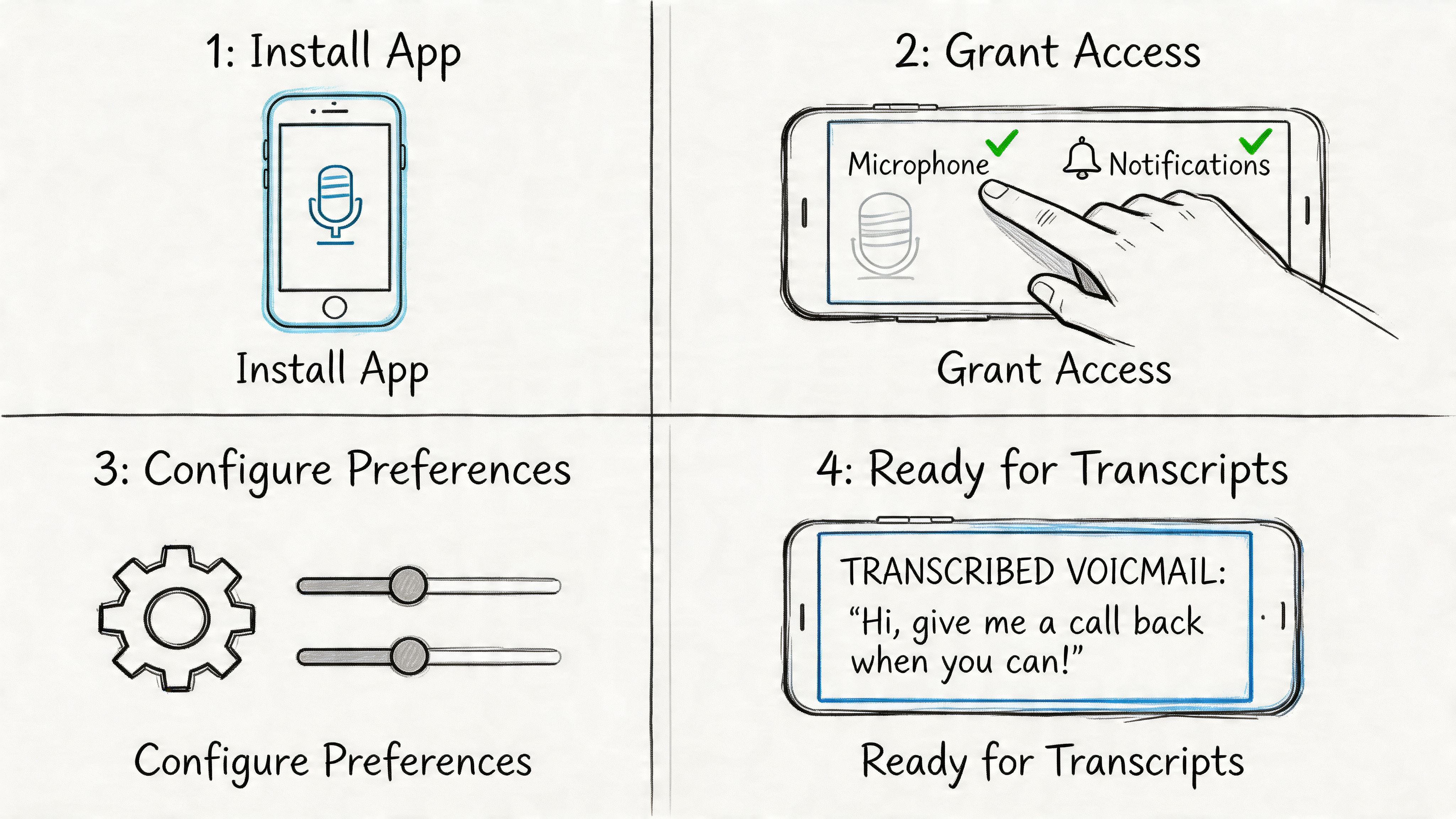
A simple first run
- Create your account
Start with a work email so your transcripts stay tied to your professional workflow. This also makes it easier to share outputs with teammates later if needed. - Choose how you want to bring audio in
You can upload a voicemail file, use a voice recorder, or bring in other spoken content from links and recordings. For many users, starting with one saved voicemail file is the easiest test because you already know what the message says. - Set your language preferences
Pick the language that best matches the speaker. If your voicemails come from multiple regions, test a few real examples before standardizing your process. - Run the transcription and review the result
Check the text against the original audio, especially for names, dates, callback numbers, and product terms. This first review gives you a realistic sense of fit.
Move from transcript to output
Once the text looks right, the next step is to make it useful.
- Generate a summary if you want the short version for a manager or teammate.
- Pull action items if the message includes next steps, deadlines, or requests.
- Export the transcript to a format your team already uses, such as a document or plain text note.
- Store or delete source material based on your internal policy.
A good onboarding habit
Don’t begin with your easiest clip. Start with a voicemail that includes one or two hard elements, maybe a fast speaker, an unfamiliar name, or some background noise. If the workflow still feels smooth, you’ve learned far more than you would from a perfect sample.
The first hour with a transcription tool should answer one question: “Will this reduce work tomorrow morning?” If the answer is yes, you’re not just trying a new app. You’re replacing a slow habit with a faster system.
Workflows for Actionable Voicemail Insights
Once your voicemail is text, the next job is interpretation. Yet, many teams halt prematurely. They treat transcription like the end result when it’s really the raw material.
The smarter workflow is: transcribe, condense, route, act.
Turn transcripts into short briefs
A long voicemail transcript still takes attention to read. A short brief is faster.
A useful pattern is to reduce each voicemail into three lines:
- Why they called
- What they need next
- Who owns the follow-up
That format works well for managers, support leads, and client-facing teams because it keeps context while removing the clutter of spoken filler.
Readability saves time. Structure saves decisions.
Extract tasks instead of forwarding walls of text
A transcript often contains hidden tasks that nobody claims because they aren’t written clearly. Once the message is in text, it becomes easier to turn vague language into ownership.
For example, “Can someone send the revised paperwork and call me after lunch?” becomes:
- Send revised paperwork
- Return call after lunch
- Confirm the correct document version before sending
That’s the difference between information and execution.
Build a team-ready handoff
One useful operating habit is to route different voicemail types into different destinations.
Voicemail typeBest next stepSales inquiryAdd to CRM and assign ownerClient change requestPost summary in project channelSupport issueCreate ticket with transcript attachedInternal updateSave to notes or team workspace
This approach keeps voicemail from becoming a private inbox problem. It turns it into shared operational knowledge.
Use transcripts as searchable memory
Teams forget spoken details quickly. Text fixes that. Once voicemails are archived in a searchable system, people can find names, commitments, and decisions without asking the caller to repeat themselves.
That’s especially valuable in hybrid teams where communication gets fragmented across phones, inboxes, chat, and meetings. A searchable transcript gives the team one recoverable version of what was said.
The best voicemail workflow doesn’t end with “message received.” It ends with “next step assigned.”
Frequently Asked Questions About Voicemail Transcription
Is a voicemail transcription app different from built-in visual voicemail
Yes. Built-in visual voicemail is usually designed for convenience at the individual user level. It helps you see and sometimes read messages on your phone.
A dedicated voicemail transcription app is usually better when you need more than that. It can support cleaner exports, better search, stronger workflow integration, shared access, summaries, and action-oriented processing for teams.
Can these apps handle heavy accents or multiple languages well
Sometimes, but you should test carefully. Multilingual support on a product page doesn’t guarantee equal quality across languages, accents, and phone-quality recordings.
Many buyers get disappointed in such instances. A tool may perform well on clean speech and still struggle with a rushed caller, mixed-language terminology, or poor line quality. The safest approach is to run your own real samples through the product before rollout.
What happens to the audio and transcript after processing
That depends on the vendor. Some systems store both for later review. Some let you export and delete. Others keep data according to a retention policy set by the organization or service.
Before adopting any tool, ask four direct questions:
- How long is audio stored
- How long are transcripts stored
- Who can access them
- Can we delete both on demand
If the answers are unclear, keep looking.
Are voicemail transcripts accurate enough for business decisions
They can be, but accuracy should be treated as situational, not universal. For routine triage, many teams find them extremely useful. For sensitive details such as legal terms, account data, pricing, or medication-related language, users should still verify against the original recording when accuracy is critical.
A good operating rule is simple: use transcripts for speed first, then verify high-stakes details.
What’s the biggest mistake people make when choosing one
They buy for the demo instead of the workflow. A sleek interface matters less than whether the app handles your real callers, routes messages into your existing tools, and gives your team enough security control to use it comfortably.
If a voicemail transcription app saves time but creates cleanup work, it’s not helping. The best one reduces listening time, cuts handoff friction, and makes the next action obvious.
If you want to move from raw transcripts to summaries, action items, exports, and searchable team knowledge, HypeScribe is worth a look. It’s built for people who need spoken information turned into usable work fast, whether that starts with voicemail, meetings, interviews, or recorded calls.