
The Difference Between Transcription and Translation: A Clear Guide

When you're trying to make sense of spoken or written content, understanding the difference between transcription and translation is the first step. At its heart, the distinction is straightforward: transcription converts audio into text within the same language, while translation takes content from one language and converts it into another.
Imagine you have a recording of an English-language business meeting.
- Transcription is the process of typing out everything that was said, creating a written English document.
- Translation is the process of taking that English document and converting it into, say, German, so your colleagues in Berlin can understand it.
One captures what was said; the other bridges a language gap.
Understanding the Key Differences
While the terms are often used interchangeably, transcription and translation have fundamentally different goals. The simplest way to tell them apart is to look at the languages involved. Transcription always works with a single language (e.g., spoken Spanish to written Spanish). Translation, by its nature, must involve at least two languages (e.g., a document in French converted to Japanese).
This concept isn't just about language services; it's also a core principle in biology. In our cells, transcription is when a gene's DNA code is copied into a messenger RNA (mRNA) molecule. The information stays in the same "language" of nucleic acids. Translation is the next step, where that mRNA message is decoded to build a protein, converting the information into the new "language" of amino acids. You can find some great insights on this biological parallel that mirrors the linguistic processes perfectly.
For a clearer picture, let's break down the main distinctions in a simple table.
Key Differences At a Glance Transcription vs Translation
This table offers a high-level summary, comparing the fundamental aspects of transcription and translation.
As you can see, one process captures information, and the other converts it. While both require sharp attention to detail, the skills and ultimate purpose are worlds apart.
Understanding Transcription: How Information Is Copied
At its heart, transcription is the process of creating a direct copy of information, just in a different format. Think of it as a scribe meticulously copying a manuscript—the language doesn’t change, only the medium. This holds true whether we're talking about genetics or language.
In biology, transcription is a fundamental step in how our cells function. It’s how the genetic code stored in a strand of DNA gets copied into a messenger RNA (mRNA) molecule. This all happens within the cell's nucleus, which is a clever way to keep the original DNA blueprint protected and unaltered.
An enzyme called RNA polymerase is the star of this show, reading the DNA template and building the corresponding mRNA strand. This process unfolds in three key stages: initiation, elongation, and termination, resulting in a portable set of instructions ready to be carried out.
Transcription in Language and Media
When we talk about transcription in a linguistic sense, the concept is remarkably similar. It’s the art of converting spoken words from an audio or video file into a written document. The language itself stays the same—if someone speaks English in a recording, the transcript will be in written English.
This is an indispensable task in countless fields. I've worked with legal teams who need a perfect written record of a deposition and journalists who need to pull exact quotes from an interview. They all rely on accurate transcription to do their jobs effectively.
The real power of transcription lies in its ability to capture spoken communication in a permanent, searchable text format. It ensures that critical details aren't lost to memory.
Of course, technology has changed the game here. While manual transcription is still a skilled profession, many now turn to specialized tools to speed things up. For anyone who regularly records meetings or interviews, learning about auto transcribe software can turn a tedious, hours-long task into something that takes just a few minutes.
Here are a few common real-world examples:
- Legal: Creating official records of court proceedings, witness statements, and client meetings.
- Media: Generating subtitles for videos or producing written scripts from podcast recordings.
- Academic: Transcribing research interviews and lectures to make them easier to analyze and cite.
Ultimately, whether in a cell or a courtroom, transcription is all about preserving information with complete fidelity.
Exploring Translation: How New Meaning Is Built
If transcription is like making a faithful copy, translation is an act of reinvention. It's the process of taking information in one form and completely rebuilding it into another, creating new meaning while preserving the original spirit. This concept plays out in fascinatingly similar ways in both biology and language.
First, let's look at the biological world. Translation is the crucial second step in making genetic instructions functional. Once the mRNA blueprint is made (during transcription), it heads out of the nucleus to a cellular factory known as the ribosome.
The ribosome essentially reads the mRNA's code. As it does, specialized molecules called transfer RNA (tRNA) act like couriers, bringing the correct amino acids to the assembly line. These amino acids are linked together, forming a chain that folds into a working protein. This is a true translation: converting the "language" of nucleic acids into the completely different "language" of proteins.
Translation in Language and Communication
When we talk about language, the difference between transcription and translation becomes even clearer. Translation isn't just swapping words; it’s the art of converting content from a source language to a target language while keeping its core intent, tone, and cultural context intact.
This is a far more complex task than it sounds. From my experience, a good translator must be a cultural interpreter, carefully handling idiomatic expressions, subtle nuances, and local customs to make sure the message lands correctly. For instance, a clever marketing slogan in English could easily become gibberish—or worse, offensive—if translated literally into Japanese.
Effective translation is less about changing words and more about recreating the original experience for a different culture. This deeper level of adaptation is often called localization.
Think about a global company preparing to launch its software in Germany. A simple, direct translation of its English website just won't cut it. To really connect with German customers, the company needs to adapt everything:
- User Interface: All menus, buttons, and instructions must be translated accurately and intuitively.
- Marketing Copy: Slogans and descriptions need to be reworked to feel natural and persuasive to a German audience.
- Legal Documents: The terms of service and privacy policies have to be updated to comply with German law.
At its core, translation is what breaks down barriers. It's the essential bridge that makes information accessible, relevant, and meaningful across linguistic and cultural divides.
Comparing the Core Processes Side-By-Side
To really get to the heart of transcription vs. translation, it helps to look at them together, breaking down their core mechanics. While both are about managing information, what they do, how they do it, and what they produce are worlds apart—whether we’re talking about a cell’s nucleus or a global business meeting.
Let’s break it down by looking at their purpose, where they happen, and the tools they require. This visual guide offers a great starting point for understanding their biological functions.
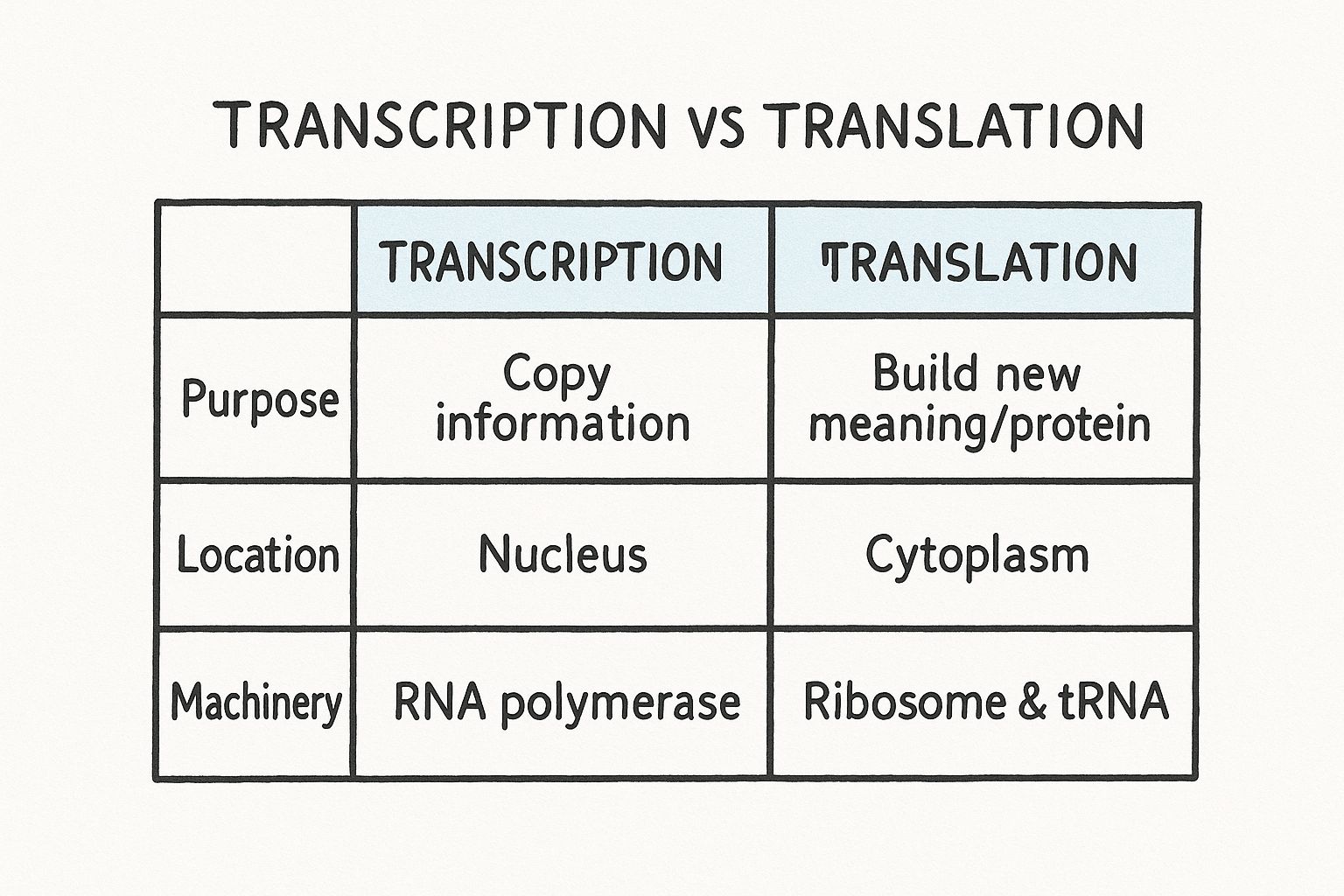
As you can see, biological transcription is all about copying information inside the nucleus. Translation, on the other hand, is about building something new out in the cytoplasm. This same pattern—copying versus building—is a perfect parallel for how these processes work in language services.
To make these differences even clearer, let's put them into a table. This detailed breakdown covers both the biological and linguistic contexts, showing how the core principles apply across different fields.
Detailed Breakdown of Transcription vs Translation
This table lays out the fundamental distinctions at a glance. Both processes are essential for their respective fields, but they serve entirely different functions and require unique sets of tools and expertise.
Biological Context: Purpose and Machinery
In a biological sense, the job of each process is incredibly specific. The sole job of transcription is to copy information—it simply creates a portable messenger RNA (mRNA) copy from a DNA gene. The purpose of translation is synthesis; it takes that mRNA blueprint and uses it to construct a functional protein.
The machinery involved is also completely different.
- Transcription is driven by an enzyme called RNA polymerase, which reads the DNA and builds the corresponding mRNA strand.
- Translation needs a more complex setup. It uses ribosomes as the assembly line and transfer RNA (tRNA) molecules to bring the right amino acids into place.
Where these events happen is another clear dividing line. Transcription occurs within the protected environment of the cell’s nucleus, where the DNA is stored safely. Translation takes place outside the nucleus, in the cytoplasm, where the ribosomes do their work.
The core biological distinction is simple: Transcription preserves the original message in a new format, while translation decodes that message to create a new functional product.
Linguistic Context: Goal and Skills
When we shift to language services, we find a perfect parallel. The main goal of transcription is to produce a verbatim written record of spoken words. It’s all about accuracy and faithfulness to the original audio, capturing exactly what was said, how it was said.
Translation, however, is all about effective cross-cultural communication. A translator's job is to make sure the meaning, tone, and intent of the source message come through perfectly for an audience that speaks a different language.
This naturally leads to very different skill sets. A transcriptionist needs fantastic listening skills, a keen eye for detail, and the ability to type quickly and accurately. Their job gets tough with poor audio quality, overlapping speakers, or thick accents.
On the other hand, a translator must have deep fluency in at least two languages and a solid grasp of cultural nuances. Their biggest challenges are navigating idioms that don't translate, cultural references that won't make sense, and complex terminology that could easily be miscommunicated.
When to Use Transcription vs. Translation Services
Knowing the definitions is one thing, but figuring out which service your project actually needs is what matters most. The decision boils down to one key question: do you need to document what was said, or do you need to communicate its meaning to a new audience? Your answer will point you in the right direction.
When You Need Transcription
Choose transcription when your goal is to create a written record of spoken audio or video, all while staying in the original language. This is all about capturing what was said with complete accuracy, often for accessibility or record-keeping.
Based on my experience, transcription is the right call for tasks like these:
- Making Media Accessible: Creating captions and subtitles for videos is a classic example. This helps viewers who are hard of hearing and gives your content an SEO boost.
- Keeping Legal and Corporate Records: You need a verbatim, written account of depositions, shareholder meetings, or formal hearings. These documents often serve as legal evidence or a tool for corporate governance.
- Conducting Academic Research: Researchers often convert hours of interviews or focus group recordings into searchable text to analyze qualitative data effectively.
Many of these jobs are getting a lot faster thanks to AI. You can check out some of the top speech-to-text software available now to see just how much technology is changing the game.
When You Need Translation
Translation is what you turn to when a language barrier stands in your way. It’s not about a simple word-for-word swap; it’s about recreating the original message’s meaning and intent for an entirely new linguistic and cultural audience.
You’d bring in a translator for projects like these:
- Expanding a Business Globally: Adapting your website, marketing campaigns, and product descriptions so they actually connect with customers in different countries.
- Localizing Software: This involves modifying an app's user interface, help guides, and store listings to feel completely native to users around the world.
- Communicating with a Multilingual Team: Ensuring that company-wide announcements, training materials, and important legal documents are clear and accessible to every employee, no matter what language they speak.
The core distinction is this: Transcription creates a written source document from audio. Translation takes a source document (written or spoken) and rebuilds it for a new culture.
Both are massive fields. The global translation market was valued at an incredible $60.68 billion in 2022, with transcription not far behind at $21.01 billion. These numbers show just how vital these services are in our connected world, and you can explore more insights into the language services industry to see just how fast they're growing.
Choosing the Right Service for Your Needs
Picking the wrong service—transcription when you need translation, or vice versa—is a surefire way to waste time and money while failing to communicate effectively. The first step in getting it right is to clarify your primary goal.
Are you trying to create a written record of what was said, or do you need to make that message understandable to a completely different audience? Your answer to that question will instantly tell you which path to take.
Key Questions to Guide Your Decision
If your project stays within a single language, you’re looking for transcription. It's all about converting spoken words into a written format. Think about these common situations:
- Documentation: You recorded a legal deposition in English and need a precise, verbatim written record for the court.
- Accessibility: You need to add English captions to an English-language training video to make it accessible for everyone.
- Analysis: You have hours of interviews recorded in one language and need to turn that audio into searchable text for your research.
In every one of these cases, the goal is to get an accurate text version of the original audio. Finding the best online transcription service is the key to getting a reliable document you can actually work with.
Now, if your project needs to cross a language barrier, translation is what you're after. This is for when your real goal is to bridge that linguistic and cultural gap, ensuring your message lands just as effectively with a new audience.
The crucial difference between transcription and translation for your project is this: one captures a conversation, while the other rebuilds it for a different culture. Choose the one that matches your final goal.
Frequently Asked Questions
Let's dig into some common questions that pop up when distinguishing between transcription and translation. These answers will clear up the finer points and give you the confidence to handle more complex projects.
Can a Single Project Require Both Transcription and Translation?
Yes, and this happens all the time. Think of it as a two-step process: first, you transcribe the original audio or video, and then you translate the resulting text. This is the standard workflow for creating accurate, multilingual video subtitles or localizing spoken content.
A perfect example is adding Spanish subtitles to an English documentary. The first job is to transcribe the spoken English into a written script. Only then can a translator take that English text and accurately convert it into Spanish for the subtitles.
Is Machine Translation as Accurate as Human Translation?
While AI translation tools have made incredible leaps, they still can't match the nuance and cultural understanding of a professional human translator. Machine translation is fantastic for quickly getting the gist of a text, but it often stumbles over slang, idioms, and specific cultural contexts.
For any professional, client-facing, or legally binding material, human translation is non-negotiable. It's the only way to guarantee that subtle meanings and cultural nuances are captured correctly.
So, for casual or internal use, AI tools can be a fast, effective option. But when accuracy and cultural appropriateness are on the line, nothing beats a human expert.
What Is the Central Dogma and How Do These Processes Fit In?
In molecular biology, the "central dogma" is the core principle explaining how genetic information flows inside a cell. It’s a simple but powerful idea: information travels from DNA to RNA to protein.
Transcription and translation are the two essential stages that make this happen:
- Transcription: This is the first step. The genetic instructions in a strand of DNA are copied into a messenger RNA (mRNA) molecule.
- Translation: This is the second step. A ribosome reads the code on the mRNA molecule and uses it as a blueprint to assemble a protein.
Together, these two processes are how the instructions for life are read and put into action to build and maintain an organism.
Ready to turn your audio and video content into accurate, actionable text? HypeScribe uses advanced AI to deliver lightning-fast transcriptions, summaries, and key takeaways in over 100 languages. Move from conversation to execution in seconds by visiting https://www.hypescribe.com to start your free trial.



































































































