
Hypescribe VS Happy Scribe Alternative and Review
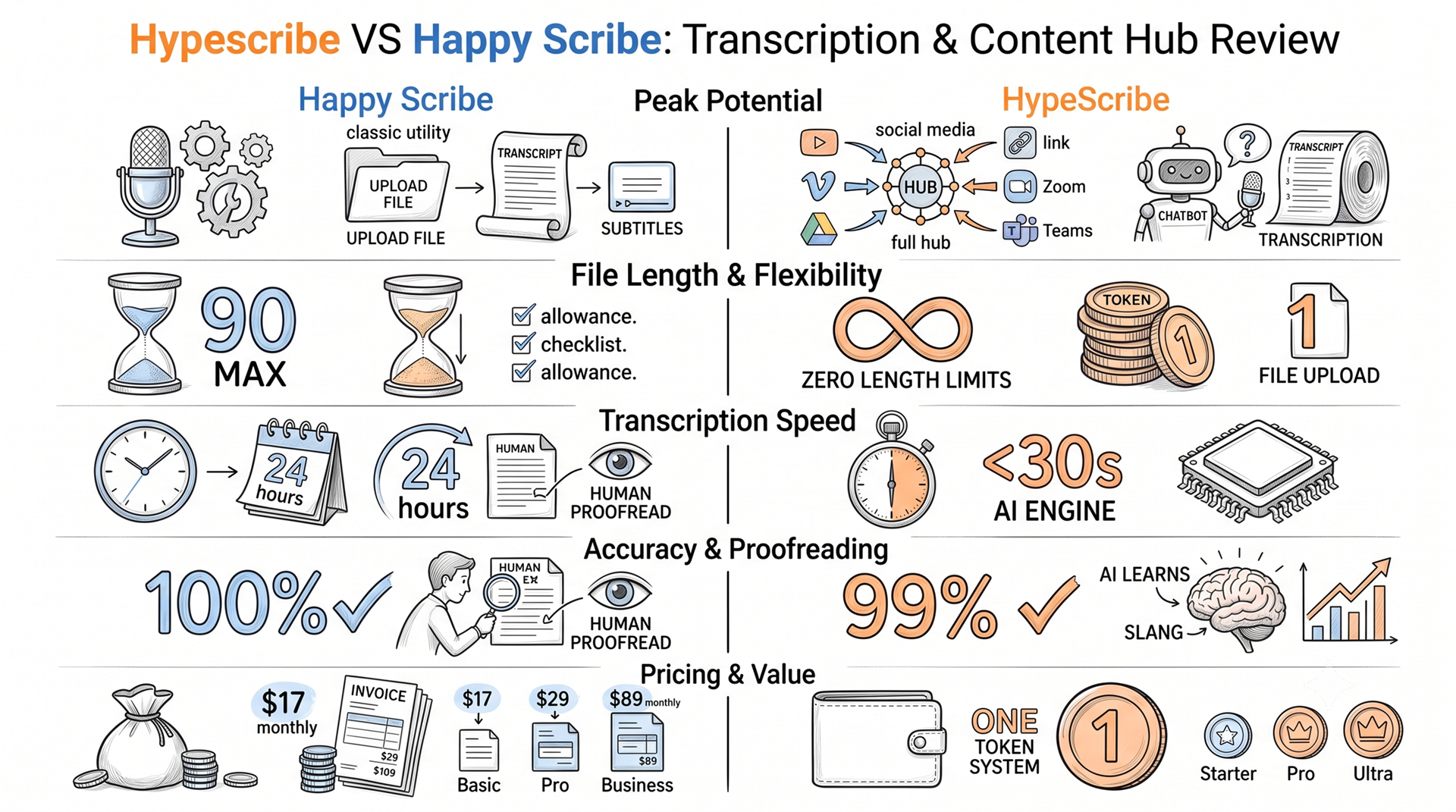
Happy Scribe built its reputation on subtitling and human proofreading. As of 2026, it remains a solid ‘traditional’-type service. Yet, if you are looking for a full hub that captures meetings, parses social media links, and turns audio into an actionable base, HypeScribe might be a sharper tool.
Either way, an objective comparison is still in order. And that’s exactly what we are going to dive into right now – here is how these two platforms stack up across various metrics.
Peak Potential – HypeScribe
Happy Scribe operates like a ‘classic’ utility. Here you upload a file, get a transcript, and maybe generate subtitles – or translate the text. It all works for video editors or those who need VTT or STL, but when you opt for in-depth processing, a different approach is required. That is what HypeScribe provides: it ingests files, extracts audio from links, and dispatches bots to calls in Zoom/Teams.
And all this is without even mentioning that the platform does also features a chatbot designed to query your recordings.
File Length & Flexibility – HypeScribe
Happy Scribe imposes time limits. On their Basic plan, a single upload cannot exceed 90 minutes. And even on higher tiers, you constantly have to ensure you don’t blow past your allowance. With HypeScribe, things are just simpler. It uses a token-based model on a 1-to-1 basis. This means there are practically zero length limits. You can easily upload a four-, five-, or even six-hour file even on the Starter plan without having to slice it up at all.
Transcription Speed – HypeScribe
Both platforms handle transcriptions. However, HypeScribe is leaned towards high-volume throughput, which is evident in its ability to process an hour of audio in under 30 seconds. Happy Scribe, on its side, offers reliable human transcription, which guarantees a polished result but takes up to 24 hours to deliver.
Having said that, if you need instant turnaround, HypeScribe’s engine is the clear choice.
Accuracy & Proofreading – Happy Scribe
If you have the budget and aim for perfection, Happy Scribe wins the round. They offer human proofreading as an add-on (starting around $2.00 per minute), which guarantees near 100% accuracy. However, this only applies to the ‘human aspect’, as their AI sits around the industry average (which’s 85%-95%), whereas HypeScribe’s AI reaches up to 99% accuracy and, what’s more, learns domain-specific slang over time.
So, for the vast majority, HypeScribe’s AI will be more than enough. Yet, if you need a human set of eyes for something highly critical (medical or legal documents, for example), Happy Scribe might be able to provide that.
Pricing & Value – HypeScribe
Happy Scribe charges by the minute, and costs scale rapidly. The platform offers the following plans (and their variations):
- Basic – $17/month (or $8.50/month billed annually) for 120 minutes of transcription. Single files are capped at 90 minutes, with extra minutes costing $0.20 each.
- Pro – $29/month (or $19/month billed annually) for 600 minutes.
- Business – $89/month (or $59/month billed annually) for 6,000 minutes.
As for HypeScribe, it ignores time restrictions at all:
- Starter – $6.99/month for 30 transcriptions (any length).
- Pro – $7.99/month for 60 transcriptions and 10 AI notetaker meeting joins.
- Ultra – $12.99/month for 300 transcriptions and 30 meeting joins.
Declaring the Champion Automatic Audio Transcription Software – HypeScribe
Happy Scribe is a reliable tool for those who need subtitle files and teams willing to pay premium rates for human proofreading. But overall, HypeScribe is the superior alternative, as it eliminates minute-tracking and can ingest content from the web via links.
FAQs About Audio to Text Transcription Software
- Do I Have to Count Transcription Minutes Every Month?
With HypeScribe – nope. It uses a token system, where 1 equals 1.
- Which Podcast Transcription Tool is Better for Subtitling?
Happy Scribe. It can generate VTT/STL subtitle files into over 80 languages.
- Can I Transcribe a Podcast Directly From a Link?
Yes, but only with HypeScribe. There, you can just paste a YouTube, Vimeo, or Google Drive link. Happy Scribe, on the other hand, requires you to, first, download the file, and second – to upload it manually.


































































































