Speech to Text Accuracy: Metrics & Best Tools
A team finishes a meeting, everyone leaves with a clear understanding, and the transcript lands ten minutes later with one critical mistake. “Ship the revised pricing deck” becomes “skip the revised pricing deck.” Nobody notices until the next day. Now the team is untangling confusion that started with a single bad line of text.
That's the key problem with speech to text accuracy. It isn't a vanity metric. It affects decisions, follow-ups, summaries, search, compliance, and trust.
Many buyers start with the wrong question. They ask, “What accuracy percentage does this tool claim?” The better question is, “How accurate will it be on my audio, with my speakers, in my workflow?” If you use meeting transcripts for action items, coaching, research, or documentation, that distinction matters more than any polished homepage number.
Why 99 Percent Accurate Is Not the Whole Story
The phrase “99 percent accurate” sounds reassuring because it compresses a messy reality into one clean promise. But transcription doesn't happen in a lab. It happens in sales calls with weak Wi-Fi, team meetings with cross-talk, interviews recorded in cafes, and training sessions where people use product names the model has never seen before.
A transcript can look excellent for most of a file and still fail at the only sentence that mattered. That's why a single headline score often hides the main issue. Accuracy is uneven. It changes with speaker overlap, accent, microphone quality, room echo, telephony compression, and vocabulary.
One wrong line can create real work
In practice, users don't judge transcription by a formula. They judge it by consequences.
If the transcript misses a deadline, renames a customer, or assigns the action item to the wrong person, people lose confidence fast. Once that trust drops, every transcript becomes something the team feels it has to double-check line by line. The promised time savings disappear.
Accuracy problems usually show up as workflow problems first. Rework, misalignment, and weak summaries are the symptoms.
That's also why transcript quality matters beyond raw text. Tools used for notes, summaries, and meeting analysis depend on a transcript that's reliable enough to support downstream decisions. If you're using transcripts as part of a broader conversation intelligence workflow, the question isn't whether the model misses any words. The question is whether it captures the parts your team acts on.
Accuracy is something you manage
This is the mindset shift I'd recommend to any new customer. Don't treat speech to text accuracy as a fixed property of a vendor. Treat it as an outcome you can influence.
You can choose better recording setups. You can test with representative files. You can review whether the tool handles your terminology, your meeting style, and your speaker mix. You can also decide where perfect wording matters and where preserved meaning is enough.
That approach makes buying and using transcription software much easier. You stop chasing a magical universal score and start measuring what matters for your work.
How Transcription Quality Is Actually Measured
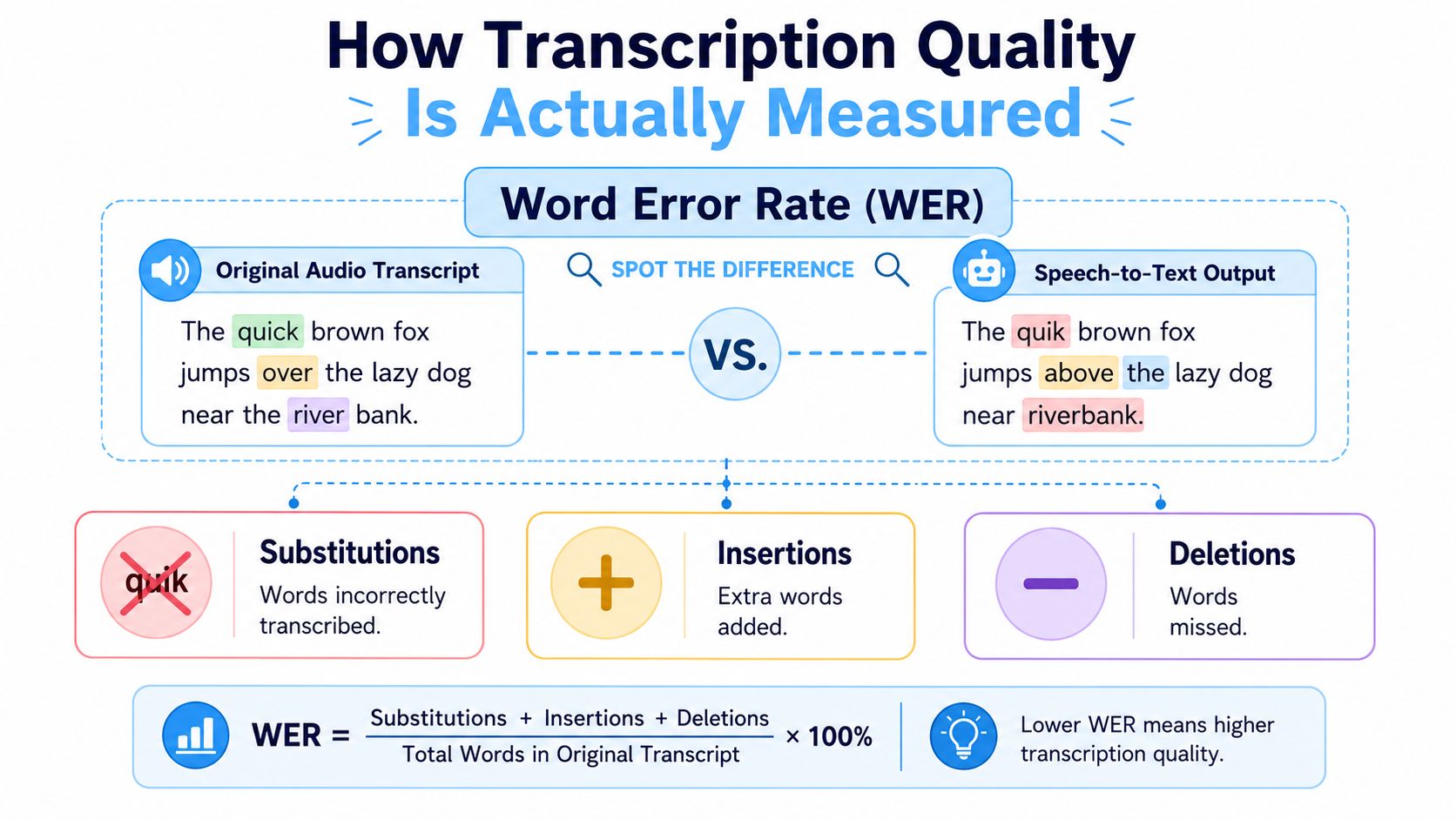
The standard industry metric is Word Error Rate, usually shortened to WER. It sounds technical, but the basic idea is simple. You compare what was said with what the system produced and play a spot-the-difference game.
If the system changed a word, that's a substitution. If it added a word that wasn't said, that's an insertion. If it missed a word entirely, that's a deletion.
What WER really counts
Here's the practical version:
- Substitutions mean the model heard the wrong word. “Budget” becomes “badge.”
- Insertions mean the model added text that nobody said.
- Deletions mean the model dropped words entirely.
A low WER usually means cleaner transcripts. That makes it useful for comparing systems on the same audio. It also gives product teams a common quality benchmark.
If you're evaluating AI-powered transcription software, WER is worth understanding because it keeps the conversation grounded. It stops vendors from hiding behind vague claims like “high precision” or “near-human output.”
Why word-perfect isn't always goal-perfect
WER still has a major limitation. It measures lexical accuracy, meaning word-for-word correctness. It doesn't fully measure semantic accuracy, meaning whether the transcript preserved the intent of the speaker.
That distinction matters a lot in business use cases. Research shows an ASR system can have a 25% WER and still maintain low semantic distance, meaning the functional intent remains intact even with word-level errors, according to this study on semantic versus lexical accuracy in transcription.
Practical rule: If your end goal is a summary, action items, or searchable notes, preserved meaning can matter more than perfect wording.
For example, “we can't approve this until legal reviews it” and “we cannot approve this until legal reviews it” may score differently in strict word matching even though they carry the same meaning. On the other hand, a transcript can post a decent WER and still hurt usability if it consistently mangles names, dates, product terms, or speaker turns.
Use more than one lens
A solid evaluation process looks at more than a single score:
| Measure | What it tells you | Best for |
|---|---|---|
| WER | How many word-level mistakes appear | Comparing transcript cleanliness |
| Semantic accuracy | Whether meaning survives | Summaries, notes, and downstream AI tasks |
| Speaker attribution quality | Whether the right person is attached to the right quote | Meetings, interviews, call review |
The smartest teams read transcripts the way users do. They ask, “Can I trust this enough to work from it?”
Benchmarks and Realistic Accuracy Expectations
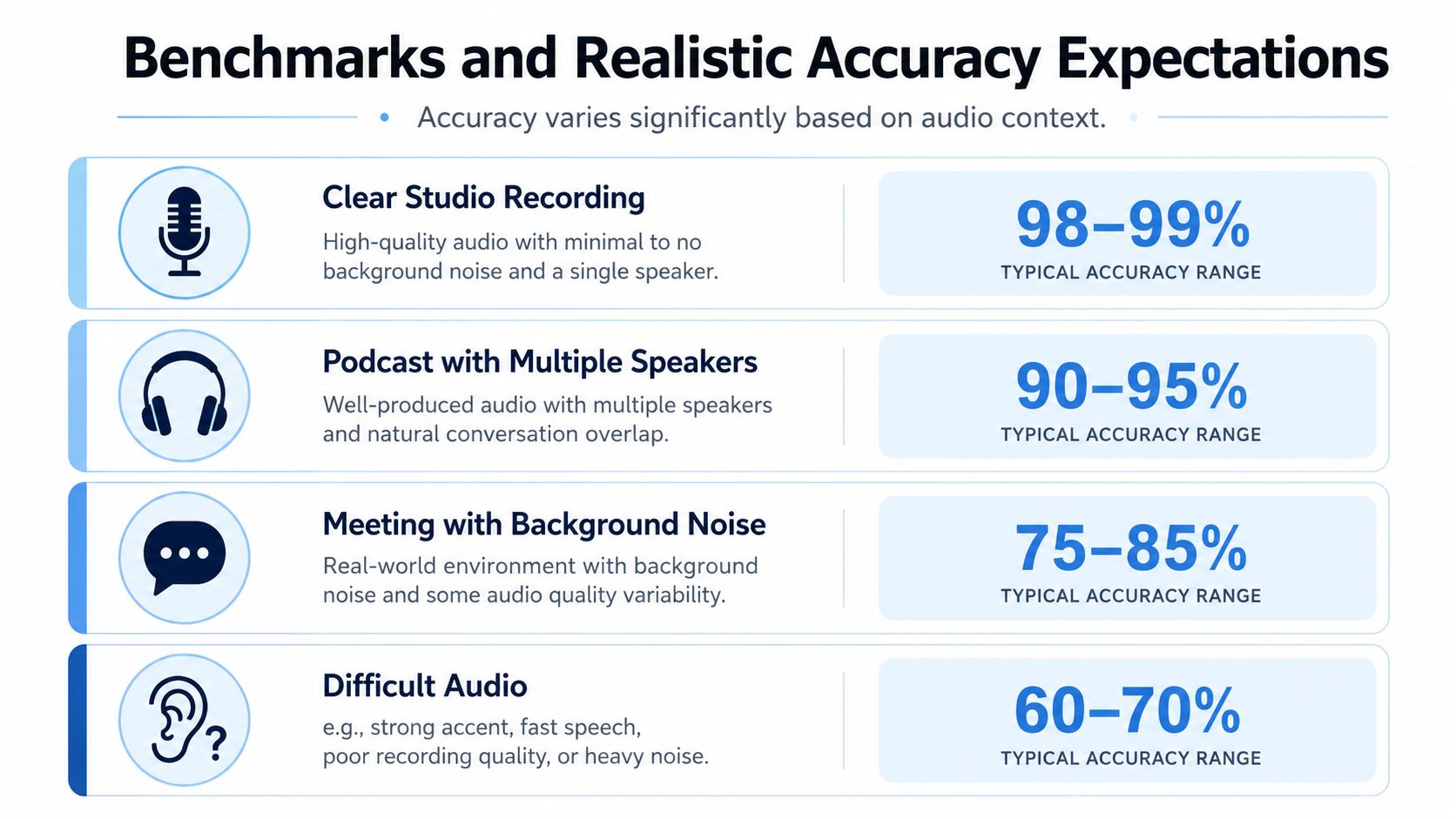
People often want a clean threshold for “good” speech to text accuracy. In production, that threshold shifts with the audio.
A controlled dictation file and a noisy multi-speaker meeting are not the same problem. A systematic review of AI-based speech recognition in healthcare found that word error rate ranged from 0.087 in controlled dictation settings to over 50% in conversational or multi-speaker scenarios, which makes the point clearly: context drives performance more than the technology label alone, as shown in this systematic review of AI speech recognition performance.
The same test can produce very different results
A useful example comes from telephony audio, which is common in support and operations teams. A 2025 benchmark of 8 kHz call-center audio found that the top performer reached 87.67% accuracy while the weakest tested model scored 68.38% on the same 40-file dataset. Voicegain's Whisper-Large-V3 implementation scored 86.17% and its Omega model reached 85.09%, leaving a gap of nearly 20 percentage points on the same difficult audio, according to this 2025 benchmark for 8 kHz call-center audio files.
That's the kind of result buyers need to pay attention to. The model didn't change. The dataset didn't change. The variance still stayed large.
A more useful way to judge quality
Instead of asking for one universal score, use expectation bands tied to the job:
| Quality band | What it usually feels like in practice |
|---|---|
| High | Transcript is easy to read and needs light review |
| Moderate | Most content is usable, but names, jargon, and some lines need correction |
| Low | You can extract broad themes, but detailed review becomes necessary |
Good accuracy means “usable for the task,” not “impressive in a product demo.”
For internal meetings, moderate lexical accuracy can still be enough if the summary and action items are right. For legal review, medical documentation, or published quotes, the tolerance is far lower. The same transcript quality can be acceptable in one workflow and unacceptable in another.
Set expectations with your own files
The most honest benchmark is always your own audio library. Pull a few files that represent reality, not ideal conditions. Include the messy ones. Test phone calls, interviews, team meetings, webinars, and any file with uncommon terminology.
That gives you a baseline you can effectively use. It also keeps you from being surprised after rollout, which is when most dissatisfaction with speech to text tools starts.
Key Factors That Influence Transcription Accuracy
When users say a tool is “inaccurate,” they usually mean one of several different failure modes. The software may be struggling with the signal, the speaker, the room, or the content itself. Those problems look similar in the finished transcript, but they need different fixes.
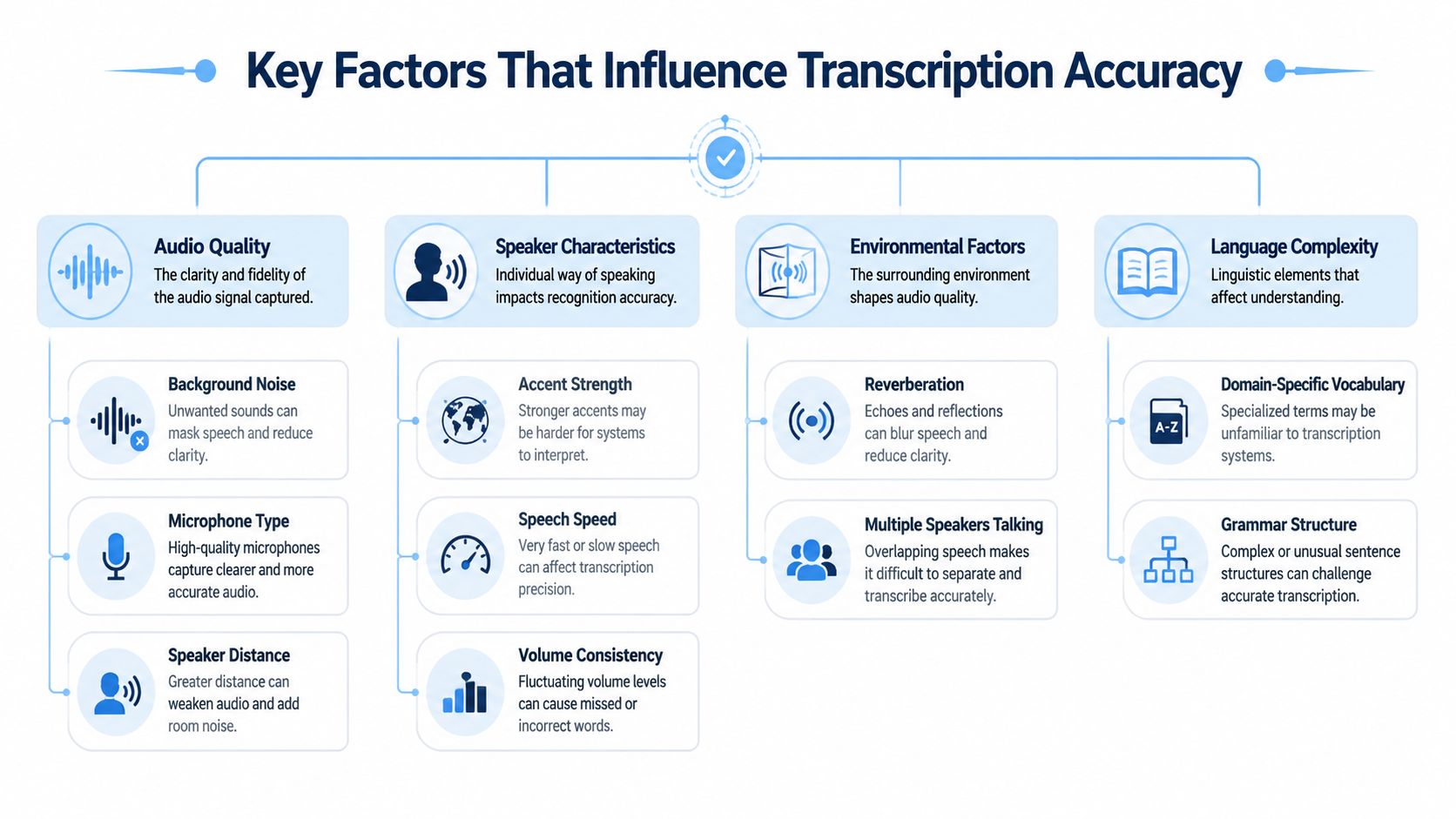
Audio quality comes first
Bad source audio limits every model.
Compressed phone audio, distant laptop mics, echo-heavy rooms, and recordings with uneven volume all make recognition harder. If one speaker is clear and another sounds like they're across the room, the transcript will reflect that difference. This is why teams sometimes think the model is inconsistent when the input was inconsistent.
A few common sources of avoidable errors:
- Weak microphones that flatten speech detail
- Background noise from fans, keyboards, traffic, or open offices
- Speaker distance that changes throughout the recording
- Cross-talk when two people start talking at once
Speaker variation is a major factor
Speech systems don't fail evenly across all speakers. That matters, especially for global teams.
A review of ASR fairness and diversity found that error rates for Black patients can be 65% to 74% higher than for White patients, and median WERs can reach 84-91% for non-native styles. It also noted that some systems with low average WER still produced error rates above 50% for individual audio samples from non-native speakers, based on this review of demographic and linguistic volatility in ASR accuracy.
That's one of the most important realities hidden by a single marketing accuracy number. Average performance can look strong while specific groups get much worse results.
If your organization includes varied accents, dialects, or language backgrounds, test for that explicitly. Don't assume the average score represents everyone.
Content complexity changes the odds
Models do better with familiar language than with specialized vocabulary. Product names, internal acronyms, medical terms, legal phrases, customer names, and regional place names all increase the risk of substitution errors.
Often, buyers misdiagnose the issue. They think the transcript engine is weak, but the actual problem is vocabulary mismatch. A meeting filled with routine conversation may transcribe well, then fall apart on the ten key nouns that matter most.
The environment shapes the result
Room acoustics matter more than is often realized.
Glass walls, empty conference rooms, shared workspaces, and hybrid calls where some participants join remotely create a messy acoustic scene. Add overlapping speakers and the model has to separate both voice content and speaker turns at once. That's hard even before punctuation and formatting enter the picture.
The practical lesson is simple. Speech to text accuracy is not one thing. It's the combined effect of audio conditions, speaker diversity, and language complexity.
How to Improve Your Speech to Text Accuracy
Improving transcription quality usually doesn't require a dramatic overhaul. Most gains come from tightening a few points in the workflow before, during, and after processing.
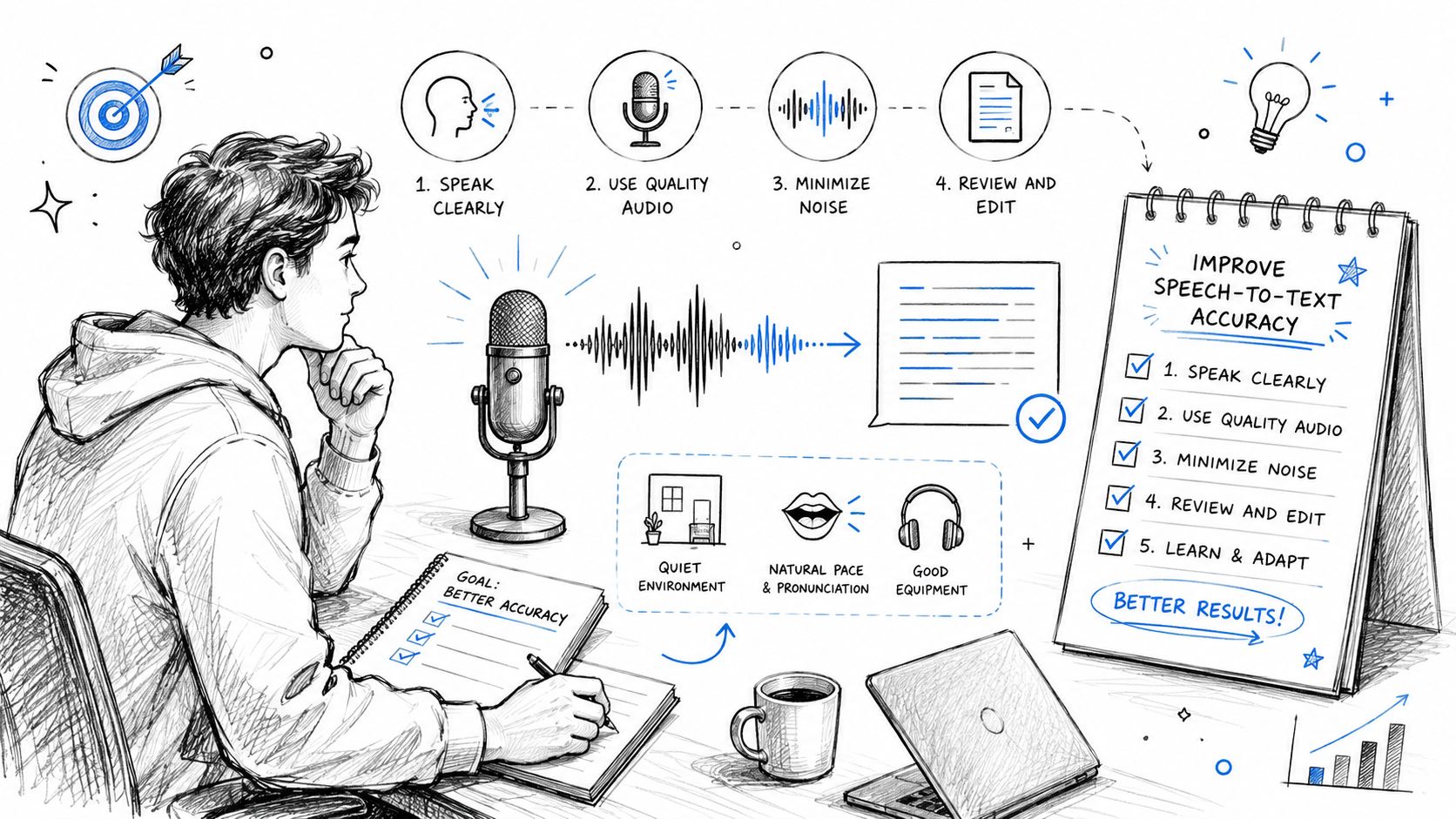
Before recording
Start with the source. The transcript can only be as good as the audio allows.
- Use the best microphone available. A dedicated headset or USB mic usually produces more consistent speech capture than a laptop mic in a reflective room.
- Reduce competing noise. Shut doors, mute notifications, and avoid spaces with HVAC hum or street noise when possible.
- Keep speakers close to the mic. Distance creates thin, echo-heavy audio that models struggle to decode.
- Prevent overlap. In meetings, ask people not to talk over each other during decisions, names, and next steps.
These aren't glamorous changes, but they work because they improve signal clarity before the model has to guess.
During transcription
The next lever is matching the tool to the task.
If your audio includes internal terms, jargon, or recurring names, use a tool that lets you influence recognition with vocabulary support, prompts, or easy correction workflows. If your use case is live meetings, also pay attention to speaker labeling and formatting, not just raw text output.
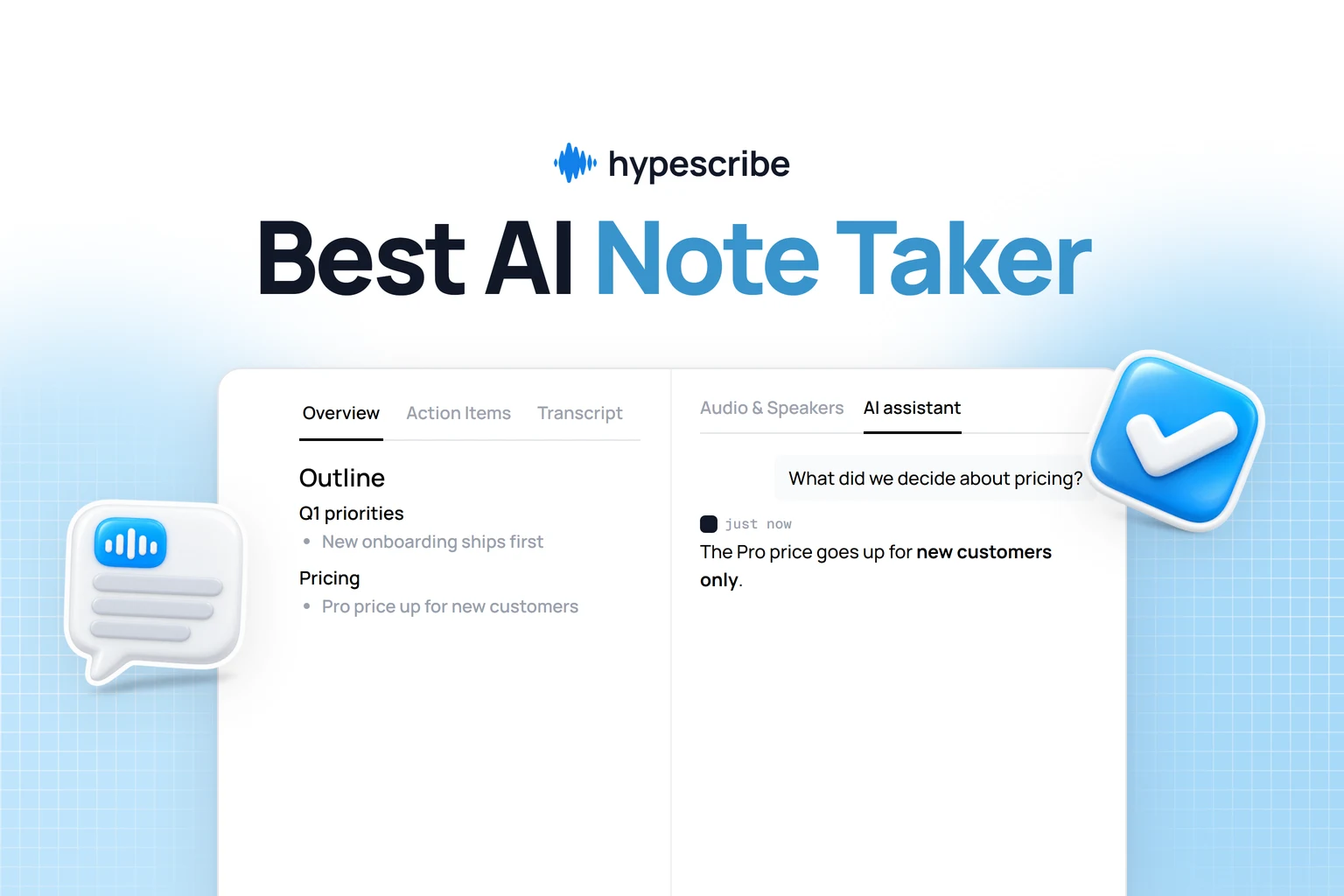
One practical option in this category is HypeScribe, which supports uploaded files, meeting note-taking for Zoom, Google Meet, and Microsoft Teams, and generates transcripts alongside summaries and action items. For teams evaluating fit, the useful question is whether the system handles your meeting style and terminology cleanly enough to reduce manual cleanup.
Clean transcripts start before “Upload file.” Tool choice matters, but input discipline matters just as much.
A quick visual walkthrough can help if you're setting up your process for the first time:
After transcription
Post-processing is where teams either recover quality or waste time.
Review strategically. Don't scan every sentence with equal effort. Check the areas where errors create the most damage:
- Names and proper nouns
- Dates, deadlines, and numbers
- Action items and ownership
- Specialized terms
- Sections with obvious low-confidence wording
If your workflow relies on summaries, compare the summary against the transcript and the original intent. A transcript can contain minor word errors and still produce a very strong meeting recap. But if the summary gets the decision wrong, the transcript wasn't good enough for the job.
That's the broader habit worth building. Don't optimize for cosmetic perfection alone. Optimize for trustworthy output where your team takes action.
How to Evaluate and Choose a Transcription Tool
The safest way to choose a transcription tool is to ignore the homepage claim for a moment and run a small evaluation on your own files. Audio context matters more than brand reputation. As noted earlier in the evidence base, word error rates can range from controlled-dictation performance to highly error-prone conversational performance depending on the scenario, so a polished benchmark won't tell you what happens in your meetings or calls.
What to test during a trial
Use a sample set that reflects the work you really do. Include a clean file, a difficult file, and one with terminology your team uses every week.
Then score the tool on practical questions:
- Transcript usability. Can someone read it without constant mental correction?
- Speaker attribution. Does it keep speakers separate consistently enough for meetings and interviews?
- Punctuation and formatting. Does the text look like something a person can work from, or like a raw dump?
- Terminology handling. Are product names, acronyms, and customer names captured correctly?
- Workflow fit. Can you export, share, search, and review without friction?
- Security fit. Does the product support the privacy expectations your organization requires?
If you're comparing vendors, this guide to best AI speech-to-text tools is a useful starting point for framing the category, but your own trial files should decide the shortlist.
A simple scoring sheet
Here's a practical table I'd use with a team:
| Feature/Capability | Tool A Score (1-5) | Tool B Score (1-5) | Notes |
|---|---|---|---|
| Transcript readability | |||
| Speaker identification | |||
| Punctuation and formatting | |||
| Search and transcript navigation | |||
| Handling of jargon and proper nouns | |||
| Meeting integrations | |||
| Export options | |||
| Security and data controls | |||
| Summary usefulness | |||
| Manual correction workflow |
Watch for the hidden costs
A tool with a decent transcript but terrible review workflow can still slow your team down. The same goes for a model that transcribes well but fails at speaker labels, or one that exports text in a format nobody wants to clean up.
The right tool is the one that reduces total work. That includes recording, transcription, review, correction, and follow-up.
Also pay attention to failure behavior. When the tool gets something wrong, is the mistake obvious and easy to fix, or subtle and dangerous? Subtle errors are the ones that create downstream problems because they look plausible.
A careful trial reveals those patterns quickly.
Moving Beyond Accuracy to Actionable Insights
Organizations don't buy transcription software because they want a perfect text artifact. They buy it because they need decisions captured, commitments remembered, and knowledge turned into something usable.
That's why obsessing over a single headline accuracy number usually leads buyers in the wrong direction. The better frame is this: Does the transcript support action? Can your team search it, summarize it, verify key details, and move work forward without replaying the whole recording?
For many use cases, that's the bar that matters. A transcript can have some lexical imperfections and still be highly valuable if it preserves meaning, keeps speakers reasonably clear, and feeds a reliable summary. In editing-heavy workflows, that same transcript may still need review. The point is to match the quality standard to the consequence of being wrong.
This same principle shows up in adjacent AI workflows too. If you're thinking about improving downstream text quality, a resource like AI Powered Revision is useful because it focuses on refining meaning and clarity after generation, not just producing raw output.
The teams that get the most from speech to text tools usually do three things well. They test on real audio, they improve what they can control, and they judge success by outcome rather than marketing language. That's the practical path to better notes, better summaries, and fewer missed details.
If you want to test that approach in your own workflow, try HypeScribe with a few real meeting recordings, interviews, or call files. Compare the transcript, summary, and action items against what your team needs to do next. That's the fastest way to see whether the output is accurate where it counts.